
BEACH HANDLEBAR KIT
J034172006-07-28
GENERAL
Kit Number
56856-05
Models
Ask a Harley-Davidson dealer or refer to the latest Harley-Davidson Genuine Motor Accessories and Genuine Motor Parts catalog to determine if this handlebar can be installed on your motorcycle.
This kit does not fit models equipped with Heated Hand Grips, Softail Nacelle Kit (Part Number 67907-96), Hydraulic Clutch Kits, handlebar mounted gauges or the Road Tech® Radio.
Additional Parts Required
Separate purchase of additional parts or accessories may be required for proper installation of this handlebar kit on your model motorcycle. Refer to the latest Harley-Davidson Genuine Motor Accessories and Genuine Motor Parts catalog for a list of required parts or accessories for your model.
Loctite® 271 (Red) Threadlocker and Sealant (H-D Part Number 99671-97) is required for the proper installation of this kit.
Fresh, uncontaminated brake fluid will also be needed. Refer to your Owner's Manual or the Service Manual for this year and model motorcycle to determine the correct brake fluid for this vehicle.
Motorcycles equipped with a glued left-side hand grip will also require a new grip, sold separately. Refer to the Parts Catalog for replacement stock hand grips.
Ask a Harley-Davidson dealer about the selection of Genuine Motor Accessory hand grips that are available.
 WARNING
Rider and passenger safety depend upon the correct installation of this kit. Use the appropriate service manual procedures. If the procedure is not within your capabilities or you do not have the correct tools, have a Harley-Davidson dealer perform the installation. Improper installation of this kit could result in death or serious injury. (00333b)
NOTE
This instruction sheet references Service Manual information. A Service Manual for your model motorcycle is required for this installation and is available from a Harley-Davidson Dealer.
INSTALLATION
Preparation
WARNINGTo prevent accidental vehicle start-up, which could cause death or serious injury, disconnect battery cables (negative (-) cable first) before proceeding. (00307a)
WARNINGDisconnect negative (-) battery cable first. If positive (+) cable should contact ground with negative (-) cable connected, the resulting sparks can cause a battery explosion, which could result in death or serious injury. (00049a)
| 1. | Refer to the Service Manual and follow the instructions given to remove the seat and disconnect the battery cables, negative cable first. Retain all seat mounting hardware. | |
| WARNING When servicing the fuel system, do not smoke or allow open flame or sparks in the vicinity. Gasoline is extremely flammable and highly explosive, which could result in death or serious injury. (00330a) | ||
| 2. | FLSTF, FXDL and FXDWG models: Loosen the fuel tank. Refer to FUEL TANK REMOVAL in the appropriate section (Carbureted or EFI Engine) of the Service Manual. |
CAUTIONDirect contact of DOT 5 brake fluid with eyes can cause eye irritation, swelling, and redness. Avoid eye contact. In case of eye contact flush with large amounts of water and get medical attention. Swallowing large amounts of DOT 5 brake fluid can cause digestive discomfort. If swallowed, obtain medical attention. Use in well ventilated area. KEEP OUT OF REACH OF CHILDREN. (00144b)
WARNINGContact with DOT 4 brake fluid can have serious health effects. Failure to wear proper skin and eye protection could result in death or serious injury.
- If inhaled: Keep calm, remove to fresh air, seek medical attention.
- If on skin: Remove contaminated clothing. Rinse skin immediately with plenty of water for 15-20 minutes. If irritation develops, seek medical attention.
- If in eyes: Wash affected eyes for at least 15 minutes under running water with eye lids held open. If irritation develops, seek medical attention.
- If swallowed: Rinse mouth and then drink plenty of water. Do not induce vomiting. Contact Poison Control. Immediate medical attention required.
- See Safety Data Sheet (SDS) for more details available at sds.harley-davidson.com
NOTICE
DOT 4 brake fluid will damage painted and body panel surfaces it comes in contact with. Always use caution and protect surfaces from spills whenever brake work is performed. Failure to comply can result in cosmetic damage. (00239c)
- If D.O.T. 4 brake fluid contacts painted surfaces, flush IMMEDIATELY with clear water.
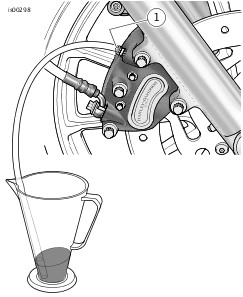
| 1 | Caliper bleeder valve |
Figure 1. Draining Brake Fluid
NOTE
On models with single front brake, only one length of plastic tubing is needed. On models with dual front brakes, connect a length of plastic tubing to each caliper.
- ALL models: Bleed the brake fluid from the front brakes. See Figure 1. Open the bleeder nipple cap on each front brake caliper. Obtain a length of plastic tubing for each front brake. Install one end of a length of tubing over each caliper bleeder valve. Place the free ends of the tubing into a suitable container.
- Open the bleeder valve about one-half turn and pump the front-brake hand lever to drain the fluid out of the front brake system. Do not re-use brake fluid.
- Proceed to "Original Handlebar Removal" for your model.
Original Handlebar Removal, FLSTF, FXDL and FXDWG
NOTE
Cover the front fender and the front of the fuel tank with clean shop towels to prevent scratching. Damage to the finish could result.
NOTICE
Remove brake line components carefully. Damage to seating surfaces can cause leakage. (00320a)
| 1. | Carefully make note of the front brake line routing and the orientation of the banjo fittings. Disconnect the brake line from the front brake caliper and the front brake master cylinder assembly. Save the banjo bolts, but discard the two brake-line gaskets found at each banjo fitting. See FRONT BRAKE MASTER CYLINDER in the Service Manual. | |||||||||||
| 2. | Remove the old brake line from the motorcycle. | |||||||||||
| 3. | Remove the plastic wiring retainer clips that secure the turn signal harnesses to the handlebar. | |||||||||||
| 4. | Using a T27 TORX® drive head, remove the front-brake master cylinder and clutch-lever assemblies from the handlebar. NOTE Refer to the Parts Catalog for your year and model for a replacement stock clutch cable, if needed. Ask a Harley-Davidson dealer about the selection of Genuine Motor Accessory Custom Braided Clutch Cables, Throttle and Idle Cables, and Brake Lines that are available. | |||||||||||
| 5. | Refer to CLUTCH HAND CONTROL: REMOVAL in the Service Manual, and follow the instructions to disconnect the clutch cable from the clutch lever. If the clutch cable is being replaced, disconnect the clutch cable from the side cover, and remove the cable from the vehicle. NOTE Molex connectors are used for the handlebar control wiring on 2007 and later models. 2006 and earlier vehicles use Deutsch connectors. Refer to the MOLEX ELECTRICAL CONNECTORS or DEUTSCH ELECTRICAL CONNECTORS section of the Service Manual for disconnection and re-connection procedures. Before disconnecting the handlebar control wiring, note the wire routing. | |||||||||||
| 6. | Disconnect the handlebar control wiring from the gray and black 6-way main harness connectors under the fuel tank. NOTE Before disconnecting the turn signal wiring, note turn signal wire routing. | |||||||||||
| 7. | Separate the 6-way turn signal connector halves. | |||||||||||
| 8. | Refer to HANDLEBAR SWITCHES; RIGHT HANDLEBAR CONTROLS section of the Service Manual for removal of the right-side switch housing assembly and harness. This is necessary to access the throttle cables. | |||||||||||
| 9. | Refer to the THROTTLE CONTROL section of the Service Manual to disconnect the throttle cables from the existing right grip/ throttle sleeve assembly. | |||||||||||
| 10. | Refer to the LEFT HANDLEBAR CONTROLS section of the Service Manual for removal of the left-side switch housing assembly and wire harness. | |||||||||||
| 11. | See Figure 2. Remove and discard the screws (1) that fasten the handlebar upper clamps (2) to the risers (3). Discard the clamps. Remove the handlebar (4) from the motorcycle. | 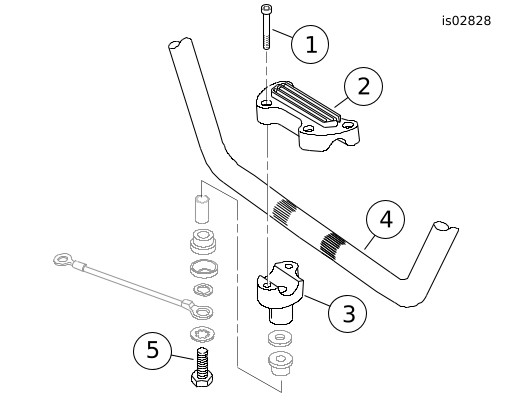
Figure 2. Handlebar Clamps and Risers | ||||||||||
| 12. | If the left-side hand grip is not glued to the
handlebar: Remove the hand grip and set it aside for installation to the new handlebar. NOTE Make note of the installed sequence of the riser attaching hardware to ensure correct re-assembly. | |||||||||||
| 13. | Remove and discard the stock handlebar risers. Save the remaining hardware for later installation. NOTE 2007 and later models use Molex connectors. 2006 and earlier vehicles use Deutsch connectors. Refer to MOLEX or DEUTSCH ELECTRICAL CONNECTORS in the Service Manual for terminal removal and re-installation procedures. DO NOT remove the wires from the Molex or Deutsch handlebar switch connector pin housings under the fuel tank. DO NOT remove the wires from the Multilock connector pin
housing under the fuel tank. | |||||||||||
| 14. | Note the wire colors and positions in each cavity of the socket housings leading from the switches. Refer to the wiring diagram and the ELECTRICAL CONNECTORS section in the Service Manual. Remove the wires from the socket housings. Note the wire colors and positions in each cavity of the Multilock socket housing leading from the turn signals. Refer to the wiring diagram and the AMP MULTILOCK ELECTRICAL CONNECTORS section in the Service Manual. Remove the wires from the socket housing. | |||||||||||
| 15. | Use tape to wrap the wire terminal ends from each source to make separate leaders. Wrap each leader tight enough to enter the grommet hole and pass easily through the new handlebar. Proceed to "New Handlebar Wiring". |
Original Handlebar Removal, FLHRS Models
NOTE
Cover the front fender and the front of the fuel tank with clean shop towels to prevent scratching. Damage to the finish could result.
NOTICE
Remove brake line components carefully. Damage to seating surfaces can cause leakage. (00320a)
| 1. | Using a T-40 TORX® drive head, remove and retain the button head screw on the underside of the fork stem and bracket assembly that holds the brake line manifold tee. | |||||||||||||||||||||||
| 2. | Carefully make note of the front brake line routing and the orientation of the banjo fittings. Disconnect the brake lines from the front brake calipers and the front brake master cylinder assembly. Save the banjo bolts, but discard the two gaskets found at each banjo fitting. See FRONT BRAKE MASTER CYLINDER in the Service Manual. | |||||||||||||||||||||||
| 3. | Remove the old brake lines from the motorcycle. | |||||||||||||||||||||||
| 4. | Remove the plastic wiring retainer clips that secure the turn signal harnesses to the handlebar. | |||||||||||||||||||||||
| 5. | Using a T27 TORX® drive head, remove the front-brake master cylinder and clutch-lever assemblies from the handlebar. NOTE Refer to the Parts Catalog for your year and model for a replacement stock clutch cable, if needed. Ask a Harley-Davidson dealer about the selection of Genuine Motor Accessory Custom Braided Clutch Cables, Throttle and Idle Cables, and Brake Lines that are available. | |||||||||||||||||||||||
| 6. | Refer to CLUTCH HAND CONTROL: REMOVAL in the Service Manual, and follow the instructions to disconnect the clutch cable from the clutch lever. If the clutch cable is being replaced, disconnect the clutch cable from the side cover, and remove the cable from the vehicle. | |||||||||||||||||||||||
| 7. | Remove the headlamp assembly from the headlamp nacelle. See HEADLAMP in the Service Manual. NOTE Molex connectors are used for the handlebar control wiring on 2007 and later models. 2006 and earlier vehicles use Deutsch connectors. Refer to the MOLEX ELECTRICAL CONNECTORS or DEUTSCH ELECTRICAL CONNECTORS section of the Service Manual for disconnection and re-connection procedures. | |||||||||||||||||||||||
| 8. | Disconnect the handlebar control wiring from the gray and black 6-way main harness connectors inside the headlamp nacelle. Separate the 6-way turn signal connector halves. Disconnect the electronic cruise-control wiring from the two 4-way connectors if so equipped. | |||||||||||||||||||||||
| 9. | Refer to the HANDLEBAR SWITCHES; RIGHT HANDLEBAR CONTROLS section of the Service Manual for removal of the right-side switch housing assembly and harness. This is necessary to access the throttle cables. | |||||||||||||||||||||||
| 10. | Refer to the THROTTLE CONTROL section of the Service Manual to disconnect the throttle cables from the existing right grip/ throttle sleeve assembly. | |||||||||||||||||||||||
| 11. | Refer to the LEFT HANDLEBAR CONTROLS section of the Service Manual for removal of the left-side switch housing assembly and wire harness. | 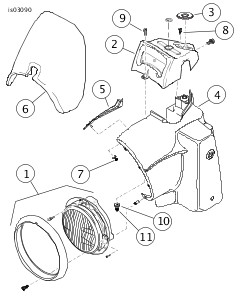
Figure 3. Nacelle, Headlamp, and Handlebar Cover (FLHRS Models) | ||||||||||||||||||||||
| 12. | See Figure 3. Reaching inside the headlamp nacelle (4), remove the flange nut (7) to release the trim strip (5). at the top of the nacelle. Retain the nut and trim strip for re-assembly. | |||||||||||||||||||||||
| 13. | Carefully pry off the fork-lock label plate (3) from the stock handlebar cover (2). Remove the entire plastic plate; do not remove the adhesive label from the plate. | |||||||||||||||||||||||
| 14. | Remove and retain the two Phillips flat head screws (8) underneath the label plate that hold the handlebar cover to the fork lock. | |||||||||||||||||||||||
| 15. | Loosen, but do not remove the Phillips pan head screw (9), nut (11) and flat washer (10) holding the front of the handlebar cover (2) and wind deflector (6) assembly. | |||||||||||||||||||||||
| 16. | Raise the handlebar clamp cover slightly, and while separating the halves of the headlamp nacelle, slide the cover and wind deflector assembly forward, running the shaft of the screw down the gap until the assembly is free of the nacelle. | |||||||||||||||||||||||
| 17. | Remove the three hex head serrated flange screws holding the wind deflector to the handlebar cover. Remove the pan head Phillips screw, nut and flat washer at the front of the handlebar cover. Discard the cover, but retain the wind deflector and all fasteners. | 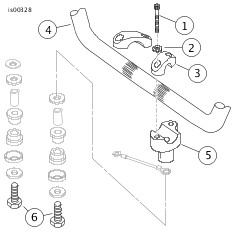
Figure 4. Handlebar Clamps and Risers (FLHRS Model) | ||||||||||||||||||||||
| 18. | See Figure 4. Remove and discard the screws (1) and flat washers (2) that fasten the handlebar upper clamps (3) to the risers (5). Discard the clamps. Remove the handlebar (4) from the motorcycle. | |||||||||||||||||||||||
| 19. | If the left-side hand grip is not glued to the
handlebar: Remove the hand grip and set it aside for installation to the new handlebar. NOTE Make note of the installed sequence of the riser attaching hardware to ensure correct re-assembly. | |||||||||||||||||||||||
| 20. | Remove and discard the stock handlebar risers. Save the remaining hardware for later installation. NOTE 2007 and later models use Molex connectors. 2006 and earlier vehicles use Deutsch connectors. Refer to MOLEX or DEUTSCH ELECTRICAL CONNECTORS in the Service Manual for terminal removal and re-installation procedures. DO NOT remove the wires from the Molex or Deutsch handlebar switch connector pin housings inside the nacelle. DO NOT remove the wires from the Multilock connector pin
housing inside the nacelle. | |||||||||||||||||||||||
| 21. | Note the wire colors and positions in each cavity of the socket housings leading from the switches. Refer to the wiring diagram and the ELECTRICAL CONNECTORS section in the Service Manual. Remove the wires from the socket housings. Note the wire colors and positions in each cavity of the Multilock socket housing leading from the turn signals. Refer to the wiring diagram and the AMP MULTILOCK ELECTRICAL CONNECTORS section in the Service Manual. Remove the wires from the socket housing. | |||||||||||||||||||||||
| 22. | Use tape to wrap the wire terminal ends from each source to make separate leaders. Wrap each leader tight enough to enter the grommet hole and pass easily through the new handlebar. Proceed to "New Handlebar Wiring". |
New Handlebar Wiring
| 1. | Remove the plastic wiring retainer clips that secured both switch harnesses to the original handlebar. | |||||||
| 2. | See Figure 7. Slide one large grommet (2) onto each of the switch-wire bundles, positioning the grommet close to the switch end. | |||||||
| 3. | For 2006 and later FXDB and FXDWG models, proceed to Step 4. For all models EXCEPT 2006 and later FXDB and FXDWG models, slide one small grommet (3) onto each of the turn-signal wire bundles, positioning the grommet close to the turn signal end. | |||||||
| 4. | Apply a light coat of liquid soap, window cleaner, or all-purpose lubricant such as WD-40®, to the right-side turn signal wire bundle. | |||||||
| 5. | For 2006 and later FXDB and FXDWG models: Gently feed the right-side turn-signal wire leader into the small round grommet on the underside of the right-side lower switch housing. Repeat Steps 4 and 5 for the left-side turn signal wires, then proceed to Step 8. For all other models: Gently feed the right-side turn-signal wire leader into the small round grommet hole near the right-side end of the new handlebar and toward the large opening in the center of the bar. | |||||||
| WARNING Carefully pull the wires through hole in handlebar to prevent stripping the wires. Stripped wires can cause short circuits and damage vehicle electrical components, which could cause loss of vehicle control resulting in death or serious injury. (00418b) | ||||||||
| 6. | Pull the taped end of the wire bundle through the wire-exit hole at the center of the handlebar. | |||||||
| 7. | Repeat Steps 4 through 6 for the left-side turn signal wires. | |||||||
| 8. | Apply a light coat of liquid soap, window cleaner, or all-purpose lubricant to the right-side switch wire bundle. | |||||||
| WARNING Wiring in the switch housings must be routed exactly as shown. Pinch points in the switch housings can short-circuit or sever wires, which could cause loss of control resulting in death or serious injury. (00415b) | ||||||||
| 9. | See Figure 5. For 2006 and later FXDB and FXDWG models: Route the switch wire and turn signal wire bundles through the switch housing as shown. Gently feed the wire bundles into the oblong switch wire hole near the right-side end of the handlebar, and toward the center of the bar. For all other models: Route the switch wire bundle through the switch housing as shown. Gently feed the wire bundle into the oblong switch wire hole near the right-side end of the handlebar, and toward the center of the bar. | 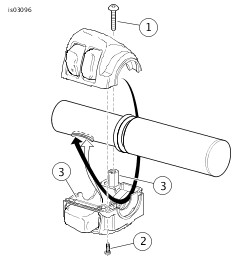
Figure 5. Switch-Housing Wire Routing (Right-Side Housing Shown) | ||||||
| WARNING Grommets in each of the wiring holes in the handlebar must remain in position after routing the wiring through the handlebar. Operation without the grommets in place can damage wires, causing a short circuit which could result in death or serious injury. (00416d) | ||||||||
| 10. | Pull the taped end of the wire bundle through the wire-exit hole at the bottom center of the handlebar. | |||||||
| 11. | Repeat Steps 8 through 10 for the left-side handlebar switch wires. | |||||||
| 12. | See Figure 7. Insert the switch-wire grommets (2) into place in the switch-wire holes in the handlebar. NOTE The round turn-signal wiring grommets are an extremely tight fit. Use a twisting motion to avoid damaging the grommets. | |||||||
| 13. | For all models EXCEPT 2006 and later FXDB and FXDWG: Insert the turn-signal grommets (3) into place in the turn-signal wire holes in the handlebar. | |||||||
| 14. | Loosely fasten the brake-lever and clutch-lever clamps to the new handlebar. | |||||||
| 15. | Loosely fasten the handlebar switch housings to the new handlebar. | |||||||
| 16. | See Figure 7 : a. Cut each 4 in. (102 mm) long piece of heat-shrink tubing (4 and 5) from the kit into two equal pieces. b. Slide one piece of the larger diameter tubing (4) over the end of each switch-wire bundle exiting the center hole of the handlebar (1). c. Slide one piece of the smaller diameter tubing (5) over the end of each turn-signal wire bundle exiting the center hole of the handlebar. | |||||||
| 17. | Remove the tape from the ends of the wire bundles. | |||||||
| 18. | Check for electrical continuity between the handlebar and each wire in the wire bundles. Continuity would indicate a short circuit, which would require examination of the wires and routing in the switch housing. NOTE The heat-shrink tubing on the wire bundles exiting the bottom center of the handlebar must be installed to protect the wires from damage and short circuits at the wire-exit hole on the handlebar. | |||||||
| WARNING Wires exiting the bottom center of the handlebar must be protected from wear with heat-shrink tubing at the wire-exit hole on the handlebar. Failure to protect wires with shrink tubing can cause short-circuits or severed wires, which could cause loss of vehicle control resulting in death or serious injury. (00432c) | ||||||||
| 19. | Position the heat-shrink tubing (installed on the wire bundles in step 16) in the area of the center wire-exit hole on the handlebar. |
WARNINGBe sure to follow manufacturer's instructions when using the UltraTorch UT-100 or any other radiant heating device. Failure to follow manufacturer's instructions can cause a fire, which could result in death or serious injury. (00335a)
- Avoid directing heat toward any fuel system component. Extreme heat can cause fuel ignition/ explosion resulting in death or serious injury.
- Avoid directing heat toward any electrical system component other than the connectors on which heat shrink work is being performed.
- Always keep hands away from tool tip area and heat shrink attachment.
- Use a heat gun or suitable radiant-heating device to shrink the heat-shrink tubing to the wire bundles.
New Handlebar Installation
- See Figure 7. Obtain new handlebar risers, purchased separately. Install the new risers onto the upper fork bracket using the saved hardware in the same sequence as removed. Snug the riser bolts, but do not fully tighten at this time.
- Center the new handlebar on the risers. To make sure that the handlebar is centered, verify that the knurled areas on the outboard side of each riser are equal.
- Position new handlebar upper clamps (purchased separately) and install with new clamp screws and flat washers. Snug the upper screws, but do not fully tighten.
- FLHRS models: Continue after Step 6. Dyna and Softail models: Route the switch wire bundles down through the large oval opening in the upper fork bracket.
- Follow the routing noted in the disassembly steps (left switch wire bundle to left side of frame; right switch wire bundle to right side of frame) until the wires reach the switch-wire pin housings under the fuel tank. Install any clips or wire guides saved in disassembly.
- Route both turn signal wires down through the large oval opening in the upper fork bracket. Follow the routing noted earlier to the 6-way turn signal pin housing under the right side of the fuel tank.
ALL models:
NOTE
Molex connectors are used for the handlebar control wiring on 2007 and later models. 2006 and earlier vehicles use Deutsch connectors. Refer to the MOLEX ELECTRICAL CONNECTORS or DEUTSCH ELECTRICAL CONNECTORS section of the Service Manual for re-connection procedures.
| 20. | Refer to the notes made during the removal steps, and the wiring diagram and correct ELECTRICAL CONNECTORS section in the Service Manual. Insert each socket terminal from the left-side switch-wire bundle into the correct cavity of the gray socket housing removed earlier. | |
| 21. | Insert each socket terminal from the right-side switch-wire bundle into the correct cavity of the black socket housing removed earlier. | |
| 22. | Refer to the notes made during the removal steps, and the wiring diagram and AMP MULTILOCK ELECTRICAL CONNECTORS section in the Service Manual. Insert each socket terminal leading from the turn signals into the correct cavity of the Multilock socket housing removed earlier. Install the clips and/ or wire guides saved earlier. | |
| 23. | FLHRS models: Feed the switch-wire and turn-signal socket housings into the headlamp nacelle. | |
| 24. | ALL models: Connect the gray 6-way switch-wire socket housing coming from the bottom-center of the handlebar to the gray 6-way pin housing. Connect the black 6-way switch-wire socket housing to the black 6-way pin housing. | |
| 25. | Connect the black 6-place Multilock connector coming from the bottom-center of the handlebar to the black 6-way Multilock pin housing. | |
| WARNING When servicing the fuel system, do not smoke or allow open flame or sparks in the vicinity. Gasoline is extremely flammable and highly explosive, which could result in death or serious injury. (00330a) | ||
| 26. | Dyna and Softail models: Re-install the fuel tank. Refer to FUEL TANK-INSTALLATION in the appropriate section (Carbureted or EFI Engine) of the Service Manual. |
ALL models:
NOTICE
Improperly aligned handlebars or components can contact the fuel tank when turned to the left or right. Contact with the fuel tank can cause cosmetic damage. (00372b)
| 27. | Slowly turn the front wheel to the full right fork stop and then the full left fork stop to be sure the handlebar does not contact the fuel tank. If contact occurs and the handlebars are properly centered, raise the handlebar angle as necessary until proper clearance is obtained. | |
| 28. | Tighten the upper handlebar-clamp screws as follows: a. Tighten the front screws until the upper handlebar clamps make contact with the handlebar riser. b. Tighten the rear screws to 16.3–21.7 N·m (12–16 ft-lbs). c. Tighten the front screws to 16.3–21.7 N·m (12–16 ft-lbs). NOTE There will be a slight gap between the upper clamps and the risers toward the rear of the handlebars after tightening. | |
| 29. | One at a time, remove the riser bolts installed in Step 1. Apply two drops of Loctite® 271 (Red) to the bolt threads and re-install. Tighten the riser bolts to 34–41 N·m (25–30 ft-lbs). | |
| 30. | Refer to RIGHT HANDLEBAR SWITCH: INSTALLATION in the Service Manual, and follow the instructions given to install the throttle control cables and a new (purchased separately) or original right grip/ throttle sleeve assembly. | |
| 31. | Adjust the position of the switch housing and the brake lever assembly on the handlebar for rider comfort and posture. The brake master cylinder must be horizontally level. NOTE Tighten the top brake lever clamp screw before tightening the bottom screw. | |
| 32. | Use a T27 TORX drive head to tighten first the top, then the bottom brake-lever clamp screws to 8–9 N·m (71–80 in-lbs). NOTE Tighten the lower switch housing screw before tightening the upper screw. This will leave any gap in the switch housing at the front for best appearance. | |
| 33. | Use a T25 TORX drive head to tighten first the lower, then the upper switch housing screws to 4–5.1 N·m (35–45 in-lbs). | |
| 34. | Verify that the right grip/ throttle sleeve rotates and returns freely and does not bind on the handlebar or switch housing. | |
| 35. | See Figure 7. Position a brake, throttle and idle cable clip (E, purchased separately) approximately 12 inches (305 mm) from where the cables exit the throttle control. Insert the throttle and idle cables into the small diameter openings in the clip, then insert the brake cable into the larger opening. |
ALL models:
NOTE
If the handlebar grips are patterned, align the pattern on the left grip with the pattern on the right grip while the throttle is in the fully closed position.
| 36. | Install a new (purchased separately) or original handlebar grip on the left end of the new handlebar according to the handlebar grip instruction sheet or LEFT HAND GRIP, INSTALLATION instructions in the Service Manual. | |
| 37. | Refer to LEFT HANDLEBAR SWITCH: INSTALLATION in the Service Manual. Adjust the positions of the switch housing and the clutch lever assembly on the handlebar for rider comfort and posture. | |
| 38. | Use a T27 TORX drive head to tighten first the top, then the bottom clutch-lever clamp screws to 8–9 N·m (71–80 in-lbs). | |
| 39. | Use a T25 TORX drive head to tighten first the lower, then the upper switch housing screws to 4–5.1 N·m (35–45 in-lbs). |
Final Assembly
| 1. | Dyna and Softail models: Continue after Step 8. FLHRS models: See Figure 7. Obtain the new handlebar clamp cover (C, sold separately), and the wind deflector and three hex head serrated flange screws saved earlier. Fasten the cover to the wind deflector with the screws, and alternately tighten to 16.3–24.4 N·m (12–18 ft-lbs). | |
| 2. | Position the deflector and cover assembly onto the flange at the top of the headlamp nacelle. | |
| 3. | Obtain the Phillips pan head screw, flange nut and flat washer removed earlier, and loosely assemble them. | |
| 4. | See Figure 6. Holding the screw assembly, reach inside the headlamp nacelle and insert just the screw head up through the opening to engage the slot in the tab at the front of the wind deflector. The nut and flat washer should remain inside the nacelle. Tighten the screw to 1.1–2.3 N·m (10–20 in-lbs). | 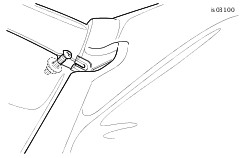 Figure 6. Wind Deflector Assembly to Nacelle (FLHRS Models) |
| 5. | See Figure 7. Install the two Phillips flat head screws (B) removed earlier to secure the handlebar clamp cover to the fork lock mechanism. | |
| 6. | Press the original fork-lock label plate (A) into position on the handlebar cover. | |
| 7. | Obtain the chrome nacelle trim strip and serrated flange nut removed earlier. Insert the weld stud on the trim strip into the hole at the top of the headlamp nacelle, and reach inside the nacelle to install the flange nut. Tighten the nut to 1.7–2.3 N·m (15–20 in-lbs). | |
| 8. | Install the headlight into the nacelle. See HEADLAMP ASSEMBLY-INSTALLATION in the Service Manual. |
ALL models:
WARNINGReplace brake line gaskets. Re-using original gaskets can cause brake failure and loss of vehicle control, which could result in death or serious injury. (00318a)
NOTICE
Avoid leakage. Be sure gaskets, banjo bolt(s), brake line and caliper bore are clean and undamaged before assembly. (00321a)
- Carefully inspect the new brake line for damage or defects, and replace if damaged. Install the brake line per the Service Manual instructions or the instructions included with the Brake Line Kit.
- Bleed the brakes. See BLEEDING HYDRAULIC BRAKES in the Service Manual.
- Re-install the clutch cable to the clutch lever or install a new clutch cable (sold separately) per the CLUTCH HAND CONTROL instructions in the Service Manual.
Safety Check
WARNINGBe sure that steering is smooth and free without interference. Interference with steering could result in loss of vehicle control and death or serious injury. (00371a)
- Be sure wires, clutch cables, throttle/ idle cables and brake lines do not pull tight when handlebars are turned fully to left or right fork stops.
WARNINGConnect positive (+) battery cable first. If positive (+) cable should contact ground with negative (-) cable connected, the resulting sparks can cause a battery explosion, which could result in death or serious injury. (00068a)
| 1. | Verify that the Ignition/ Light Key Switch is turned to the OFF position. Apply a light coat of petroleum jelly or corrosion retardant material to the battery terminals. Refer to the Service Manual and follow the instructions given to re-attach the battery cables (positive cable first). | |
| WARNING Be sure that all lights and switches operate properly before operating motorcycle. Low visibility of rider can result in death or serious injury. (00316a) | ||
| 2. | Turn the Ignition/ Light Key Switch to IGNITION and test each handlebar switch for proper operation. | |
| 3. | For 2005 and earlier FXDL and FXDWG models: |
WARNINGBe sure plug in lower forward section of rear fender is installed. Operation without plug installed could allow tire contact with wiring harness. Tire contact with wiring harness can cause wire damage, which could result in death or serious injury. (00456b)
- Inspect the lower forward section of the fender inside the rear wheel well. A three-inch (76 mm) square hole in the fender should be covered with a rubber plug.
- If the plug is damaged, loose or missing, it MUST be replaced (Part Number 59150-90, available from a Harley-Davidson dealer). Without this plug in place, the wire harness could come out of the opening and contact the rear tire, causing rear lighting failure or other serious electrical problems.
| 4. | For ALL models: Turn the handlebar to the left and right steering stops, testing the handlebar control functions at each stop. | |
| 5. | Apply the front brake hand lever to test operation of the brake lamp. | |
| 6. | Refer to the Service Manual, and follow instructions to install the seat. | |
| WARNING After installing seat, pull upward on seat to be sure it is locked in position. While riding, a loose seat can shift causing loss of control, which could result in death or serious injury. (00070b) WARNINGBefore starting engine, be sure throttle control will snap back to idle position when released. A throttle control that prevents engine from automatically returning to idle can lead to loss of control, which could result in death or serious injury. (00390a) WARNINGAfter repairing the brake system, test brakes at low speed. If brakes are not operating properly, testing at high speeds can cause loss of control, which could result in death or serious injury. (00289a) | ||
| 7. | FLHRS models: Remove the adhesive backing from the Bar and Shield emblem (D, sold separately) and install in the handlebar clamp cover recess. |
SERVICE PARTS
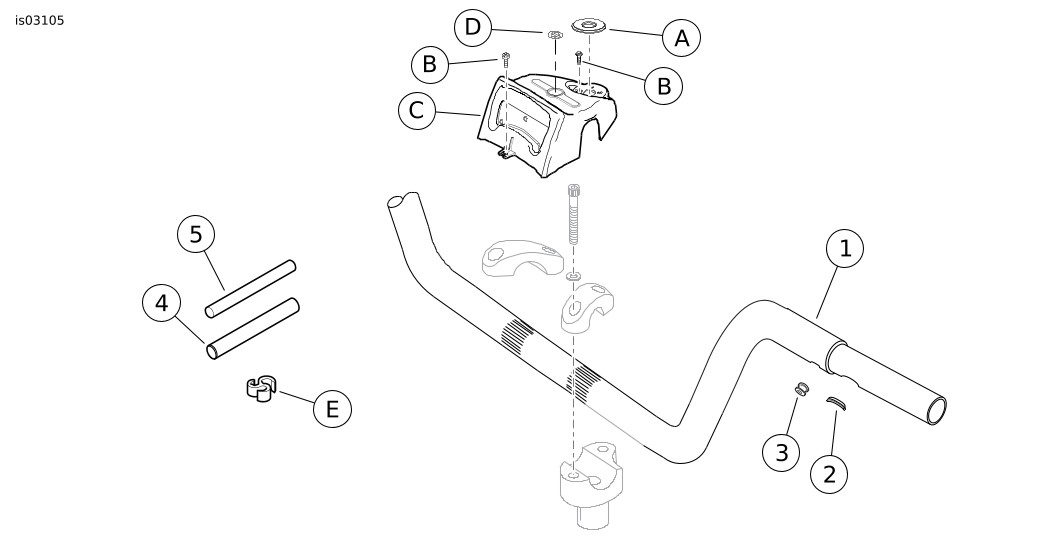
Figure 7. Service Parts, Beach Handlebar Kit
Table 1. Service Parts Table
Item | Description (Quantity) | Part Number |
|---|---|---|
1 | Handlebar | 56544-02 |
2 | Handlebar grommet, large (2) | 11403A |
3 | Handlebar grommet, small (2) | 11398 |
4 | Heat-shrink tube, large | 72162-02 |
5 | Heat-shrink tube, small | 72165-02 |
Items mentioned in text, but not included in kit: | ||
A | Original equipment fork-lock plate (FLHRS models) | |
B | Original equipment Phillips-head screws (3); (2) flat head, (1) pan head (FLHRS models) | |
C | Handlebar cover (FLHRS models) | |
D | Emblem, "Bar and Shield" logo (FLHRS models) | |
E | Clip, 3-way (Part Number 70488-02, for brake, throttle and idle cables) (2006 and later FXDB and FXDWG models) | |