
BRAKE SEAL/PISTON KIT
J017272013-03-01
GENERAL
Kit Number
44315-00A, 44313-00, 44313-01A
Models
See a Harley-Davidson dealer or the parts catalog for a specific year/model motorcycle for the correct brake caliper repair parts.
Additional Parts Required
In addition to this kit, Harley-Davidson recommends installing new rubber brake line washers at the banjo-bolt locations. See the service manual for your model motorcycle, and the brake caliper you are servicing, for specific rubber washer part numbers.
 WARNING
Rider and passenger safety depend upon the correct installation of this kit. Use the appropriate service manual procedures. If the procedure is not within your capabilities or you do not have the correct tools, have a Harley-Davidson dealer perform the installation. Improper installation of this kit could result in death or serious injury. (00333b)
NOTE
This instruction sheet references service manual information. A service manual for your model motorcycle is required for this installation and is available from a Harley-Davidson Dealer.
Kit Contents
See Service Parts Illustrations Figure 3 and Figure 4.
REMOVAL
CAUTIONDirect contact of DOT 5 brake fluid with eyes can cause eye irritation, swelling, and redness. Avoid eye contact. In case of eye contact flush with large amounts of water and get medical attention. Swallowing large amounts of DOT 5 brake fluid can cause digestive discomfort. If swallowed, obtain medical attention. Use in well ventilated area. KEEP OUT OF REACH OF CHILDREN. (00144b)
NOTICE
Avoid leakage. Be sure gaskets, banjo bolt(s) and brake line are clean and undamaged before assembly. (00323a)
Front Caliper
- See Figure 1. Remove the banjo bolt (1) and steel/rubber washers (2) to remove the front brake line (3) from the caliper. Discard washers.
- Remove both the upper (4) and lower (5) mounting bolts. Lift caliper upward to remove from brake disc.
Rear Caliper
- If present, remove right saddlebag.
- See Figure 2. Remove the banjo bolt (1) and both steel/rubber washers (2) to detach rear brake line (3) from caliper. Discard washers.
- Pull axle from rear wheel. Refer to applicable service manual.
- Lift rear caliper away from axle and rear fork. Notch (4) in caliper mount must clear tab on rear fork.
DISASSEMBLY
- See Figure 3 for front calipers or Figure 4 for rear calipers. Remove the pad pins (10), brake pads (7), and bridge bolts (11) to separate caliper housings (1, 8).
- Remove the anti-rattle spring (6).
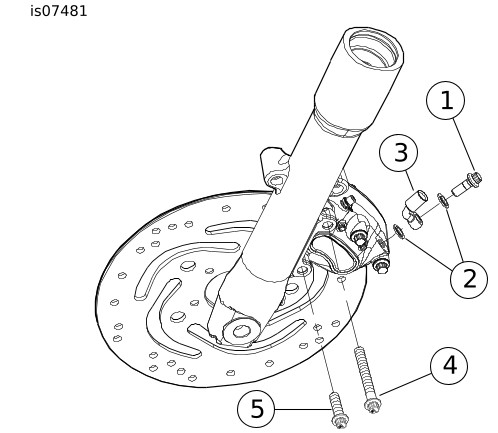
| 1 | Banjo bolt |
| 2 | Washers (2) |
| 3 | Front brake line |
| 4 | Upper mounting bolt |
| 5 | Lower mounting bolt |
Figure 1. Front Caliper Mount
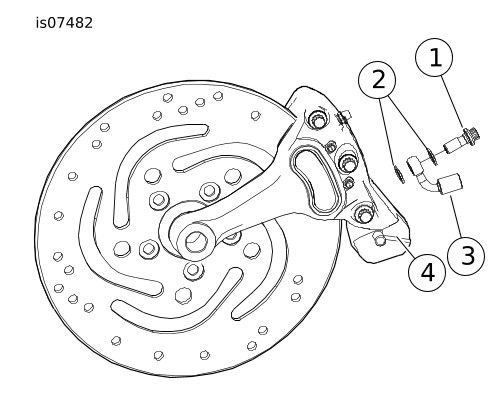
| 1 | Banjo bolt |
| 2 | Washers (2) |
| 3 | Rear brake line |
| 4 | Notch |
Figure 2. Rear Caliper Mount
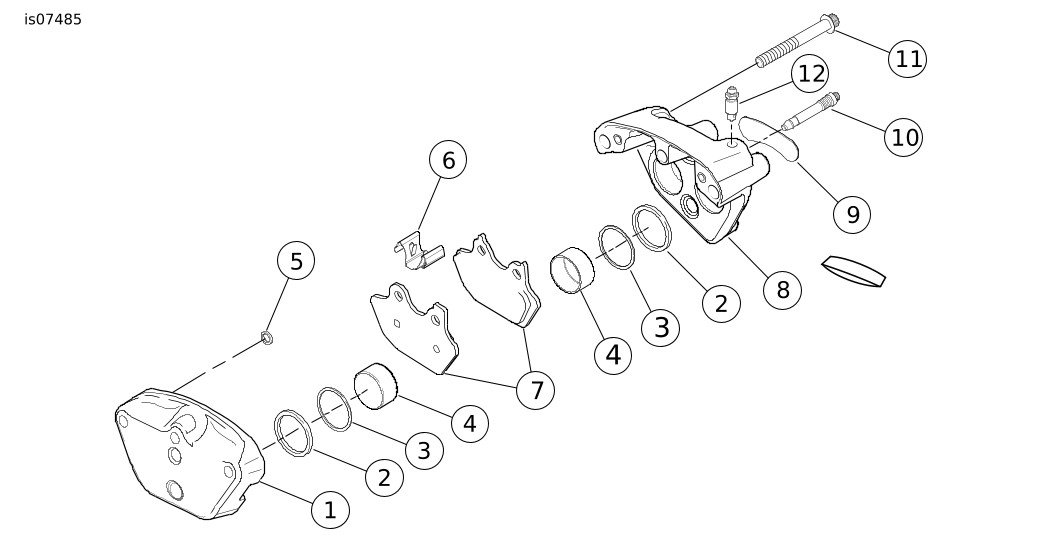
Figure 3. Front Brake Caliper
Table 1. Items Mentioned in Text
Item | Description (Quantity) | Item | Description (Quantity) | |
|---|---|---|---|---|
1 | Inside caliper housing | 7 | Brake pads (2) | |
2 | Square seal (4) | 8 | Outside caliper housing | |
3 | Wiper (4) | 9 | Decal | |
4 | Piston (4) | 10 | Pad pin (2) | |
5 | Crossover O-ring (2) | 11 | Bridge bolt | |
6 | Anti-rattle spring | 12 | Bleeder valve |

Figure 4. Rear Brake Caliper
Table 2. Items Mentioned in Text
Item | Description (Quantity) | Item | Description (Quantity) | |
|---|---|---|---|---|
1 | Inside caliper housing | 7 | Brake pads (2) | |
2 | Square seal (4) | 8 | Outside caliper housing | |
3 | Wiper (4) | 9 | Decal | |
4 | Piston (4) | 10 | Pad pin (2) | |
5 | Crossover O-ring (2) | 11 | Bridge bolt | |
6 | Anti-rattle spring | 12 | Bleeder valve |
WARNINGCompressed air can pierce the skin and flying debris from compressed air could cause serious eye injury. Wear safety glasses when working with compressed air. Never use your hand to check for air leaks or to determine air flow rates. (00061a)
| 1. | See Figure 5. Remove pistons. a. Place BRAKE CALIPER PISTON REMOVER (3) (Part No. HD-43293) between caliper housings. b. Insert two bridge bolts (three for the rear caliper) and tighten securely. c. Apply low pressure compressed air (1) to banjo bolt hole to remove pistons from caliper bores. d. Remove bridge bolts to disassemble tool. | |
| 2. | See Figure 6. Remove and discard both crossover O-rings (1) from inside caliper housing. | |
| 3. | Remove pistons (2) from caliper bores. | |
NOTICE Avoid leakage. Prevent damage to piston or piston bore. Use non-metallic tools when servicing components. (00529d) | ||
| 4. | See Figure 7. Use a wooden toothpick (1) to remove and discard a wiper (2) and square seal (3) from each caliper bore. |
ASSEMBLY
NOTE
Do not use D.O.T. 5 brake fluid for lubrication. Use of D.O.T. 5 brake fluid causes increased lever travel.
- Apply Piston Lube to only the following parts before assembly:
- nose radius and outside diameter of piston.
- inside of caliper piston bores.
- inside diameter of seals and wipers.

| 1 | Low pressure air hose |
| 2 | Bridge bolt |
| 3 | Caliper piston remover (Part Number HD-43293) |
Figure 5. Front Calipers
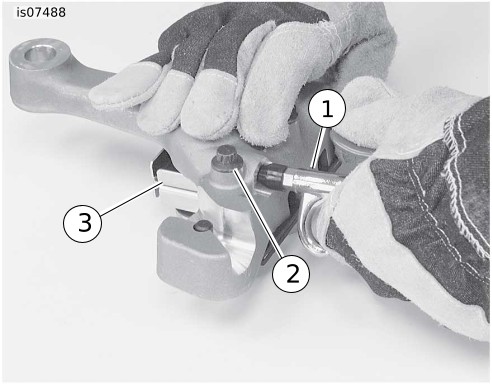
| 1 | Low pressure air hose |
| 2 | Bridge bolt |
| 3 | Caliper piston remover (Part Number HD-43293) |
Figure 6. Rear Calipers
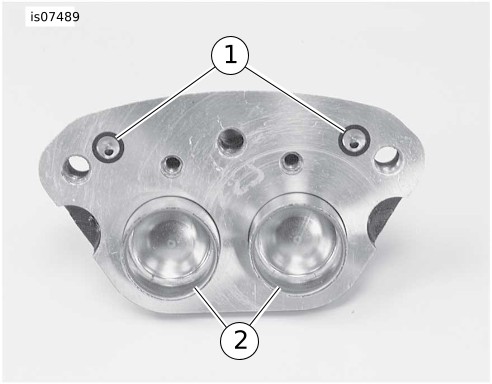
| 1 | Crossover O-ring |
| 2 | Pistons (2) |
Figure 7. Crossover O-Rings and Inside Housing

| 1 | Wooden toothpick |
| 2 | Wiper |
| 3 | Square seal |
Figure 8. Wipers and Square Seals
NOTICE
Avoid leakage. Prevent damage to piston or piston bore. Use non-metallic tools when servicing components. (00529d)
| 1. | See Figures 8. Install a new square seal (3) and a new wiper (2) into each piston bore. | |
| 2. | Carefully insert pistons by hand into bores of inside and outside caliper housings. If installation shows resistance, remove piston and check that seals and wipers are properly installed. | |
| 3. | See Figure 7. Place two new crossover O-rings (1) on inside housing. | |
| 4. | Assemble caliper housings. a. See Figures 9 and 10. Place outside caliper on work bench with decal side down. Install anti-rattle clip (1) in channel with indent (2) facing upwards. b. Verify that new crossover O-rings are installed on inside caliper housing. c. Mate inside and outside caliper housings using bridge bolts. For the front caliper, place one bridge bolt in the middle hole and one next to the bleeder valve. For the rear caliper, mate inside and outside caliper housing using three bridge bolts. Loosely install bridge bolts. d. Check that anti-rattle spring is still seated between caliper housings. e. Tighten bridge bolts to 38–51.5 N·m (28–38 ft-lbs). NOTE See Figure 11. The front left, front right (not present on all vehicles) and rear brake calipers use the same exact brake pad set. Each brake pad set has three tabs. On the right side of the vehicle, the pad with two tabs (1), installs on the inboard side of the caliper. On the left side of the vehicle, the pad with two tabs (1), installs on the outboard side of the caliper. | |
| 5. | Insert one set of brake pads into caliper with friction material on pad facing opening for brake disc. Curved portion of pad must face rear of motorcycle when caliper is installed. | |
| 6. | Install pad pins. Pad pins will give an audible click when inserted into inside housing. Tighten both pad pins to 20.3–22.6 N·m (180–200 in-lbs). NOTE If pad pins do not fit, check the following:
The set of pads must be pushed tight against the anti-rattle clip before the pad pins can be installed. |
INSTALLATION
Front Caliper
NOTE
If the front wheel was removed, refer to the applicable service manual for installation. A service manual for your motorcycle is available at your Harley-Davidson dealer.
| 1. | See Figure 3. Attach caliper to fork leg. a. Place caliper over brake disc with bleeder valve facing upwards. b. Loosely install long mounting bolt (4) into top hole on fork leg. c. Install short mounting bolt (5) into top hole on fork leg. Tighten bottom mounting bolt to 38–51.5 N·m (28–38 ft-lbs). d. Tighten the top mounting bolt to 38–51.5 N·m (28–38 ft-lbs). |
Rear Calipers
- See Figure 2. Place the caliper on the rear axle with notch (4) inside rear fork tab. Install the rear axle and check drive belt tension according to the applicable service manual.
Front or Rear Caliper
NOTICE
Avoid leakage. Be sure gaskets, banjo bolt(s), brake line and caliper bore are clean and undamaged before assembly. (00321a)

| 1 | Anti-rattle clip |
| 2 | Indent |
Figure 9. Front Caliper
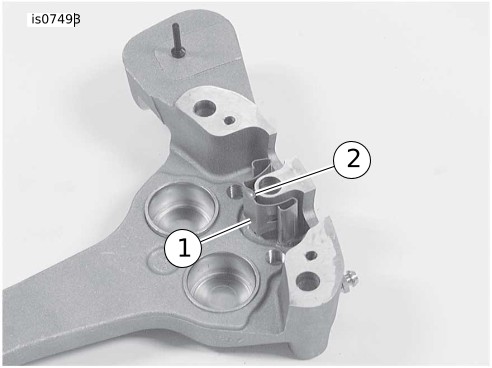
| 1 | Anti-rattle Clip |
| 2 | Indent |
Figure 10. Rear Caliper

| 1 | Single tab on backing plate |
| 2 | Two tabs on backing plate |
Figure 11. Brake Pad
| 1. | See Figure 4. Connect the brake line (3) to caliper using two new washers (2) (sold separately) and tighten banjo bolt (1)23–29.8 N·m (17–22 ft-lbs). | |
| 2. | Remove the cover from front or rear brake master cylinder. Fill the master cylinder with D.O.T. 5 Silicone Brake Fluid. Verify that fluid level is 1/8 in. (3 mm) below the top of the reservoir with the master cylinder in a level position. | |
| WARNING After servicing brakes and before moving motorcycle, pump brakes to build brake system pressure. Insufficient pressure can adversely affect brake performance, which could result in death or serious injury. (00279a) | ||
| 3. | Bleed the brake system. Refer to applicable service manual. | |
| WARNING A plugged or covered relief port can cause brake drag or lock-up, which could lead to loss of control, resulting in death or serious injury. (00288a) | ||
| 4. | Verify proper operation of the master cylinder relief port. Actuate the brake lever with the cover removed. A light spurt of fluid breaks the surface if all internal components are working properly. | |
| 5. | Install gasket and cover on master cylinder. Tighten cover screws to 0.7–0.9 N·m (6–8 in-lbs). | |
| 6. | For rear calipers, install right saddlebag if necessary. | |
| WARNING After repairing the brake system, test brakes at low speed. If brakes are not operating properly, testing at high speeds can cause loss of control, which could result in death or serious injury. (00289a) | ||
| 7. | Test the brake system. a. Turn ignition switch ON. b. Pump the front brake hand lever to verify operation of the brake lamp. c. Pump the rear brake pedal to verify operation of the brake lamp. d. Test ride the motorcycle. If a brake feels spongy, bleed that brake system again. Refer to applicable service manual. NOTE Avoid hard stops for the first 100 miles (160 km). This allows the new pads to become conditioned to the brake discs. |