
CHROME BELT GUARD AND HARDWARE KIT
J035922006-06-27
GENERAL
Kit Number
60303-06, 60304-06, 60711-07, 60303-07
Models
Table 1. Models
Kits | Models |
|---|---|
Kit 60303-06 | Fits 2006 Dyna models |
Kit 60304-06 | Fits 2006 and later Dyna models |
Kit 60711-07 | Fits 2007 Dyna models, stock on FXDSE |
Kit 60303-07 | Fits 2007 Dyna models, stock on FXDL, FXDWG and FXDC |
Additional Parts Required
 WARNING
Rider and passenger safety depend upon the correct installation of this kit. Use the appropriate service manual procedures. If the procedure is not within your capabilities or you do not have the correct tools, have a Harley-Davidson dealer perform the installation. Improper installation of this kit could result in death or serious injury. (00333b)
NOTE
This instruction sheet references Service Manual information. A Service Manual for your model motorcycle is required for this installation and is available from a Harley-Davidson Dealer.
INSTALLATION
Chrome Belt Guard and Hardware
| 1. | Remove and discard existing front button head Torx® screw and washer from belt guard. | |
| 2. | Remove and discard existing rear button head Torx screw, two washers, and nut from belt guard. | |
| 3. | Lift existing belt guard away from rear fork. NOTE See Figure 2. Verify rear swingarm tab is in between the belt guard rear mounting bracket (A) tabs. | |
| 4. | See Figure 1. Place chrome belt guard (Item 1, Figure 2 ) over front and rear tabs (1, 2) on rear fork (3). | |
| 5. | See Figure 2. Loosely install front button head Torx screw (2) and washer (3) on chrome belt guard (1). | |
| 6. | Loosely install rear button head Torx screw (4), two washers (3), and nut (5) on chrome belt guard mounting bracket (A). | |
| 7. | Tighten hardware to 13.6–20.3 N·m (120–160 in-lbs). |
Chrome Belt Guard Hardware Only
| 1. | See Figure 2. Remove and discard existing front 5/16-18 X 1 in. button head Torx screw and washer from belt guard. Install button head Torx screw (2) and washer (3) on chrome belt guard (1). Tighten screws to 13.6–20.3 N·m (120–160 in-lbs). | |
| 2. | Remove and discard existing 5/16-18 X 1-1/4 in. button-head Torx screw, two washers, and nut from belt guard. Install button head Torx screw (4), two washers (3), and nut (5) on chrome belt guard mounting bracket (A). Tighten screws to 13.6–20.3 N·m (120–160 in-lbs). |

| 1 | Front swingarm tab |
| 2 | Rear swingarm tab |
| 3 | Rear fork |
Figure 1. Front and Rear Swingarm Tabs
SERVICE PARTS
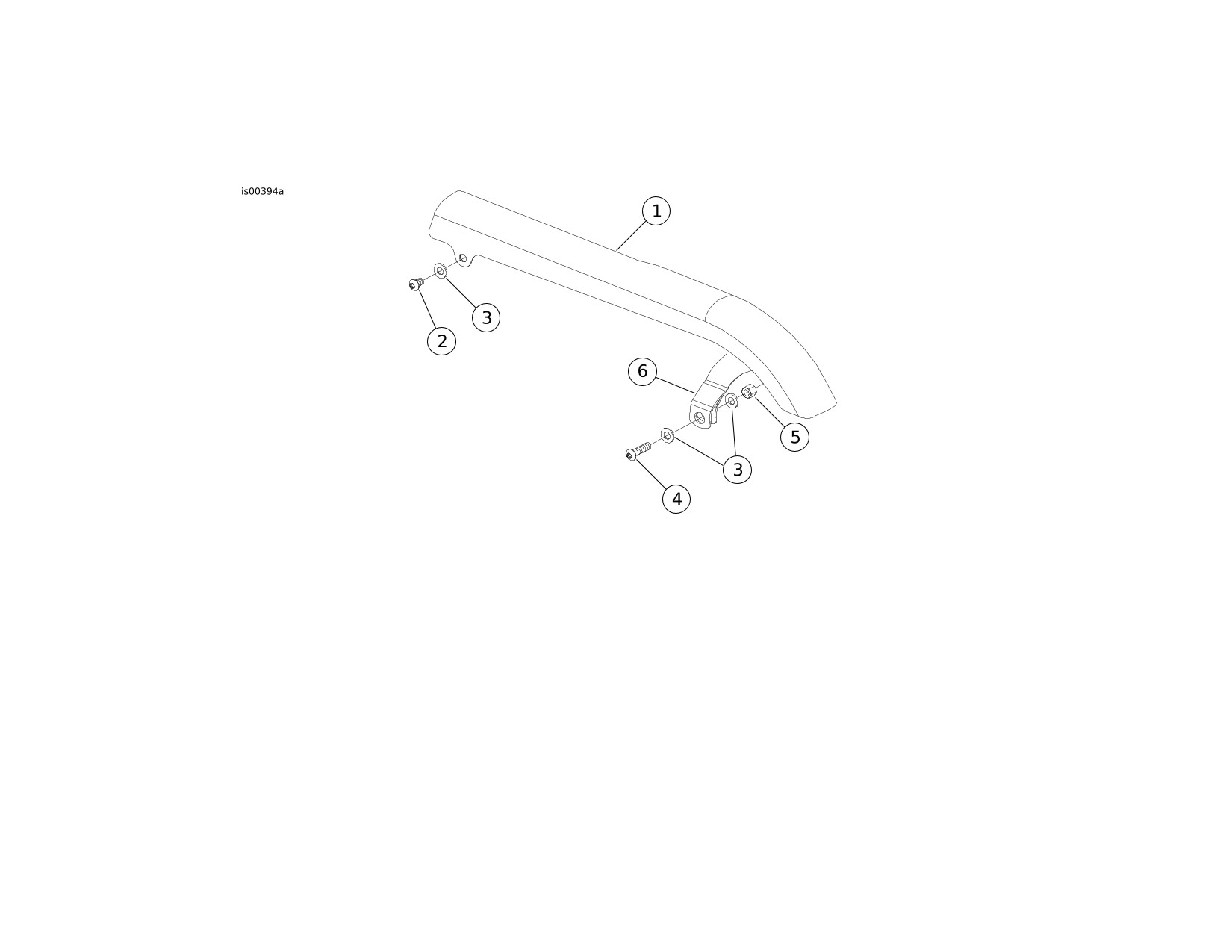
Figure 2. Service Parts for Chrome Belt Guards and Hardware Kit
Table 2. Service Parts Table
Kit | Item | Description (Quantity) | Part Number |
|---|---|---|---|
Kit 60303-06 Chrome Upper Belt Guard Kit (Includes Hardware Kit 60304-06) | 1 | Chrome Belt Guard | 60293-06 |
Kit 60304-06 Chrome Belt Guard Hardware Kit | 2 | Screw, button head Torx, 5/16-18 X 1 in. | 94599-98 |
3 | Plain washer, type A (3) | 6330 | |
4 | Screw, button head Torx, 5/16-18 X 1-1/4 in. | 94602-98 | |
5 | Hex nut | 7849 | |
Kit 60711-07 Chrome Upper Belt Guard Kit | 1 | Chrome Belt Guard | 60634-07 |
2 | Screw, button head Torx, 5/16-18 X 1 in. | 94599-98 | |
3 | Plain washer, type A (3) | 6330 | |
4 | Screw, button head Torx, 5/16-18 X 1-1/4 in. | 94602-98 | |
5 | Hex nut | 7849 | |
Kit 60303-07 Chrome Upper Belt Guard Kit | 1 | Chrome Belt Guard | 60293-07 |
2 | Screw, button head Torx, 5/16-18 X 1 in. | 94599-98 | |
3 | Plain washer, type A (3) | 6330 | |
4 | Screw, button head Torx, 5/16-18 X 1-1/4 in. | 94602-98 | |
5 | Hex nut | 7849 | |
Items mentioned in text, but not included in kit: | |||
A | Mounting bracket | ||