
TOURING LAYBACK LICENSE PLATE BRACKET
J014702005-05-19
GENERAL
Kit Number
53385-00
Models
This kit is designed to fit all 1999 and later Road King, Road Glide and Electra Glide standard models having license plates up to 7 1/4 x 4 1/4 inches. Does not fit with Detachable Tour-Pak Rack part number 53276-04.
INSTALLATION
| 1. | Remove original equipment bolts holding license plate bracket in place. Save hardware. | |
| 2. | Install new Layback License Plate Bracket using hardware saved in Step 1. | |
| 3. | Tighten bolts to 25.8 N·m (19 ft-lbs). | |
| 4. | From the back side of the license plate bracket, thread one button head screw (2) through upper hole of license plate bracket (1), then through license plate. | |
| 5. | Place flat washer (3) over screw (1) on front side of license plate and fasten with acorn nut (4). Finger tighten. | |
| 6. | Repeat steps 4 and 5 for each of the remaining holes in the license plate bracket. | |
| 7. | Tighten all license plate mounting fasteners securely. |
NOTE
Depending on hole spacing of license plate, it may be necessary to secure the license plate with only the two bottom fasteners.
SERVICE PARTS
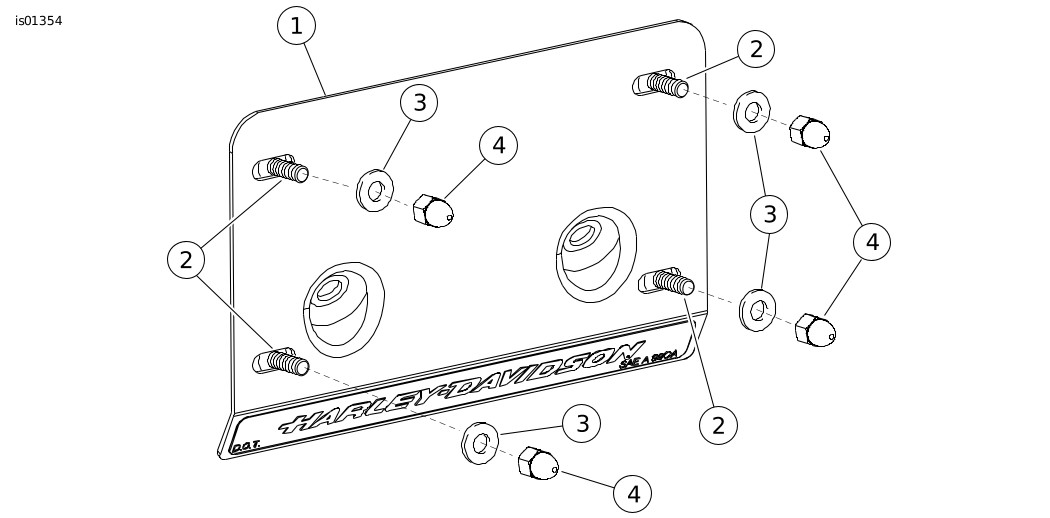
Figure 1. Service Parts: Touring Layback License Plate Bracket
Table 1. Service Parts: Touring Layback License Plate Bracket
Item | Description (Quantity) | Part Number |
|---|---|---|
1 | Layback license plate bracket | Not Sold Separately |
2 | Screw, hex, button head (4) | 94407-94T |
3 | Washer, flat, chrome, 1/4 (4) | 94065-90T |
4 | Acorn nut, 1/4-20 (4) | 94004-90T |