
Sissy Bar Mounted Auxiliary Brake and Tail Light
J030632006-06-20
GENERAL
Kit Number
Kit Number 59429-04, Light Kit with Red Lens
Kit Number 59470-06, Light Kit with Smoked Lens
Models
These kits fit 1999 and later XL models, 1996 and later Dyna™ and 1996 and later Softail models (except 2006 FXSTC) equipped with a Medallion Plate-Style Sissy Bar Upright. Will not fit with Backrest Pads that have mounting brackets that match the contour of the sissy bar medallion. Will not fit with sissy bar mounted storage bags.
Additional Parts Required
See Figure 2. To provide clearance for the auxiliary brake and tail light, backrest pads with mounting holes (5) spaced 2.55 inch (64.8 mm) center to center require the purchase of a Backrest Mounting Bracket Kit (Part No. 59545-04). This mounting bracket replaces the existing backrest mounting bracket (3).
 WARNING
Rider and passenger safety depend upon the correct installation of this kit. Use the appropriate service manual procedures. If the procedure is not within your capabilities or you do not have the correct tools, have a Harley-Davidson dealer perform the installation. Improper installation of this kit could result in death or serious injury. (00333b)
NOTE
This instruction sheet references Service Manual information. A Service Manual for your model motorcycle is required for this installation and is available from a Harley-Davidson Dealer.
INSTALLATION
| 1. | Follow the instructions in the Service Manual to remove the seat. | |||||||||||||||
| WARNING To prevent accidental vehicle start-up, which could cause death or serious injury, disconnect negative (-) battery cable before proceeding. (00048a) WARNINGDisconnect negative (-) battery cable first. If positive (+) cable should contact ground with negative (-) cable connected, the resulting sparks can cause a battery explosion, which could result in death or serious injury. (00049a) | ||||||||||||||||
| 2. | Disconnect battery cables, negative (-) cable first. | 
Figure 1. Medallions 
Figure 2. Backrest Pad and Bracket |
Remove the Backrest Pad
NOTE
Medallions are attached to a medallion plate between the uprights of the sissy bar using either adhesive or push nuts.
- See Figure 1. Remove and retain any existing medallion. Adhesive Mounted Medallion (1): Carefully pry the medallion (1) from the plate. Remove any adhesive residue from the back of the medallion and the sissy bar medallion plate. To avoid contaminating the adhesive backing, place the medallion in an area away from dirt and debris. Push Nut Mounted Medallion (2): Carefully pry the edge of the medallion until the medallion is free of the push nuts.
- See Figure 2. Remove and retain the screw (1) that secures the backrest pad to the plate.
- Remove and retain the two screws (2), backrest bracket (3) and backrest pad (4).
Install the Light Assembly
| 1. | See Figure 3. Clean the front of the medallion plate (2) with a 50/50 solution of isopropyl alcohol and water. | |||||||||||||||||||||||
| 2. | Peel the adhesive backing from the adhesive tape located on the light assembly (1). Fit and hold the light assembly to the front of the medallion plate (2). | |||||||||||||||||||||||
| 3. | See Figure 6. For 2.55 inch (64.8 mm) center to center mounting hole backrest pads, use the bracket kit (Part Number 59545-04) and sandwich the light assembly between the bracket frame and the medallion plate. The bracket clamps will fit around the back of the sissy bar arms. | |||||||||||||||||||||||
| 4. | See Figure 3. Place the spacer (3) in the center hole in the light assembly, and place the backrest pad (4) against the light assembly/sissy bar. Install the screw (5) through the medallion plate and spacer, to secure the backrest pad. | |||||||||||||||||||||||
| 5. | See Figure 4. Secure the harness (2) to the sissy bar upright, using either adhesive-backed metal clips or cable straps at locations (1) near the light assembly and the side plate. If using adhesive-backed metal clips, snap the light assembly harness (2) into the clips. | |||||||||||||||||||||||
| 6. | Hold light assembly harness (2) against a sissy bar upright, and install the backrest bracket (3) using two screws included in the kit. NOTE To ensure maximum adhesion, clean the area of the frame where the adhesive clips are to be placed using a 50/50 solution of isopropyl alcohol. | |||||||||||||||||||||||
| 7. | Softail and Dyna and 1999 to 2003 XL models: Route the light assembly wiring harness along the fender support. Secure the harness to the fender support using adhesive-backed metal clips. 2004 and later XL models: See Figure 5. Route the light assembly wiring harness (2) along the fender support and along the inside of the frame tube. Secure the wiring harness using adhesive-backed plastic clips (1) placed as shown. | 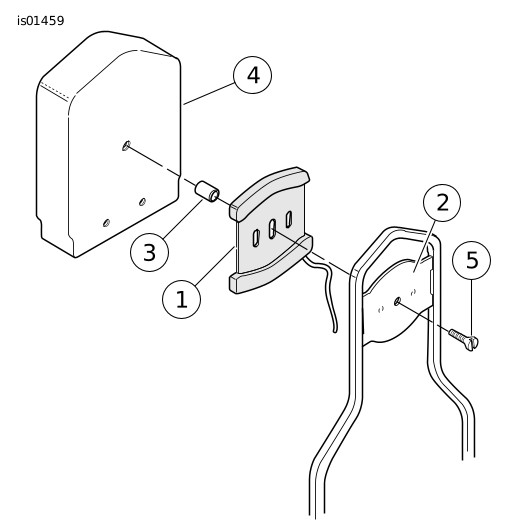
Figure 3. Light Assembly, Spacer and Backrest Pad 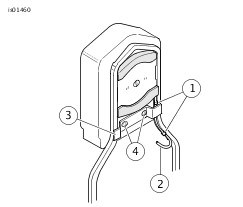
Figure 4. Install the Backrest Bracket 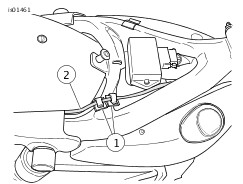
Figure 5. Harness Routing - XL Models |
Connect the Light Assembly
| 1. | Locate and separate the taillamp wiring harness connector [7B] from the main harness taillamp connector [7A]. | |||||||||||||||||||||
| 2. | Following the instructions in the Service Manual, note the cavity numbers and remove the main harness black, blue and red/yellow leads (with pin terminals) from the taillamp connector [7A]. | |||||||||||||||||||||
| 3. | See Figure 7. Install the main harness leads removed from the taillamp connector [7A] into the 3-way pin housing (1) provided in the kit as follows: a. The blue lead (2) to cavity 1. b. The red/yellow lead (3) to cavity 2. c. The black lead (4) to cavity 3. | |||||||||||||||||||||
| 4. | Mate the kit 3-way connector (1) to the socket housing (5) on the Y-harness (6) from the kit. | |||||||||||||||||||||
| 5. | Mate the 3-way connector (10) on the Y-harness to the sissy bar mounted auxiliary brake and tail light assembly wire connector. | |||||||||||||||||||||
| 6. | Install the blue, red/yellow and black terminated leads (7, 8 and 9) from the Y-harness into the numbered cavities of the taillamp connector [7A] that matched the original main harness lead colors. | |||||||||||||||||||||
| 7. | Mate the main harness connector [7A] to taillamp wiring harness socket connector [7B]. | 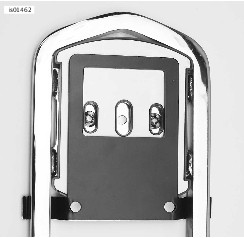 Figure 6. Bracket for 2.55 inch (64.8mm) Pad Hole Spacing (light assembly installed - view from front of sissy bar) 
Figure 7. Y-Harness Wiring Diagram |
Return Motorcycle to Service
WARNINGConnect positive (+) battery cable first. If positive (+) cable should contact ground with negative (-) cable connected, the resulting sparks can cause a battery explosion, which could result in death or serious injury. (00068a)
| 1. | Connect the battery cables, positive (+) cable first. | |
| WARNING After installing seat, pull upward on seat to be sure it is locked in position. While riding, a loose seat can shift causing loss of control, which could result in death or serious injury. (00070b) | ||
| 2. | Follow the instructions in the Service Manual to install the seat. | |
| WARNING If ABS lamp continues flashing at speeds greater than 5 km/h (3 mph) or remains on continuously, the ABS is not operating. The standard brake system is operational, but wheel lock up can occur. Contact a Harley-Davidson Dealer to have ABS repaired. A locked wheel will skid and can cause loss of vehicle control, which could result in death or serious injury. (00361b) | ||
| 3. | Turn ignition on and test for proper brake light and tail light operation. | |
| 4. | Install the medallion. Adhesive Mounted Medallions: Center the medallion on the plate, and press the medallion firmly onto the plate. Push Nut Mounted Medallions: Align the pins on the medallion (2) with the "push nuts" on the medallion plate, and push the medallion firmly into the "push nuts." |
SERVICE PARTS

Figure 8. Service Parts: Sissy Bar Mounted Auxiliary Brake and Tail Light
Table 1. Service Parts Table
Item | Description (Quantity) | Part Number |
|---|---|---|
1 | Clip, adhesive-backed metal (4) | 10102 |
2 | Clip, adhesive-backed plastic (2) | 10120 |
3 | Cable strap (6) | 10006 |
4 | Spacer | Not sold separately |
5 | Y-harness (includes 3-way pin housing) | 70327-04 |
6 | Light assembly, hi-mount sissy bar | Not sold separately |
7 | Backrest mounting bracket kit | 59545-04 |
8 | Connector housing | 73153-96BK |
9 | Socket terminals (3) | 73191-96 |
10 | Connector housing | 73103-96BK |
11 | Pin terminal | 73190-96 |