
DYNA TRIPLE CLAMP KITS
J044702011-06-22
GENERAL
Kit Number
46311-07, 46313-07, 46317-07
Models
These kits fit 2006 and 2007 Dyna model motorcycles.
Tools and Supplies Required
Special Purpose Grease (H-D Part Number 99857-97) is required for this installation and is available from a Harley-Davidson Dealer.
A Steering Head Bearing Race Installer (Part Number H-D-39302) MAY also be needed, along with a small quantity of engine oil.
 WARNING
Rider and passenger safety depend upon the correct installation of this kit. Use the appropriate service manual procedures. If the procedure is not within your capabilities or you do not have the correct tools, have a Harley-Davidson dealer perform the installation. Improper installation of this kit could result in death or serious injury. (00333b)
NOTE
This instruction sheet references Service Manual information. A 2007 Dyna Service Manual is required for this installation and is available from a Harley-Davidson Dealer.
INSTALLATION
NOTE
Cover the fuel tank with clean shop towels to prevent scratching. Damage to the finish could result.
| 1. | See Figure 1. Remove and retain the fork stem cap (A). Bend the lockwasher (B) tab away from the fork stem nut (C). Remove and retain the fork stem nut. Remove and discard the lockwasher. | |
| 2. | Remove the handlebar assembly with the risers and bushings, and set them back onto the protected fuel tank. Refer to HANDLEBAR: REMOVAL in the Service Manual. | |
| 3. | Loosen the upper fork bracket (triple clamp) pinch bolts (6) and remove the upper fork bracket (2) along with the handlebars. Be sure not to kink or pinch the control cables. | |
| 4. | Refer to STEERING HEAD in the Service Manual, and follow the instructions to: a. Remove the fork sides. b. Remove the headlamp from the lower fork bracket (triple clamp). c. Remove the bearing adjuster nut (D), and pull the fork stem (E) and lower fork bracket (F) out of the steering head. Set the adjuster nut aside for later re-assembly. d. Remove and retain the upper dust shield (4), and the bearing cone and roller assembly (3) from the fork stem. Remove the fork stem and bracket from the vehicle frame. e. Check the condition of the bearing cups (races, Items I and J) inside the steering head tube, and replace if necessary. Bearing cones and cups should always be replaced as sets if their condition is questionable. Refer to STEERING HEAD: CLEANING AND INSPECTION in the Service Manual. | |
| 5. | Obtain the new lower fork bracket assembly (1), lower bearing cone (3) and dust shield (4) from the kit. Pack the new lower bearing cone with grease, and install the dust shield and bearing cone onto the fork stem (E). If the bearing cup has been replaced or is dry, lubricate with engine oil as indicated in STEERING HEAD: ASSEMBLY in the Service Manual. | |
| 6. | Insert the fork stem and bracket assembly into the frame steering head. Obtain the upper bearing cone (H), dust shield (G), and bearing adjuster nut (D) removed earlier. Pack the upper bearing with grease, and lubricate the bearing cup with engine oil as necessary. See STEERING HEAD: ASSEMBLY in the Service Manual. | |
| 7. | Install the upper bearing cone onto the fork stem, followed by the dust shield. | |
| 8. | Thread the adjuster nut onto the fork stem, and tighten to 31–36.6 N·m (23–27 ft-lbs) Back the bearing adjuster nut off about 180 degrees (one-half turn). NOTE Over-tightening the bearing adjuster nut will cause excessive bearing wear, leading to the need for premature replacement. | |
| 9. | Tighten the adjuster nut until there is no noticeable shake or free play between the bearings and cups. The fork stem MUST turn freely from side to side. | |
| 10. | Install the new upper fork bracket (2) and the hardened washer (5) from the kit. Install the handlebar assembly with the risers and bushings. Refer to HANDLEBAR: INSTALLATION in the Service Manual. | |
| 11. | Use a few drops of engine oil to lubricate the threads of the fork stem nut (C) removed earlier. Thread the nut onto the fork stem, and tighten securely. | |
| 12. | Install the headlamp assembly. See HEADLAMP in the Service Manual. | |
| 13. | Obtain the four socket head cap screws (6) from the kit, to be used as the pinch bolts in the upper and lower fork brackets. Refer to FRONT FORK in the Service Manual, and follow the instructions to install the fork sides. | |
| 14. | Adjust the steering head bearings. See STEERING HEAD BEARINGS: ADJUSTMENT (FALL-AWAY) in the Service Manual, with the following exceptions: a. Tighten the fork stem nut to 95–108 N·m (70–80 ft-lbs) before checking fall-away, and again after the check has been completed. b. The lock washer with lock tab is no longer installed so bending the tab is not required. | |
| 15. | Install the fork stem cap (A) removed earlier. | |
| 16. | Align the headlamp. Refer to HEADLAMP ALIGNMENT in the Service Manual. |
SERVICE PARTS
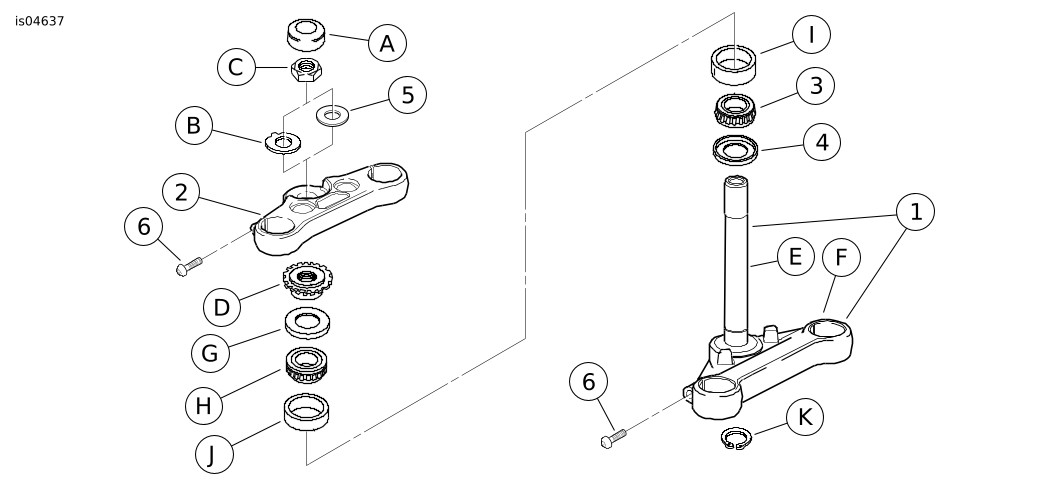
Figure 1. Service Parts, Dyna Triple Clamp Kits
Table 1. Service Parts Table
Kit | Item | Description (Quantity) | Part Number |
|---|---|---|---|
Kit 46311-07 FXD, FXDB, FXDC models | 1 | Lower fork bracket (triple clamp) assembly | 45867-08 |
2 | Upper fork bracket (triple clamp) assembly | 45538-08 | |
Kit 46313-07 FXDL models | 1 | Lower fork bracket (triple clamp) assembly | 45539-08 |
2 | Upper fork bracket (triple clamp) assembly | 46278-08 | |
Kit 46317-07 FXDWG models | 1 | Lower fork bracket (triple clamp) assembly | 46386-08 |
2 | Upper fork bracket (triple clamp) assembly (polished) | 46700-08 | |
Items common to ALL Kits | 3 | Lower bearing cone and roller assembly | 48300-60 |
4 | Lower dust shield | 48198-06 | |
5 | Flat washer (hardened) | 45727-08 | |
6 | Socket head cap screw, 3/8-16 x 1.5 inch, Grade 8 (4) | 4352 | |
Items mentioned in text, but not included in kit: | |||
A | Fork stem cap | ||
B | Lockwasher | ||
C | Fork stem nut | ||
D | Bearing adjuster nut | ||
E | Fork stem | ||
F | Lower fork bracket | ||
G | Upper dust shield | ||
H | Upper bearing cone and roller assembly | ||
I | Lower bearing cup | ||
J | Upper bearing cup | ||
K | Retaining ring | ||