
CHROME FAN KIT
J043472011-05-16
GENERAL
Kit Number
91196-08
Models
For model fitment information, see the P&A Retail Catalog or the Parts and Accessories section of www.harley-davidson.com (English only).
 WARNING
Rider and passenger safety depend upon the correct installation of this kit. Use the appropriate service manual procedures. If the procedure is not within your capabilities or you do not have the correct tools, have a Harley-Davidson dealer perform the installation. Improper installation of this kit could result in death or serious injury. (00333b)
NOTE
This instruction sheet references Service Manual information. A Service Manual for your model motorcycle is required for this installation and is available from a Harley-Davidson Dealer.
INSTALLATION
| 1. | Refer to Service Manual and remove seat. | |
| WARNING To prevent accidental vehicle start-up, which could cause death or serious injury, disconnect negative (-) battery cable before proceeding. (00048a) | ||
| 2. | Disconnect battery negative cable. |
Horn Relocation
NOTE
This cooling fan is designed to provide supplemental cooling for motorcycles subjected to long periods of idling/parade duty. The fan is mounted on the left side of the engine in the area where the horn is mounted. The stock horn must be removed.
Remove Stock Horn
| 1. | Follow Service Manual instructions to remove stock horn and its bracket. | |
| 2. | Assemble new horn 69043-96B to bracket 69135-04 using screws 3658 and washers 7069. | |
| 3. | Remove right front fuel tank TORX® screw. | |
| 4. | Mount horn at front of fuel tank with TORX screw. Verify there is adequate room between horn bracket and fuel tank to prevent paint damage. Tighten screw to 20–27 N·m (15–20 ft-lbs). |
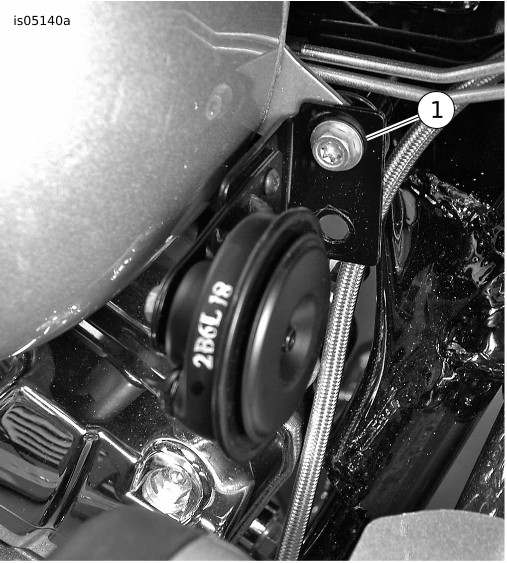
| 1 | Horn mounting location |
Figure 1. Horn Relocation
Remove Stock Upper Engine Mounting Bracket
- Remove screw securing rear of fuel tank and gently raise fuel tank to gain access to upper engine mounting bracket. Place suitable blocking under tank.
- On 2007 models remove bolt attaching stabilizer link to upper engine mounting bracket.
- Remove two bolts and washers securing upper engine mounting bracket to front and rear cylinder heads. Retain bolts and washers for attaching new upper engine mounting bracket from kit.
- Note position of fuel hose. Remove upper engine mounting bracket.
- Connect horn relocation harness to horn.
- Route stock horn wires forward towards relocated horn.
- See Figure 7. Cut ends off stock horn wires and strip wires 3/8 inch. Follow instructions in Service Manual, "SEALED BUTT SPLICE CONNECTORS" to crimp and heat connector (17) to be spliced.
- Route horn harness relocation to stock horn wires and cut to proper length. Connect wires with sealed butt splice connector (17).
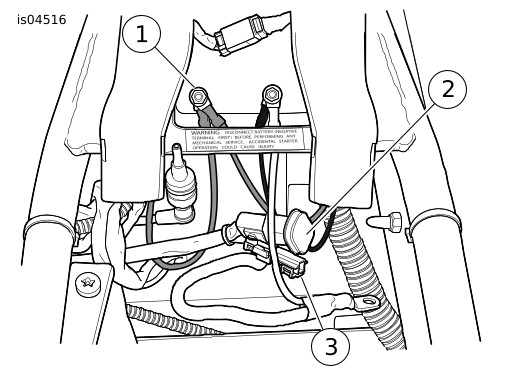
| 1 | Ground stud |
| 2 | Accessory connector |
| 3 | Battery positive connector |
Figure 2. 2007 and Later Under Seat Connectors
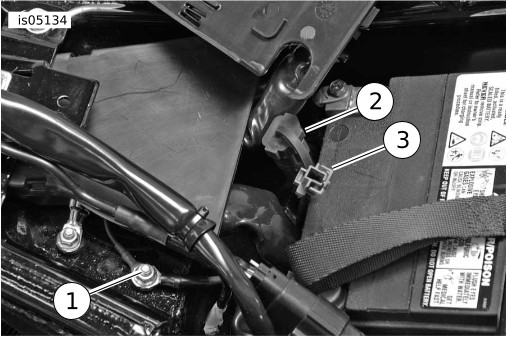
| 1 | Battery ground stud |
| 2 | Accessory connector |
| 3 | Battery positive connector |
Figure 3. 2008 and Later Under Seat Connectors
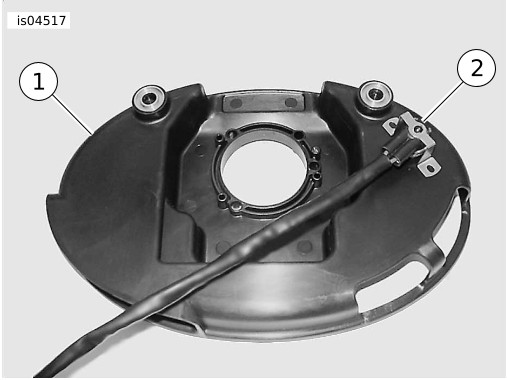
| 1 | Backplate |
| 2 | Thermostat |
Figure 4. Thermostat Mounting
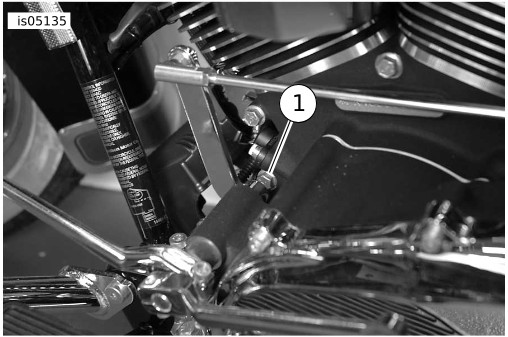
| 1 | Front engine case bolt |
Figure 5. Mounting Point
Connect Accessory Fan Harness
- Connect fan harness power lead to power source. See Figure 2 and Figure 3 for the battery positive connector on your model year.
- Locate the battery positive connector under the seat.
- See Figure 7. Mate the kit wire harness adapter (21) to the battery positive connector.
- Cut the ring terminal off the lead (fuseholder lead) of the fan harness and cut the length of the battery positive adapter lead to reach the end of the fuseholder lead on the fan harness.
- Strip 3/8 inch wire from the ends of the leads and follow Service Manual instructions in "SEALED BUTT SPLICE CONNECTORS" to crimp and heat connector (22) to splice lead of the battery positive adapter to the fuse holder lead on the wire harness.
- See Figure 4. Follow Service Manual instructions to remove air cleaner backplate.
- Position the thermostat (part of accessory fan harness) on backplate to rear of intake and described in "NOTE" above. Mark thermostat mounting hole locations on backplate.
- Drill two 5/32 inch holes in backplate.
- See Figure 7. Mount thermostat with 6-32x3/8 inch screws (4) and nuts (7).
- Mount fan relay in a vertical position (mounting hole up) to a stable position on the frame that allows adequate seat clearance. Depending on model year application, secure in an open relay socket with an existing (stock) mounting screw, or secure with a cable strap from kit.
NOTE
Due to the different air cleaner backplate configurations, take care to mount the thermostat in a suitable location in the next step. Make certain thermostat will not contact cylinder head or prevent normal mounting of backplate. Orient thermostat so its leads are routed away from components that could damage them.
Mount Fan Assembly
| 1. | See Figure 7. Install fan mount (2) or (3) (top engine mount, kit 16317-00 for 2007 models and kit 16313-08 for 2008 models) on front and rear cylinder heads and secure with stock bolts and washers. Tighten bolts to 38–47.5 N·m (28–35 ft-lbs). | |
| 2. | 2007 Models: Secure stabilizer link with stock bolt, nut and washer. Tighten bolt to 24–30 N·m (18–22 ft-lbs). |
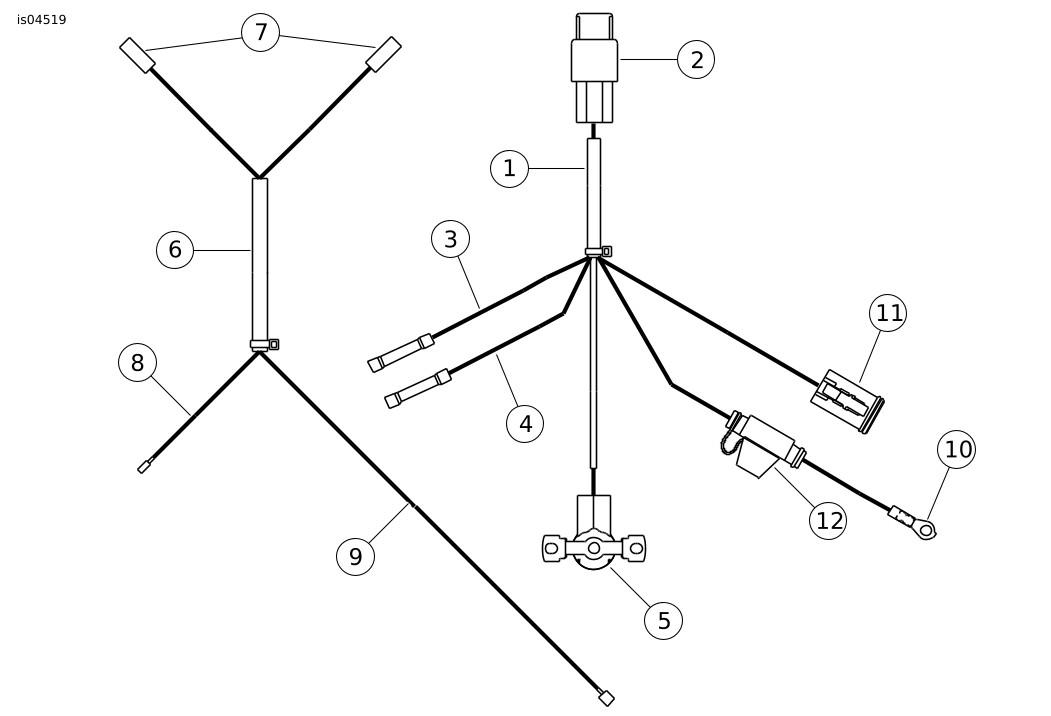
| 1 | Fan harness |
| 2 | Fan relay and connector |
| 3 | Lead to fan motor lead |
| 4 | Lead to fan motor lead |
| 5 | Thermostat |
| 6 | FLHT horn relocation harness |
| 7 | Horn terminal |
| 8 | Lead (yellow/black) to cavity 6 connector |
| 9 | Lead to cigarette lighter lead |
| 10 | Power lead ring terminal |
| 11 | Accessory connector |
| 12 | Fuse holder (15 amp) |
Figure 6. Wire Harness
| 3. | Insert rubber mount stud (9) through mounting hole in fan mount (2) or (3) and secure with 1/4 in ID washer (10) and 1/4-20 nut (18). Tighten nut to 8–11 N·m (72–96 in-lbs). NOTE When tightening the locknuts on the rubber mounts, do not allow the rubber mounts to twist. Twisted mounts may cause equipment damage. | |
| 4. | See Figure 7. Insert rubber mount stud (9) through bottom mounting hole in fan cover assembly and secure with 1/4 in ID washer (10) and 1/4-20 nut (18). Tighten nut to 8–11 N·m (72–96 in-lbs). | |
| 5. | Position fan assembly so holes in upper mounting tabs on fan cover assembly engage rubber mount studs in upper engine mounting bracket. |
| 6. | Install 1/4 inch inside diameter (ID) flat washers (10) and 1/4-20 locknuts (18) on upper studs. Tighten finger tight. | |
| 7. | See Figure 5. Remove front engine case bolt from engine. Install stud into engine case. Tighten stud to 20.3–25.8 N·m (15–19 ft-lbs) . | |
| 8. | See Figure 7. Install lower mounting bracket (5), 1/4 inch ID flat washer and 1/4-20 locknut on rubber mount stud. Tighten finger tight. | |
| 9. | Insert fan lower mounting bracket onto engine stud. Install nut and tighten finger tight. Position lower mounting bracket so rubber mounts are not stressed and tighten nut for lower bracket to 20.3 N·m (15 ft-lbs). | |
| 10. | Tighten the three 1/4-20 fan mounting nuts to 8–11 N·m (72–96 in-lbs). |
- See Figure 7. Peel off medallion (19) backing. align logo and affix to hole in cover. Tape is strong and will not allow repositioning.
- Route fan motor leads over upper engine mounting bracket (2) or (3). Install a cable strap to secure fan motor leads.
- See Figure 6. Connect motor leads to the sealed butt connectors on the accessory fan harness. Connect as follows:
NOTE
Make certain motor leads are connected as specified in the next step. Reversed leads would reverse fan rotation and decrease cooling efficiency which could cause engine damage.
- Black fan motor lead to Black harness lead.
- Blue fan motor lead to Blue/Black harness lead.
- Follow Service Manual instructions in "SEALED BUTT SPLICE CONNECTORS" to crimp and heat connectors to melt the sealant.
- See Figure 7. Cable strap (1) fan motor leads to fan mount (top engine mount) (2) or (3) between the center and left side mounting hardware.
- Arrange accessory fan harness under seat so harness and fuseholder will not be pinched/damaged when seat is installed.
- Secure harness with cable straps (23) from kit.
Return Motorcycle to Service
| 1. | Carefully remove blocking from under rear of fuel tank and install screw at rear of fuel tank. | |
| 2. | Reconnect the negative battery cable. | |
| WARNING After installing seat, pull upward on seat to be sure it is locked in position. While riding, a loose seat can shift causing loss of control, which could result in death or serious injury. (00070b) | ||
| 3. | Install the seat. |
Operation
The cooling fan is thermostatically controlled and will only operate when the thermostat senses cooling air temperature of approximately 140° F (60° C).
Cooling air movement is from left to right. Air is drawn in through slots in the fan cover and blown across the cylinders and cylinder heads.
SERVICE PARTS
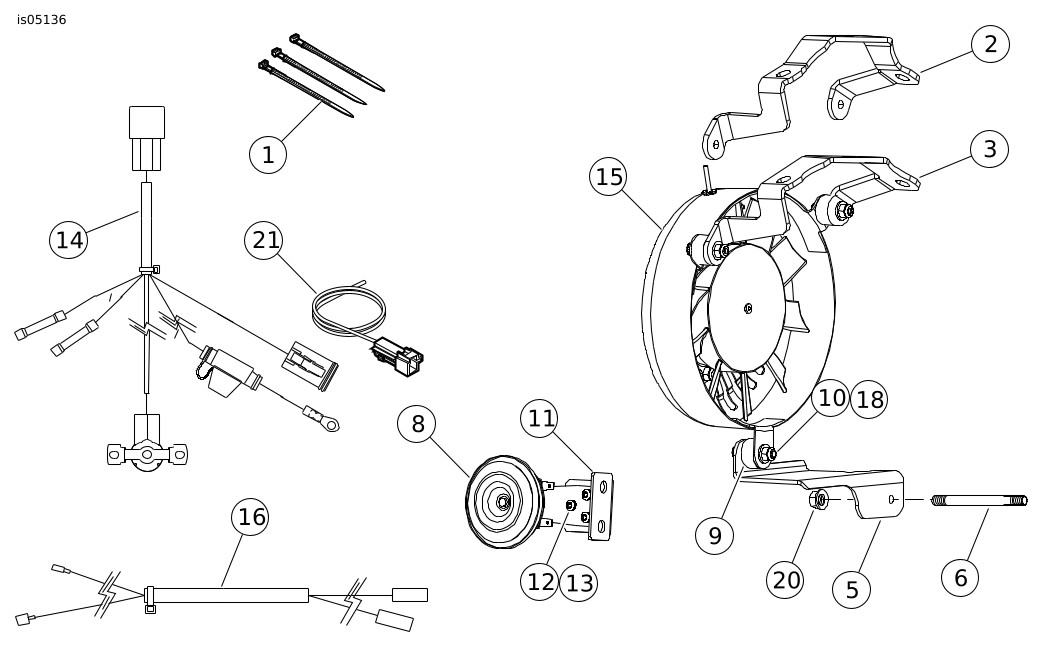
Figure 7. Service Parts: Fan Kit for Touring Models
Table 1. Service Parts Table
Item | Description (Quantity) | Part Number |
|---|---|---|
1 | Cable strap (3) | 10065 |
2 | Fan mount (top engine mount) 2007 bracket | 16317-00 |
3 | Fan mount (top engine mount) 2008 and later bracket | 16313-08 |
4 | Screw, 6-32 x 3/8 inch (2) (not shown) | Not Sold Separately |
5 | Bracket, lower mounting | 91197-08 |
6 | Stud, fan mount | 3097 |
7 | Nut, 6-32, nylon insert (2) (not shown) | 60031-61 |
8 | Horn assembly | 69000014 |
9 | Mount, rubber (3) | 62901-00A |
10 | Washer, 1/4 x 5/8 x 1/16 (6) | 6703 |
11 | Bracket, horn | 69135-04 |
12 | Screw, horn (3) | 3658 |
13 | Washer, horn (3) | 7069 |
14 | Harness, fan | Not Sold Separately |
15 | Fan and cover assembly | See repair kits below |
16 | Harness, horn relocation | Not Sold Separately |
17 | Butt-splice connector (2) (not shown) | 70585-93 |
18 | Nut, hex, 1/4-20, nylon insert (6) | 7686 |
19 | Medallion , fan cover, chrome (not shown) | 99598-00 |
20 | Nut, 3/16-18 | 7766 |
21 | Wire harness, adapter | 70310-04 |
22 | Butt-splice connector (not shown) | 70586-93 |
23 | Cable strap (4) (not shown) | 10039 |
Repair kits available: | ||
A | Fan motor | 74452-00A |
B | Thermostat | 74453-00 |
C | Fan assembly, chrome | 74456-00B |