
ROAD TECH ZUMO XM SATELLITE RADIO ANTENNA MOUNT KIT
J052242011-03-15
GENERAL
Kit Number
76000016
Models
This XM Satellite Radio Antenna Mount Kit is an accessory for the Road Tech™ GPS zumo 665® (Part No. 76000014) on specific model motorcycles. For model fitment information, see the P&A retail catalog or the Parts and Accessories section of www.harley-davidson.com (English only).
NOTE
XM satellite radio is available within the continental United States. It is not available in Alaska or Hawaii.
Additional Parts Required
NOTE
Along with the Road Tech Zumo GPS and GPS mounting kit, an XM satellite radio subscription is required, for an additional fee.
 WARNING
Rider and passenger safety depend upon the correct installation of this kit. Use the appropriate service manual procedures. If the procedure is not within your capabilities or you do not have the correct tools, have a Harley-Davidson dealer perform the installation. Improper installation of this kit could result in death or serious injury. (00333b)
NOTE
This instruction sheet refers to service manual information. A service manual for this year/model motorcycle is required for this installation and is available from a Harley-Davidson dealer.
INSTALLATION
Preparation
Models with Main Fuse:
WARNINGTo prevent accidental vehicle start-up, which could cause death or serious injury, remove main fuse before proceeding. (00251b)
- Refer to the service manual and follow the instructions given to remove the main fuse.
Models with Main Circuit Breaker:
WARNINGTo prevent accidental vehicle start-up, which could cause death or serious injury, disconnect negative (-) battery cable before proceeding. (00048a)
- Refer to the service manual and follow the instructions given to remove the seat and disconnect the negative (black) battery cable from the negative (-) battery terminal. Retain all seat mounting hardware.
- If not already in place, install the Road Tech Zumo GPS mount per the instructions in that kit.
- Remove the outer fairing and windshield. Refer to the service manual.
Installation, FLTR models
| 1. | See Figure 2. Obtain the XM satellite radio antenna (B), the antenna mounting bracket (4) and two flat head screws (2) from the kit. Position the antenna over the mounting bracket in the orientation shown. | |
| 2. | Line up the mounting holes on the underside of the antenna with the holes in the bracket. Fasten the antenna to the bracket with the flat head screws, and tighten to 0.68–1.13 N·m (6–10 in-lbs). | |
| 3. | See Figure 1. Obtain the 1/4-20 x 5/8 inch button head cap screw (2) from the kit. | |
| 4. | Remove the two right-side radio mounting screws (1). | |
| 5. | Insert the new button head cap screw (2) into the upper (rearward) radio mounting hole, through the radio carrier bracket to the radio, and tighten to 4–5.1 N·m (35–45 in-lbs). | |
| 6. | Position the antenna bracket (3) to the side of the radio carrier bracket (5) with the angled tab (4) aligned with the front of the radio bracket. | |
| 7. | Line up the hole in the antenna bracket with the remaining radio mounting hole. Fasten the antenna bracket through the radio carrier bracket to the radio with one of the screws removed earlier. Tighten to 4–5.1 N·m (35–45 in-lbs). | |
| WARNING Be sure that steering is smooth and free without interference. Interference with steering could result in loss of vehicle control and death or serious injury. (00371a) | ||
| 8. | Route the antenna cable down to the steering neck, and up to the left side of the handlebar. Verify there is enough slack for steering. | |
| 9. | Plug the XM antenna cable into the Zumo cradle harness. Use cable straps (5) from the kit to secure inside the fairing. |
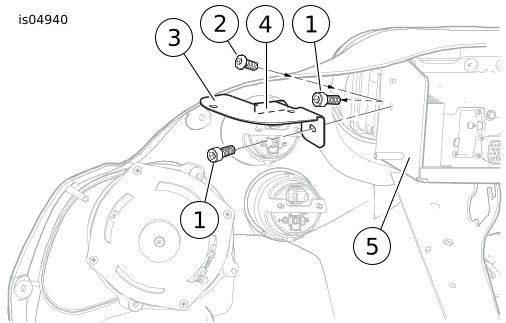
| 1 | Right-side radio mounting screws (2) |
| 2 | Button head cap screw from kit |
| 3 | Antenna mounting bracket |
| 4 | Angled tab on bracket |
| 5 | Radio carrier bracket |
Figure 1. XM Radio Bracket Installation (FLT Models)
Return to Service
| 10. | Verify that the Ignition/Light Key Switch is turned to the OFF position. Models with Main Fuse: Refer to the service manual and follow the instructions given to install the main fuse. Models with Main Circuit Breaker: Apply a light coat of Harley-Davidson electrical contact lubricant (part number 99861-02), petroleum jelly or corrosion retardant material to the negative battery terminal. Refer to the service manual and follow the instructions given to attach the negative battery cable. Refer to the service manual, and follow instructions to install the seat. | |
| WARNING After installing seat, pull upward on seat to be sure it is locked in position. While riding, a loose seat can shift causing loss of control, which could result in death or serious injury. (00070b) | ||
| 11. | Test the XM antenna by navigating to the XM functions in the GPS unit. See the Road Tech Zumo user manual. | |
| 12. | Install the outer fairing and windshield. Refer to the service manual. |
SERVICE PARTS

Figure 2. Service Parts: XM Satellite Radio Antenna
Table 1. Service Parts Table
Item | Description (Quantity) | Part Number |
|---|---|---|
1 | Flat head screw, M3 x 8 mm long (2) | 4496M |
2 | Hex socket button head screw, 1/4-20 x 5/8 inch long | 924 |
3 | Bracket, antenna mounting (for FLTR models) | Not sold separately |
4 | Cable strap (4) | 10006 |
Item mentioned in text, but not included in kit: | ||
A | Radio mounting screw | |
B | Antenna, Zumo XM satellite radio | |