
MEDIA GLOVE BOX LINER KIT
J059212014-03-17
GENERAL
Kit Number
76000539
Models
For model fitment information, see the P&A Retail Catalog or the Parts and Accessories section of www.harley-davidson.com (English only).
Kit Contents
Table 1. Kit Contents
Description (Quantity) | Part Number |
|---|---|
Media glove box liner, R.H. | Not Sold Separately |
Media glove box liner, L.H. | Not Sold Separately |
There are no Service Parts available with this kit.
INSTALLATION
NOTE
The media glove box liners are labeled (Left and Right) for easier identification.
| 1. | See Figure 1. Open glove box door (A). | |
| 2. | Remove the original molded rubber liner glove box (B). | |
| 3. | Remove the hook and loop tabs from the inside of the glove box. Discard the hook and loop tabs. | |
| 4. | Wipe the inside of the glove box with a clean damp rag or sponge. Allow to dry completely. | |
| 5. | Apply pressure on liner (C) surfaces and slide into the glove box. Adjust until liner fits snugly inside glove box. | |
| 6. | Close glove box door. | 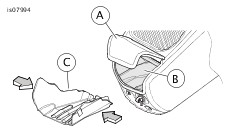 Figure 1. Media Storage Liner, Left Side |
| 7. | See Figure 2. Open glove box door (A). | |
| 8. | Remove the original molded rubber liner glove box (B). | |
| 9. | Remove the hook and loop tabs from the inside of the glove box. Discard the hook and loop tabs. | |
| 10. | Wipe the inside of the glove box with a clean damp rag or sponge. Allow to dry completely. | |
| 11. | Hold the communications cable connector (D) to the top of the glove box. | |
| 12. | Apply pressure on liner (C) surfaces and slide into the glove box. Adjust until liner fits snugly inside glove box. | |
| 13. | Close glove box door. | 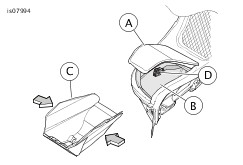 Figure 2. Media Storage Liner, Right Side |