
SCREAMIN' EAGLE BILLET CAM PLATE & HIGH FLOW OIL PUMP
J045042007-10-24
GENERAL
Kit Number
25283-07
Models
For model fitment information, please see the P&A Retail Catalog or the Parts and Accessories section of www.harley-davidson.com (English only).
Additional Parts Required
Proper installation of this kit requires the separate purchase of the following additional items:
Table 1. Additional Parts Required
Description | Part Number |
|---|---|
Spacer Kit | 25938-00 |
Cam Service Kit | 17045-99C |
Drive Gear Retention Kit | 25533-99A |
Splined Cam Drive Sprocket (1999 models only) | 25716-99 |
Cam Support Plate Oil Control Kit (1999 models only) | 94667-00 |
Proper installation of this kit also requires the use of the following tools and materials: CAMSHAFT/CAMSHAFT BEARING REMOVER/INSTALLER (HD-43644), CRANKSHAFT/CAMSHAFT SPROCKET LOCKING TOOL (HD-42314), Loctite® 262 Threadlocker and Sealant - Red (94759-99), Loctite® 243 Threadlocker and Sealant - Blue (99642-97) and Loctite® 7649 Cleaner/Primer (98968-99).
 WARNING
Rider and passenger safety depend upon the correct installation of this kit. If the procedure is not within your capabilities or you do not have the correct tools, have a Harley-Davidson dealer perform the installation. Improper installation of this kit could result in death or serious injury. (00308b)
NOTE
This instruction sheet references Service Manual information. A Service Manual for your model motorcycle is required for this installation and is available from a Harley-Davidson Dealer.
Kit Contents
WARNINGDisconnect negative (-) battery cable first. If positive (+) cable should contact ground with negative (-) cable connected, the resulting sparks can cause a battery explosion, which could result in death or serious injury. (00049a)
WARNINGGasoline can drain from the carburetor fuel line when disconnected from fuel valve fitting. Gasoline is extremely flammable and highly explosive, which could result in death or serious injury. Wipe up spilled fuel immediately and dispose of rags in a suitable manner. (00256a)
REMOVAL
NOTE
Installing this kit requires removal and re-installation of the Cam Support Plate. Refer to the applicable Service Manual for instructions. Replace information pertaining to cam compartment components with the following information:
Crank and primary cam-sprocket flange bolts are specially hardened, and the flat washers are of a special diameter and have ground surfaces. Use only the parts provided in the Drive Gear Retention Kit (25533-99A), when installing this kit. The crank and primary cam sprocket flange bolts are NOT interchangeable.
WARNINGTo prevent accidental vehicle start-up, which could cause death or serious injury, disconnect battery cables (negative (-) cable first) before proceeding. (00307a)
- Refer to the applicable Service Manual and remove the seat and disconnect the battery cables, negative cable first.
- Refer to the applicable Service Manual and remove and discard the crank and primary cam sprocket flange bolts and washers.
- For 1999 models only: Refer to the applicable Service Manual and remove and discard the existing cam drive sprocket.
- Refer to the applicable Service Manual and remove and disassemble the cams from the support plate and oil pump. Discard the support plate and oil pump.
- Inspect cams, chain, sprockets, chain tensioners and guide for wear and replace as needed. Refer to the Service Manual for inspection and replacement procedures.
INSTALLATION
NOTE
See Figure 2. If not enough of the splined shaft is exposed to install the sprocket, omit the spacer (4) and proceed to Step 2e. When the bearing inner race is started onto the machined area, remove the flange bolt (5), flat washer (6) and sprocket, then re-assemble using the spacer (4). Repeat Step 2e to fully install bearing inner race.
| 1. | See Figure 2. Obtain new Rear Cam Roller Bearing Kit (8983) from Cam Service Kit (17045-99C) and install according to the following: | |||||||||||||||||||||||
NOTICE To center thrust washer, be sure O-ring is installed in relief groove. Damage to bearing cage and engine can occur if thrust washer is not centered. (00473d) | ||||||||||||||||||||||||
| 2. | See Figure 2. Install O-ring, thrust washer and bearing inner race onto rear camshaft as follows: a. To properly locate thrust washer, install O-ring (3) in grinding relief groove on the splined end between the machined area and the secondary cam sprocket. Do not stretch or break O-ring since the O-ring is not sold separately and damage will require purchase of new roller bearing kit. b. Slide thrust washer (2) down rear camshaft until centered over O-ring in grinding relief position. c. Slide bearing inner race (1) down rear camshaft until contact is made with shoulder of machined area. d. Install primary cam sprocket spacer (4) and sprocket on camshaft and secure using thicker flat washer (6) and long flange bolt (5). e. See Figure 2. Wrap a shop rag around camshaft to get a firm grip and also to protect hand from sharp edges of sprocket. Tighten flange bolt (5) until the bearing inner race makes firm contact with the thrust washer (2). f. Verify that thrust washer is locked in place and cannot be rotated. If necessary, install shaft in vise using brass jaw inserts, and further tighten flange bolt until the desired result is achieved. g. Remove flange bolt, flat washer, sprocket and spacer. NOTE See Figure 1. The front and rear cam bearings are not interchangeable. The rear bearing is a roller bearing and the front bearing is a ball bearing. NOTE Bearings may be a press-to-loose fit. If necessary, clean bearing OD and apply Loctite® Threadlocker 243 - Blue (99642-97) before installation. Use caution to avoid getting compound on rollers or bearing ID. | 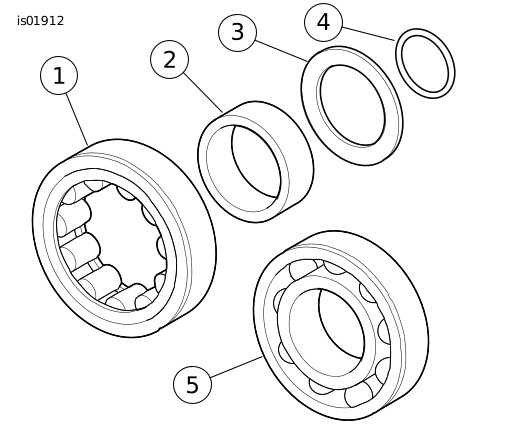
Figure 1. Cam Bearings 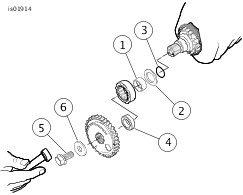
Figure 2. Install Bearing Inner Race with O-ring and Thrust Washer using Cam Drive Sprocket | ||||||||||||||||||||||
| 3. | For 1999 models only: Install Cam Support Plate Oil Control Kit into billet cam support plate, after verifying crankcase version, per instructions included in the Oil Control Kit. | |||||||||||||||||||||||
| 4. | See Figure 1. Install new front ball cam bearing (5) and rear cam roller bearing (1) into cam support plate according to the following: a. See Figure 3. Obtain the CAMSHAFT/CAMSHAFT BEARING REMOVER/INSTALLER (HD-43644). b. With the secondary cam chain side facing up, place cam support plate on support block (1), so that outer races of bearings are properly supported. Note that one corner of the support block is contoured to accommodate the chain guide blocks cast into the front of the support plate. c. Center new bearing over bearing bore with the lettered side up. Slide pilot shaft of bearing driver (3) through bearing into hole of support block. d. See Figure 4. Center bearing driver (1) under ram of arbor press. Press on driver until bearing (2) makes firm contact with counterbore in cam support plate (3). e. Repeat procedure to install second bearing. | |||||||||||||||||||||||
| 5. | Apply Loctite Threadlocker 243 - Blue (99642-97) to threads of four bearing retainer plate screws. Fasten bearing retainer plate to the cam-support plate. Tighten the screws to 2.3–3.4 N·m (20–30 in-lbs) in a crosswise pattern. Verify that the hole in the retainer plate is properly aligned with secondary cam chain oiler (except 2005 and later models). | |||||||||||||||||||||||
| 6. | Place the cam support plate back on the support block, if removed. The block supports inner races of bearings as camshafts are installed. | |||||||||||||||||||||||
| 7. | See Figure 5. Align punch marks on teeth of secondary cam sprockets (outboard faces). Use a colored marker to carefully mark the punch-mark locations on the inboard side of the sprocket teeth. These marks help align the camshafts when they are pressed into the bearings. | 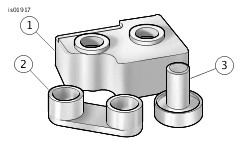
Figure 3. Camshaft and Camshaft Bearing Remover/Installer (part number HD-43644) | ||||||||||||||||||||||
| 8. | Place the secondary cam chain around the sprockets of both the front and rear camshafts. To maintain the original direction of rotation, the colored marks on the chain link during disassembly must face opposite the cam support plate during installation. | |||||||||||||||||||||||
| 9. | Position the camshafts on opposite ends of the chain, then verify that the colored marks placed on the inboard side of the sprocket teeth are aligned. NOTE Do not mix camshafts during the press procedure. The rear camshaft, which can be identified by the splined shaft, must press into the roller bearing at the rear of the cam support plate. | |||||||||||||||||||||||
| 10. | Maintaining the position of the camshafts on the chain with the colored marks in alignment, place the sprocket ends of the camshafts into the bearings. | 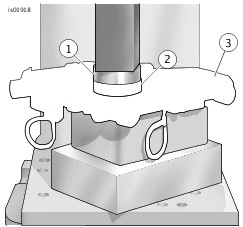
Figure 4. Press Bearings into Cam Support Plate 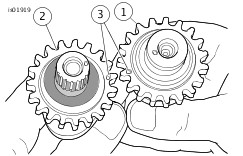
Figure 5. Align Punch Marks on Teeth of Camshaft Sprockets | ||||||||||||||||||||||
| 11. | Place the cup of the camshaft driver ( Figure 3 , Item 2) over end of the front camshaft only. | |||||||||||||||||||||||
NOTICE During press procedure, keep tensioner shoe clear of chain to prevent damage to tensioner assembly. (00474b) | ||||||||||||||||||||||||
| 12. | Center the end of the front camshaft under the ram, then slowly apply pressure to the driver just to start the front camshaft into the bearing ID. | |||||||||||||||||||||||
NOTICE Be sure rear camshaft is aligned during press procedure. Misalignment can cause inner race to catch on bearing rollers resulting in bearing damage. (00475b) | ||||||||||||||||||||||||
| 13. | Slowly apply pressure to the driver on the front camshaft, while wiggling the rear camshaft as necessary to guide the inner race between bearing rollers. | |||||||||||||||||||||||
| 14. | When the inner race on the rear cam is started into the roller bearing, apply pressure to the driver until the front camshaft is fully seated. If necessary, keep finger pressure at the top of the rear camshaft to ensure that the assembly remains square and the inner race moves to the installed position in the roller bearing. | |||||||||||||||||||||||
| 15. | Refer to the applicable Service Manual and check for proper cam-to-cam timing using a straightedge along the punch marks. | |||||||||||||||||||||||
| 16. | Install the new retaining ring in the groove at the end of the front camshaft. | |||||||||||||||||||||||
| 17. | Refer to the applicable Service Manual and replace needle bearings in crankcase. NOTE Replace original cam plate to crankcase O-ring with new O-ring (11301) from Service Kit (17045-99C). | |||||||||||||||||||||||
| 18. | Refer to the applicable Service Manual and install the cam plate with the new oil pump included with the kit in place of the original oil pump. | |||||||||||||||||||||||
| 19. | Apply a thin film of clean H-D 20W50 engine oil to the splines of the rear cam. | |||||||||||||||||||||||
| 20. | Refer to the applicable Service Manual and install splined sprocket (25716-99) onto rear camshaft. Use new spacers provided in Spacer Kit (25938-00) in place of those listed in Service Manual. NOTE Refer to the applicable Service Manual and verify alignment at crank and primary cam sprocket punch marks. Verify alignment at crank and primary cam sprocket faces. Use spacers provided in Spacer Kit (25938-00) to maintain alignment at ±0.10 inch. | |||||||||||||||||||||||
| 21. | Use new cam drive sprocket flange bolt (996), new washer (6294), new crank flange bolt (898A) and new flat washer (6278A) provided in kit (25533-99A). | |||||||||||||||||||||||
| WARNING Apply threadlocker to maintain clamp load on flange bolt. A loose flange bolt can cause engine failure, which could result in death or serious injury. (00476c) | ||||||||||||||||||||||||
| 22. | Install new flange bolts and washers as follows: a. Ensure threads are clean and free from oil then apply Loctite Cleaner/Primer 7649 (98968-99). b. Apply Loctite® 262 - Red (94759-99) to threads of flange bolts. c. Apply a thin film of clean H-D 20W50 engine oil to both sides of flat washers. d. Start flange bolt with flat washer to secure crank sprocket to end of crankshaft. e. Start flange bolt with flat washer to secure primary cam sprocket to end of camshaft. f. Position CRANKSHAFT/CAMSHAFT SPROCKET LOCKING TOOL (HD-42314) between the crank and primary cam sprockets to prevent rotation. The handle of the tool is stamped "Crank" and "Cam" to ensure proper orientation. g. Tighten crank and primary cam sprocket flange bolts to 20.3 N·m (15 ft-lbs). h. Loosen each flange bolt one full turn. i. Tighten the crank flange bolt to 32.5 N·m (24 ft-lbs) final torque value. j. Tighten the primary cam sprocket flange bolt to 46 N·m (34 ft-lbs) final torque value. k. Remove the sprocket locking tool and follow instructions in Service Manual for unloading the primary cam chain tensioner. NOTE Replace original cam cover gasket with new cam cover gasket (25244-99A) from Cam Service Kit (17045-99C). | |||||||||||||||||||||||
| 23. | Refer to the applicable Service Manual and install the cam cover. |
SERVICE PARTS

Figure 6. Service Parts for Screamin' Eagle Billet Cam Plate & High Flow Oil Pump
Table 2. Service Parts Table
Item | Description (Quantity) | Part Number |
|---|---|---|
1 | Plate, cam support, early | Not Sold Separately |
2 | Bypass valve | 26400-82 |
3 | Spring, bypass valve | 26210-99 |
4 | Roll pin | 601 |
5 | Riser, chain guide | Not Sold Separately |
6 | Screw, #8-32 x 3/4 in. (2) | Not Sold Separately |
7 | Screw, retainer plate (4) | 68042-99 |
8 | Plate, bearing retainer | Not Sold Separately |
9 | Pin, tensioner mounting (2) | Not Sold Separately |
10 | Oil pump | 26037-06 |
11 | 1/8 in. NPT plug (10) | Not Sold Separately |