
HARLEY DAVIDSON AUDIO POWERED BY ROCKFORD FOSGATE WIRELESS HEADSET SPEAKERS
941003072022-01-19
GENERAL INFORMATION
Table 1. General Information
Kits | Suggested Tools | Skill Level(1) |
|---|---|---|
76001137 | Safety Glasses, Screwdriver |  1 Dark wrench 1 Dark wrench |
(1) Only simple tools and techniques required
KIT CONTENTS
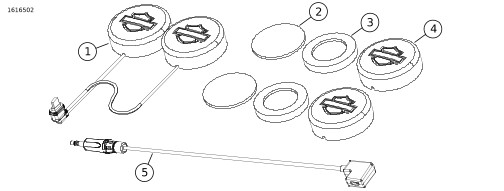
Figure 1. Kit Contents: Wireless Headset Speakers
Table 2. Kit Contents: Wireless Headset Speakers
 | Verify that all contents are present in the kit before installing or removing items from vehicle. | ||||
|---|---|---|---|---|---|
Item | Qty | Description | Part No. | Notes | |
 | 1 | 1 | Headset speakers | Not sold separately | |
| 2 | 2 | Velcro disc | Not sold separately | |
| 3 | 2 | Foam spacer | Not sold separately | |
| 4 | 2 | Foam speaker cover | 76001284 | |
| 5 | 1 | Harness adapter | 69203134 | |
GENERAL
Models
For model fitment information, see the Parts and Accessories (P&A) Retail Catalog or the Parts and Accessories section of www.harley-davidson.com.
Verify that the most current version of the instruction sheet is used. It is available at: h-d.com/isheets
Contact Harley-Davidson Customer Support Center at 1-800-258-2464 (U.S. only) or 1-414-343-4056.
Installation Requirements
 WARNING
Rider and passenger safety depend upon the correct installation of this kit. If the procedure is not within your capabilities or you do not have the correct tools, have a Harley-Davidson dealer perform the installation. Improper installation of this kit could result in death or serious injury. (00308b)
Speaker connector fits Bluetooth wireless headset models 20S, 30K and 50S. Harness adapter will connect to other devices with 3.5mm connector.
PREPARE
| 1. | If installed, remove wireless Bluetooth® headset and speakers from helmet. |
REMOVE
| 1. | Figure 2 Remove screw (1). | |
| 2. | Remove clamp (2) and speaker connector (3) as one assembly. | |
| 3. | Remove clamp (2) from speaker connector (3). |
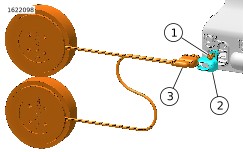
| 1 | Screw |
| 2 | Clamp |
| 3 | Speaker connector |
Figure 2. Disassembly
INSTALL
| 1. | Figure 2 Install clamp (2) to Harley Davidson Audio Powered by Rockford Fosgate Wireless Headset speaker connector (3). | |
| 2. | Figure 3 Install clamp (2) and speaker connector (3) as one assembly. | |
| 3. | Install and tighten screw (1) |
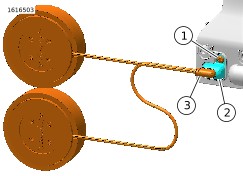
| 1 | Screw |
| 2 | Clamp |
| 3 | Speaker connector |
Figure 3. Speaker Assembled
COMPLETE
| 1. | Install wireless Bluetooth® headset and speakers into helmet. | |
| 2. | For firmware updates, see http://www.harley-davidson.com. a. 20S and 30K headsets require firmware updates. | |
| 3. | For App updates, see internet where apps are available. a. 20S and 30K headsets require speaker setup. |