
ANTI-VIBRATION MODULE
941004882025-01-23
GENERAL INFORMATION
Table 1. General Information
Kits | Suggested Tools | Skill Level(1) |
|---|---|---|
76001342, 76001343, 76001492, 76001493 | Safety Glasses, Torque Wrench |  |
(1) Tightening to torque value or other moderate tools and techniques required
KIT CONTENTS
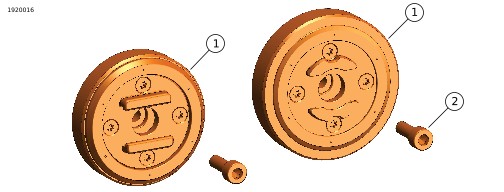
Figure 1. Kit Contents: Anti-Vibration Module
Table 2. Kit Contents: Anti-Vibration Module Kit
 | Verify that all contents are present in the kit before installing or removing items from vehicle. | ||||
|---|---|---|---|---|---|
Item | Qty | Description | Part No. | Notes | |
 | 1 | 1 | Anti-vibration module | Not sold separately | |
| Anti-vibration module (SPC+) | Not sold separately | |||
| 2 | 1 | Screw | Not sold separately | |
GENERAL
Models
For model fitment information, see the Parts and Accessories (P&A) Retail Catalog or the Parts and Accessories section of www.harley-davidson.com.
Verify that the most current version of the instruction sheet is used. It is available at: h-d.com/isheets
Contact Harley-Davidson Customer Support Center at 1-800-258-2464 (U.S. only) or 1-414-343-4056.
Installation Requirements
 WARNING
Rider and passenger safety depend upon the correct installation of this kit. If the procedure is not within your capabilities or you do not have the correct tools, have a Harley-Davidson dealer perform the installation. Improper installation of this kit could result in death or serious injury. (00308b)
REMOVE
| 1. | Figure 2 Remove screw (1) and phone interface (2) from phone mount. |
INSTALL
| 1. | Figure 2 Install anti-vibration module (4). | |
| 2. | Adjust phone position as desired. | |
| 3. | Install new screw (3). Tighten. Torque: 5 N·m (44 in-lbs) |
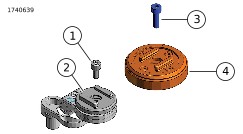
| 1 | Screw |
| 2 | Phone interface |
| 3 | Screw |
| 4 | Anti-vibration module |
Figure 2. Install Anti-Vibration Module
COMPLETE
WARNINGBe sure that steering is smooth and free without interference. Interference with steering could result in loss of vehicle control and death or serious injury. (00371a)
| 1. | Turn handlebar lock to lock installation to verify that the phone carrier and phone do not interfere with fairings, gas tank, cables, lines, hoses, wiring or other equipment. | |
| 2. | Make sure that the phone does not obscure visibility of speedometer, hand controls, indicator lights or mirrors. |