
HARLEY-DAVIDSON AUDIO POWERED BY ROCKFORD FOSGATE (LEFT SADDLEBAG AMPLIFIER INSTALLATION KIT)
941006602026-01-14
GENERAL INFORMATION
Table 1. General Information
Kits | Suggested Tools | Skill Level(1) |
|---|---|---|
76001385 | Safety glasses, Torque wrench, Power Drill, Drill Bit Set, Hole Saw, Masking Tape, Deburring Tool, Isopropyl Alcohol, Clean Shop Rags. |  |
(1) Tightening to torque value or other moderate tools and techniques required
KIT CONTENTS
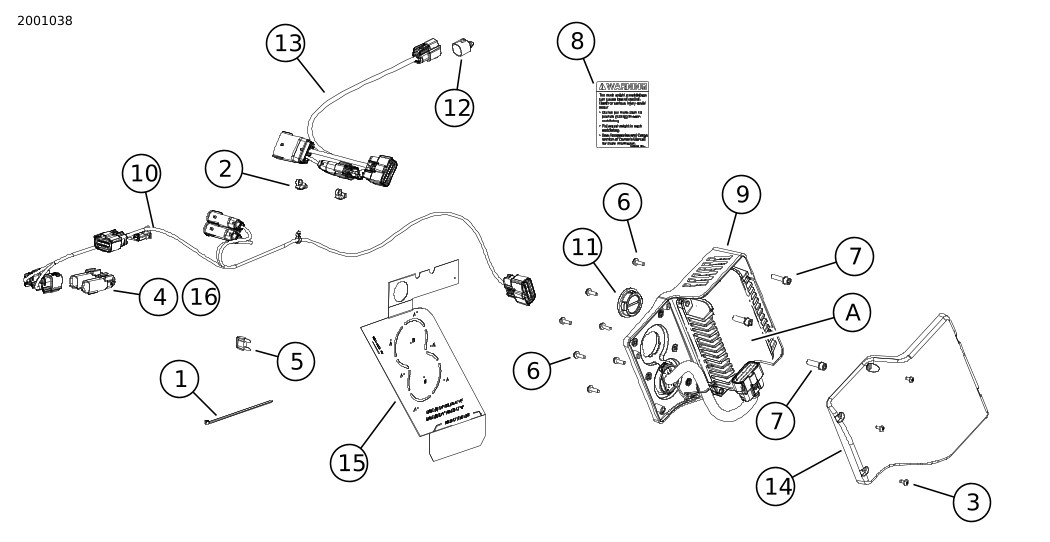
Figure 1. Kit Contents: Left Saddlebag Secondary Amp Installation Kit
Table 2. Kit Contents: Left Saddlebag Secondary Amp Installation Kit
 | Verify that all contents are present in the kit before installing or removing items from vehicle. | ||||
|---|---|---|---|---|---|
Item | Qty | Description | Part No. | Notes | |
 | 1 | 7 | Cable strap | 10065 | |
| 2 | 2 | Cable strap, tree mount | 10177 | |
| 3 | 3 | Screw, self tapping | 68042-99 | |
| 4 | 2 | Connector housing, 4-way pin | 72415-07GY | |
| 5 | 1 | Fuse, 30 amp, green | 72539-06 | |
| 6 | 7 | Screw, pan head TORX™, T15 | 10200065 | |
| 7 | 3 | Screw, socket head, 1/4-20 | 10200947 | |
| 8 | 1 | Label, saddlebag capacity | 14002201 | |
| 9 | 1 | Saddlebag harness, internal | 69203311 | |
| 10 | 1 | Saddlebag harness, external | 69203313 | |
| 11 | 1 | Panel plug | 69203374 | |
| 12 | 1 | Connector seal, terminal plug | 69203512 | |
| 13 | 1 | Rear audio/rear lighting harness adapter | 69203683 | |
| 14 | 1 | Amplifier cover panel, left | 76001381 | |
| 15 | 1 | Drill template | Not sold separately | |
| 16 | 8 | Seal pin, connector | 69203106 | |
Items mentioned in text, but not included in kit | |||||
| A | 1 | Amplifier, Audio | ||
GENERAL
Instruction sheet is also available electronically. To verify you are using the most current version available, do one of the following:
- Go to h-d.com/isheets
- Scan QR code in upper left corner of the instruction sheet
NOTE
This instruction sheet may have a Supplemental Video to assist installer in clarifying a certain part of the assembly. A linked video would be located at the end of this instruction sheet.
For supplemental wire diagram information, click on Service Information Portal (SIP) link: 2023 and Later: Harley-Davidson Powered by Rockford Fosgate P&A Wiring (Center-Cooled Models)
Models
For model fitment information, see the Parts and Accessories (P&A) Retail Catalog or the Parts and Accessories section of www.harley-davidson.com.
Contact Harley-Davidson Customer Support Center at 1-800-258-2464 (U.S. only) or 1-414-343-4056.
Installation Requirements
 WARNING
Rider and passenger safety depend upon the correct installation of this kit. Use the appropriate service manual procedures. If the procedure is not within your capabilities or you do not have the correct tools, have a Harley-Davidson dealer perform the installation. Improper installation of this kit could result in death or serious injury. (00333b)
NOTE
This instruction sheet references service manual information. A service manual for the year and model motorcycle is required for this installation and is available from:
- A Harley-Davidson dealer.
- H-D Service Information Portal, a subscription-based access available for most 2001 and newer models. For more information see Frequently ask questions about subscriptions.
These items are available at your local Harley-Davidson dealership:
- Separate purchase and prior installation of Fairing Amplifier Kit (Part No. 76001294) is required for this installation.
- Separate purchase and prior installation of Stage I, II, III Fairing speaker kit is required for this installation.
- Separate purchase of Saddlebag Amplifier Kit (Part No. 76001444) is required for this installation.
- 2023-2025 models require separate purchase of rear audio/rear lighting Adapter Harness (Part No. 69203682).
- Vehicles with original equipment Tour-Pak speakers require separate purchase of Tour-Pak Audio Harness (Part No. 69203594).
For speaker options and model fitment information, see the P&A Retail Catalog or the Parts and Accessories section of www.harley-davidson.com.
Installation by a technician at a Harley-Davidson dealership is recommended.
To ensure proper audio performance, speaker set up in the Infotainment Control Unit (IFCU) OR Digital Technician II (DT II) is required for audio configuration and amplifier firmware update.
Electrical Overload
NOTICE
It is possible to overload the vehicle's charging system by adding too many electrical accessories. If the combined electrical accessories operating at any one time consume more electrical current than the vehicle's charging system can produce, the electrical consumption can discharge the battery and cause damage to the vehicle's electrical system. (00211d)
WARNINGWhen installing any electrical accessory, be certain not to exceed the maximum amperage rating of the fuse or circuit breaker protecting the affected circuit being modified. Exceeding the maximum amperage can lead to electrical failures, which could result in death or serious injury. (00310a)
NOTE
This kit requires 16 A of current from the electrical system.
PREPARE
NOTE
Models with security: Disable security system. See service manual.
| 1. | Remove left and right saddlebags. See service manual. | |
| 2. | Remove left and right side covers. See service manual. | |
| 3. | Remove main fuse. See service manual. | |
| 4. | Remove seat. See service manual. |
MODIFY SADDLEBAG
Vehicles Without Saddlebag Lid Speakers Only
NOTE
Drill template must lay flat against all saddlebag surfaces to position holes properly.
NOTE
Take extreme caution not to damage the painted surface.
It is recommended to mark holes with a soft tip marker, then measuring the marks with a scale or calipers to ensure proper hole alignment to the internal harness panel.
| 1. | See Figure 2. Position drill template (1) on back of left saddlebag with printed lettering facing inward. NOTE Use extreme caution not to cut outside of connector hole perimeter to prevent a loose panel fit or improper gasket seal. a. Apply masking tape to entire template area of saddlebag. b. Install drill template (1) over rear mount grommet (2) noting alignment to latch screws. c. Fold drill template (1) to follow contour (3) of saddlebag under grommet (2). d. Fold drill template (5) over bottom of saddlebag where indicated. e. Use tape (4) to secure drill template (1) in several locations. | 
Figure 2. Left Saddlebag Drill Template | ||||||||||
| 2. | Modify left saddlebag: a. Center punch drill locations marked (A and B) on template. b. Remove template from saddlebag. c. Drill seven mounting holes at locations marked as (A) on template. Diameter: 6 mm (¼ in) d. Drill two connector pass thru holes with hole saw at locations marked as (B) on template. Diameter: 70 mm (2¾ in) e. Remove masking tape from saddlebag. f. De-burr edges of hole by lightly sanding the surface. | |||||||||||
| 3. | See Figure 1. Install saddlebag capacity label (8). a. Install over existing label inside saddlebag. |
MODIFY SADDLEBAG
Vehicles Equipped With Saddlebag Lid Speakers/Power Locks Only
NOTE
Use caution as harness panel screws have lock patch and can easily be stripped.
| 1. | Remove original left saddlebag audio harness panel from saddlebag. See Service Manual. a. Remove original left saddlebag internal harness six-way twist lock connector from original panel. See Service Manual. | |||||||
| 2. | See Figure 2. Position drill template (1) on back of left saddlebag with printed lettering facing in. a. Apply masking tape to saddlebag at rear most mounting hole area marked (A) on template. b. Install drill template (1) over rear mount grommet (2) noting alignment to latch screws. c. Align template to follow contour (3) of saddlebag under grommet (2). d. See Figure 3. Align six template holes marked (A) with the six existing holes in saddlebag (1). | |||||||
| 
Figure 3. Harness Panel- models with saddlebag speakers | |||||||
| 3. | Drill seventh hole marked "A" in saddlebag: a. Center punch drill seventh screw location marked "A" (2) on template rearward of the mounting grommet. b. Remove template from saddlebag. c. Drill seventh mounting hole. Diameter: 6 mm (¼ in) d. Remove masking tape from saddlebag. e. De-burr edge of hole by lightly sanding the surface. | |||||||
| 4. | Figure 1 Install saddlebag capacity label (8). a. Install over existing label inside saddlebag. |
INSTALL
| 1. | Install secondary amplifier into harness panel. a. Follow instructions in amplifier kit. | |||||||||||||||||||
| 2. | See Figure 4. Models equipped with saddlebag speakers: Install original left saddlebag internal harness six-way twist lock connector (2) into top opening in new saddlebag harness panel (1). | 
Figure 4. Speaker/Locks Harness Panel Connector | ||||||||||||||||||
| 3. | See Figure 1. Models without saddlebag speakers: Install twist lock panel plug (11) into top opening in new saddlebag harness panel. | |||||||||||||||||||
| 4. | Route power lock and saddlebag speaker internal harness (if equipped) out the bottom of harness panel along audio harness. | |||||||||||||||||||
| 5. | See Figure 5. All models: Verify that cable strap (1) is installed. If not, install cable strap to secure harnesses to panel as shown. | 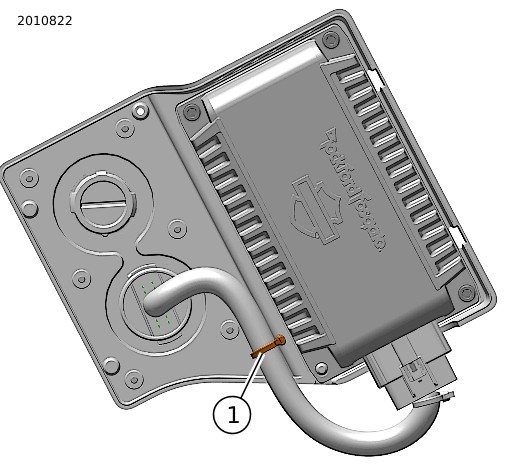
Figure 5. Amplifier Harness Panel Cable Strap | ||||||||||||||||||
| 6. | See Figure 6. All Models: Install amplifier panel cover (1). a. Verify tabs (3) are properly engaged. | |||||||||||||||||||
| 
Figure 6. Amplifier Cover (Secondary) | |||||||||||||||||||
| 7. | Install harness panel and amplifier assembly into saddlebag. | 
Figure 8. Amplifier Harness Panel Installed | ||||||||||||||||||
| 
Figure 7. Amplifier Harness Panel | |||||||||||||||||||
| 8. | See Figure 1. Install external harness (10): | |||||||||||||||||||
| 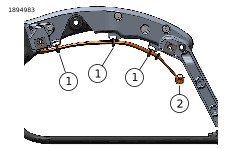
Figure 9. Rear Fender Strut | |||||||||||||||||||
| 
Figure 10. External Harness Connectors | |||||||||||||||||||
| 9. | See Figure 11. Route harness forward between rear fender and frame (3) into battery box area. NOTE Remove fasteners retaining left side caddy (4) to allow harness connectors to pass between frame and rear fender. Reinstall fasteners when complete. See service manual. | 
Figure 11. External Harness Routing | ||||||||||||||||||
| 10. | See Figure 12. Complete under seat wiring: a. Remove weather plug from the 12 way main harness connector [325A_1] (2) on top of battery tray. b. Insert amplifier external harness connector [325B_1] (2) into vehicle harness [325A_1] and route all branches as shown. NOTE The left hand saddlebag amplifier external wire harness 69203313 in this kit will support usage of prior or future accessories connected to vehicle connector [C325A] (P&A 12-way). If an accessory is already connected to connector [C325A], or is part of another kit being installed simultaneously, in most cases this will be accessory amplifier harness 69203486, which is no longer required and can be removed from the vehicle. Color coded tape is used to aid in identifying proper connector placement from harness to harness. If this kit is installed with a right hand saddlebag amplifier kit, remove the accessory amplifier harness 69203486 and connect A2B connectors [C350A/B] as noted below: Secure connector [350B] from LH saddlebag amp external harness 69203313 (YELLOW TAPE) to connector [350A_1] from RH saddlebag amp external harness 69203323 (YELLOW TAPE). Secure connector [350A] from LH saddlebag amp external harness 69203313 (GREEN TAPE) to connector [350B_1] from RH saddlebag amp external harness 69203323 (GREEN TAPE). c. Connect A2B out connector [350B_1] (5) with A2B in connector [350A_1] (6). d. Place CAN 12V connector [325B_2] (3) and rear PNA 2 connector [325B_3] (4) as shown. | 
Figure 12. Accessory Amplifier Harness- Under Seat | ||||||||||||||||||
| 11. | Install rear audio/rear lighting adapter harness: a. See Figure 1. Locate rear audio/rear lighting harness adapter (13) and tree mount cable straps (2) from kit. NOTE 2023-2025 models use harness, 69203682, available separately. b. Audio connectors [351A_2] (7) and [351A_3] (8) are interchangeable and can be used to drive either saddlebag lid speakers or Tour-Pak speakers. c. See Figure 12. Separate vehicle rear audio/lighting harness connector [C7A]/[C7B] (1). d. Mate harness adapter connectors between connectors [C7A] and [C7B]. Secure harness to frame with two tree mount cable straps. NOTE Saddlebag speakers and/or Tour-Pak speakers will be driven by LH saddlebag amplifier harness [351A_2] (7) and/or [351A_3] (8). IF fairing lower speakers ARE present: Connect Tour-Pak speakers: Connect 4-way socket Tour-Pak harness to 4-way pin [351_2] or [351_3] of left external amplifier harness (10). DO NOT connect to audio/lighting harness 69203683/69203682. Connect saddlebag speakers: Connect LH external amplifier harness (10) 4-way pin [351_2] or [351_3] to adapter harness (13) 4-way socket [351B]. Adapter harness 4-way pin [351A] will not be used in this configuration. IF fairing lower speakers ARE NOT present, saddlebag or Tour-Pak speakers may be connected differently depending if speakers are stock or installed accessories. Either Tour-Pak or saddlebag speakers will be driven by fairing amplifier at rear lighting/audio connector [C7], but not both. The other will be driven by LH amplifier. Adapter harness (13) enables re-use of existing factory installed wiring on models that came equipped with stock Tour-Pak or saddlebag speakers. IF saddlebag speakers ARE NOT present, skip ahead to Tour-Pak speaker section. Saddlebag speaker wiring is present in the vehicle rear lighting harness, connector [C7A] pins 5 thru 8, in both stock or accessory saddlebag speaker applications. Connect adapter harness 4-way socket [351B] (blue tape) to LH amplifier harness (10) 4-way pin connector [351A_2] or {351A_3] (both blue tape). IF adding saddlebag speakers to models with STOCK Tour-Pak speakers: See saddlebag speaker installation kit instructions to install 4 saddlebag speaker wires into connector [C7A]. Connect LH external amplifier harness (10) 4-way pin [351_2] or [351_3] to adapter harness (13) 4-way socket [351B]. Adapter harness (13) 4-way socket [351B] connector will not be used for this configuration. IF adding Tour-Pak speakers to models with STOCK saddlebag speakers: Connect adapter harness (13) connectors [C351A] and {C351B] together. Connect Tour-Pak speaker connector (if present) to LH amplifier external harness (10) 4-way pin [351_2] or [351_3]. e. Models equipped with Grand Tour-Pak lighting: Route rear lighting six-way connector C7B_1 rearward along top of right fender support. Connect to Tour-Pak lighting harness. f. Models NOT equipped with Grand Tour-Pak lighting: Install connector plug (12) into rear lighting six-way connector C7B_1. Coil Tour-Pak lighting harness branch and secure in under seat area. | |||||||||||||||||||
| 12. | Cap all unused connectors with seal plugs provided. | |||||||||||||||||||
| 13. | See Figure 13. Install 30A fuse into fuse block (1) in location shown (2). | 
Figure 13. Amplifier fuse install |
COMPLETE
NOTE
To prevent possible damage to the sound system, verify that the ignition is OFF before installing the main fuse.
NOTE
Complete installation of all audio kits prior to performing these operations.
| 1. | Install seat. After installing seat, pull up on the seat to verify that it is secure. See service manual. | |
| 2. | Install main fuse. See service manual. | |
| 3. | Install side covers. See service manual. | |
| 4. | Install saddlebags. See service manual. |
CONFIGURE
NOTE
- Step 1. Update Infotainment Control Unit (IFCU) software to the latest version.
- Step 2. Update amplifier software to the latest version.
Update software in this order:
Do not proceed without performing these updates.
| 1. | From the www.harley-davidson.com website. a. Select: Software Updates. This links to Infotainment Support Resources. b. Select: Infotainment Control Unit (IFCU) SkylineTM OS Located in Table of Content. c. Follow the instructions to transfer the update to the (IFCU) and Amplifiers as equipped. | |
| 2. | Perform system configuration ONLY after all audio accessory kits have been installed. | |
| 3. | Power up vehicle in accessory mode. | |
| 4. | On the Infotainment Control Unit (IFCU): a. Select: Settings icon. b. Select: Sounds Settings. c. Follow on screen prompts for applicable audio system changes. | |
| 5. | When complete, turn power off for 60 seconds. | |
| 6. | Turn power back on, verify proper operation of audio system. |
NOTE
If audio system has subwoofer (s) connected, operated at full volume and subwoofer gain level 10 at idle for an extended period of time, battery voltage can drop and system may go into load shed mode with reduced performance until adequate battery state of charge is restored.