
TOUR-PAK SPEAKER INSTALLATION KIT
941007082026-01-14
GENERAL INFORMATION
Table 1. General Information
Kits | Suggested Tools | Skill Level(1) |
|---|---|---|
76001510 | Safety glasses, Torque wrench, Drill, Hole saw |  |
(1) Tightening to torque value or other moderate tools and techniques required
KIT CONTENTS
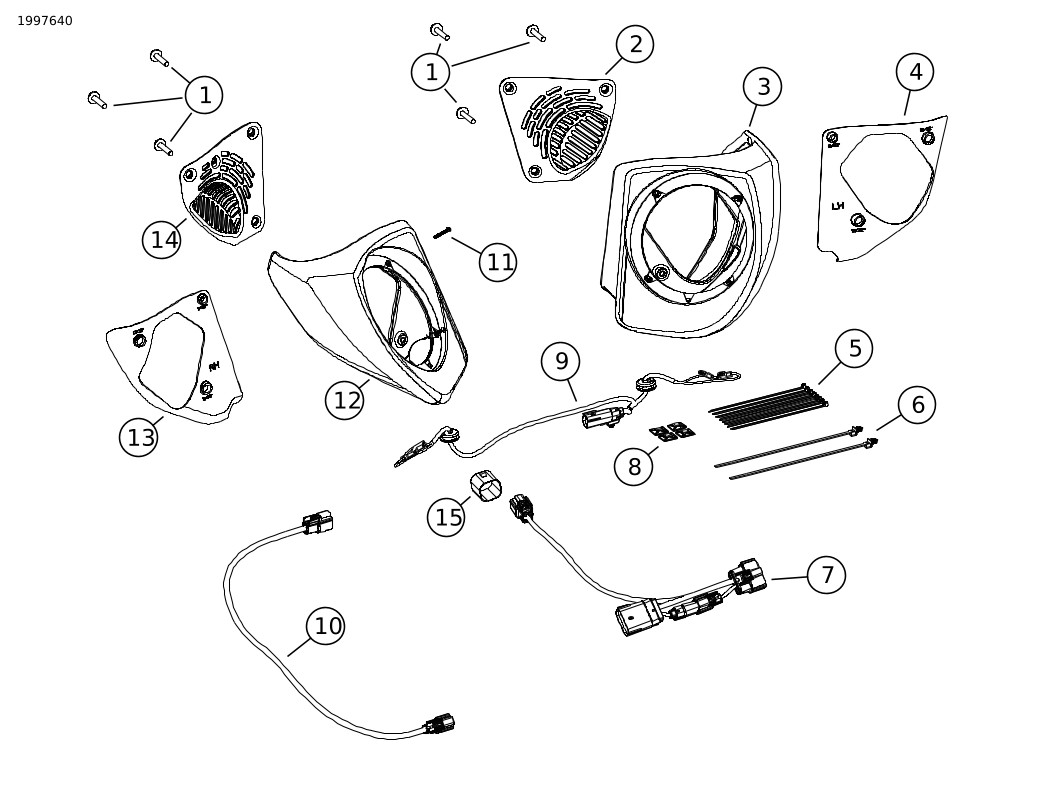
Figure 1. Kit Contents: Tour-Pak Speaker Installation Kit
Table 2. Kit Contents: Tour-Pak Speaker Installation Kit
 | Verify that all contents are present in the kit before installing or removing items from vehicle. | ||||
|---|---|---|---|---|---|
Item | Qty | Description | Part No. | Notes | |
 | 1 | 6 | Screw 1/4-20 x 1.375 | 10201470 | |
| 2 | 1 | Vent, enclosure, left | 76001430 | |
| 3 | 1 | Enclosure, speaker, left | 76001439 | |
| 4 | 1 | Cut template, tour-pak, left | Not sold separately | |
| 5 | 8 | Cable strap | 10065 | |
| 6 | 2 | Cable strap, tree mount | 10177 | |
| 7 | 1 | Wire harness, speaker/lighting adapter | 69203683 | 2026 and later models |
| 8 | 4 | Retainer, cable strap, adhesive | 69200342 | |
| 9 | 1 | Wire harness, speaker pod | 69203556 | |
| 10 | 1 | Wire harness, audio, tour-pak | 69203594 | |
| 11 | 8 | Screw, 6-32 x 1 | 10201469 | Speaker mounting |
| 12 | 1 | Enclosure, speaker, right | 76001438 | |
| 13 | 1 | Cut template, tour-pak, right | Not sold separately | |
| 14 | 1 | Vent, enclosure, right | 76001429 | |
| 15 | 1 | Weather plug, connector | 69203512 | |
Items mentioned in text, but not included in kit | |||||
| A | 1 | Color Matched Grand Tour-Pak, sold separately | ||
| B | 1 | 69203682, Wire harness, lighting adapter (required for 2023-2025 model year vehicles) | ||
GENERAL
Instruction sheet is also available electronically. To verify you are using the most current version available, do one of the following:
- Go to h-d.com/isheets
- Scan QR code in upper left corner of the instruction sheet
NOTE
This instruction sheet may have a Supplemental Video to assist installer in clarifying a certain part of the assembly. A linked video would be located at the end of this instruction sheet.
For supplemental wire diagram information, click on Service Information Portal (SIP) link: 2023 and Later: Harley-Davidson Powered by Rockford Fosgate P&A Wiring (Center-Cooled Models)
Models
For model fitment information, see the Parts and Accessories (P&A) Retail Catalog or the Parts and Accessories section of www.harley-davidson.com.
Contact Harley-Davidson Customer Support Center at 1-800-258-2464 (U.S. only) or 1-414-343-4056.
Installation Requirements
 WARNING
Rider and passenger safety depend upon the correct installation of this kit. Use the appropriate service manual procedures. If the procedure is not within your capabilities or you do not have the correct tools, have a Harley-Davidson dealer perform the installation. Improper installation of this kit could result in death or serious injury. (00333b)
NOTE
This instruction sheet references service manual information. A service manual for the year and model motorcycle is required for this installation and is available from:
- A Harley-Davidson dealer.
- H-D Service Information Portal, a subscription-based access available for most 2001 and newer models. For more information see Frequently ask questions about subscriptions.
Proper installation of this kit requires the following parts available from a Harley-Davidson dealer:
- Separate purchase and prior installation of Amplifier Kit (Part No. 76001294).
- Separate purchase of Stage I, II, III Fairing speaker kit is required for this installation.
- Separate purchase of Stage I, II, III Tour-Pak speaker kit is required for this installation.
NOTE
See the P&A Retail Catalog or the Parts and Accessories section of www.harley-davidson.comfor available part numbers.
Installation by a technician at a Harley-Davidson dealership is recommended.
To ensure proper audio performance, speaker set up in the Infotainment Control Unit (IFCU) OR Digital Technician II (DT II) is required for audio configuration and amplifier firmware update.
NOTE
Make certain to select the proper stage speaker during set up for proper audio functionality and speaker performance. If the wrong stage is selected, this may lead to poor speaker performance and damage.
PREPARE
NOTE
Models with security: Disable security system. See service manual.
| 1. | Remove left saddlebag. See Owner's Manual. | |
| 2. | Remove left side cover. See Owner's Manual. | |
| 3. | Remove main fuse. See Owner's Manual. | |
| 4. | Remove seat. See Owner's Manual. |
MODIFY TOUR-PAK
NOTE
Drill template must lay flat against all tour-pak surfaces to position holes properly.
NOTE
Take extreme caution not to damage the painted surface.
It is recommended to mark holes with a soft tip marker, then measuring the marks with a scale or calipers to ensure proper hole alignment to the speaker enclosure.
| 1. | See Figure 2. Position left drill template (1) on front left surface of tour-pak with lettering facing out. a. Cover entire area behind template with tape to protect surface. b. Install template (1) following contour of tour-pak. | |
| 2. | Modify tour-pak. a. Center punch drill locations marked (A and B) on template. b. Drill one mounting hole at location (A) for each template location. Diameter: 7 mm (9/32 in) NOTE Screw (1) and a 1/4-20 nut (not included) can be used to secure template while cutting vent hole. c. Drill two mounting holes at location (B) for each template location. Diameter: 10 mm (13/32 in) d. Drill pilot hole approximately centered in template opening (C). Diameter: 57 mm (2¼ in) NOTE Use extreme caution not to cut outside of vent hole perimeter. e. Use body saw or rotary tool to carefully remove remaining vent opening material. f. Remove left template (1). g. De-burr edges of hole by lightly sanding the surface. | |
| 3. | Repeat steps with right template (2). |
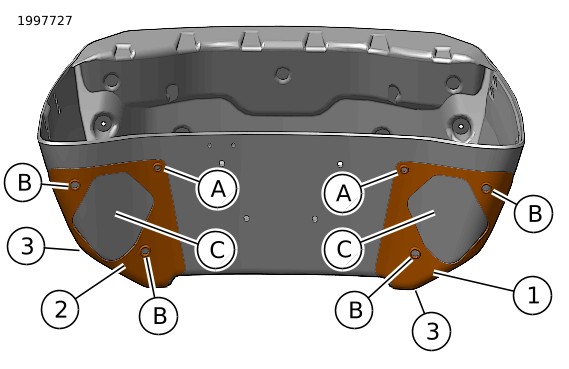
| 1 | Left template |
| 2 | Right template |
| 3 | Tour-Pak contour |
| A | 9/32-in hole |
| B | 13/32-in hole |
| C | Vent cut out |
Figure 2. Tour-Pak Cut Templates
INSTALL
| 1. | See Figure 1. Install speaker harness (10) into speaker enclosures (3, 12). a. See Figure 3. Install left branch of audio harness (4) into left speaker enclosure (2). NOTE Left harness branch can be identified with light blue/gray and light blue/orange speaker wires. | |||||||||||
| 
Figure 3. Audio Harness Install (viewed from rear) | |||||||||||
| 2. | Repeat for right enclosure by inserting right harness branch into right speaker enclosure. Seat grommet (3) into hole in right enclosure (2). NOTE Right harness branch can be identified with light blue/black and light blue speaker wires. | |||||||||||
| 3. | Install speakers into enclosures. a. Follow instructions in that kit. | |||||||||||
| 4. | Install speaker enclosure assemblies to tour-pak: a. See Figure 1. Loosely install left speaker enclosure assembly (3) to tour-pak using three screws (1) and left vent (2). b. Loosely install right speaker enclosure assembly (12) to tour-pak using three screws (1) and right vent (14). c. Tighten six screws (1). Torque: 3–4 N·m (27–35 in-lbs) | |||||||||||
| 5. | See Figure 1. Harness installation: a. 2026 and later model year vehicles: Place speaker/lighting harness adapter (7) in under seat area. b. See Figure 4. Separate 16-way connector C7A and C7B on vehicle, attach speaker/lighting harness adapter 16-way connectors between C7A and C7B until connectors click. c. 2023-2025 model year vehicles: Install audio harness 69203682 (sold separately) to under seat area. d. See Figure 4. Separate 12-way connector C7A and C7B on vehicle, attach speaker/lighting harness adapter 12-way connectors between C7A and C7B until connectors click. e. Models with rear tour-pak lighting: Route six-way tour-pak lighting branch of harness along right side fender support, to front of tour-pak mount. Connect to tour-pak lighting harness and anchor to tour-pak support. f. Models without rear tour-pak lighting: Install weather plug (15) on 6-way lighting connector, coil harness and secure under seat to prevent damage. g. Separate 4-way audio connectors on speaker/lighting harness adapter (7). h. Install tour-pak audio harness (10) on mating 4-way audio connector of adapter harness (7). i. Route tour-pak audio harness along right side fender support, to front of tour-pak mount. Attach to tour-pak speaker harness. j. Retain connectors to hole in tour pak mount with attached tree clip. | 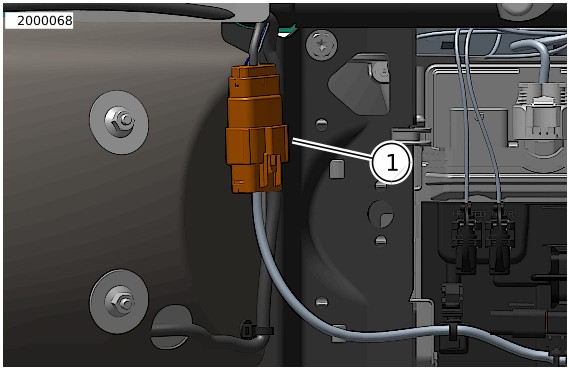
Figure 4. Under Seat Connector C7A/B |
COMPLETE
NOTE
To prevent possible damage to sound system, verify that ignition is OFF before installing main fuse.
| 1. | Confirm audio harness is connected to proper amplifier output channel. | |
| 2. | Install main fuse. See Owner's Manual. | |
| 3. | Install left side cover. See Owner's Manual. | |
| 4. | Install left saddlebag. See Owner's Manual. | |
| 5. | Install seat. See Owner's Manual. | |
| 6. | Turn ignition ON, but do not start vehicle. | |
| 7. | Make sure that all speakers are working properly. Check that front to rear fader and balance functions are operating correctly. If not, check speaker wiring and proper speaker set up in the Infotainment Control Unit (IFCU) OR Digital Technician II (DT II). |