Checking Coolant Level in Expansion Tank
| 1. | Open the seat. | |
| 2. | On VRSCF model, remove front side covers. See Maintenance and Lubrication → Front Side Covers: VRSCF Model. | |
| 3. | See Figure 1. Remove the airbox cover by turning the bailhead fastener 1/4 turn counterclockwise. Pull the airbox cover away from the front locating holes. | |
 WARNING WARNINGDo not loosen or remove pressure cap when cooling system is hot. The cooling system is under pressure and hot coolant and steam can escape from pressure cap, which could cause severe burns. Allow motorcycle to cool before servicing the cooling system. (00091c) | ||
| 4. | See Figure 2. Check coolant level in expansion tank with coolant cold and motorcycle on jiffy stand. | |
| 5. | If level is below "COLD FULL" line on tank, remove cap from expansion tank by using pull tab and add Harley-Davidson Extended Life Antifreeze & Coolant until fluid level reaches the "COLD FULL" line. NOTE Genuine Harley-Davidson Extended Life Antifreeze & Coolant is pre-diluted and ready to use full-strength. Do NOT add water. | |
| 6. | Replace the cap on the expansion tank. | |
| 7. | Install the airbox cover. Secure the cover by turning the bailhead fastener 1/4 turn clockwise. | |
| 8. | On VRSCF model, install front side covers. See Maintenance and Lubrication → Front Side Covers: VRSCF Model. NOTE If the coolant expansion tank is empty when the engine is cold, it is possible that air has been drawn into the cooling system. The system must be purged of any trapped air and refilled with coolant. See an authorized Harley-Davidson dealer for service. |
NOTICE
Clean the inlet surface of the radiator regularly. Leaves and other debris can collect on the radiator surface and degrade radiator performance which could lead to overheating and motorcycle damage. (00197d)
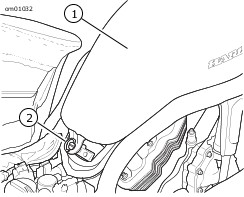
| 1 | Airbox cover |
| 2 | Bailhead fastener |
Figure 1. Airbox Cover
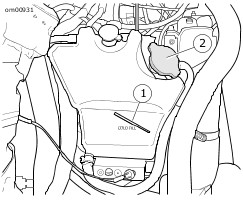
| 1 | Cold full line |
| 2 | Expansion tank cap |
Figure 2. Coolant Expansion Tank