Special Tools
| Description | Part Number | Qty. |
|---|---|---|
| DIGITAL TECHNICIAN II | HD-48650 | 1 |
NOTICE
This device is sensitive to electrostatic discharge (ESD). To prevent damage to the device, always touch the motorcycle frame or a grounded surface before handling. (00588c)
| 1. | Assemble ABS module to bracket. a. See Figure 3. Install ABS module to bracket with screws. b. Tighten screws. Torque: 5.8–7.8 N·m (51–69 in-lbs) ABS module mounting screws | |
| 2. | Install ABS module bracket assembly. a. See Figure 1. Install ABS module bracket (6). b. Install screws (4). Tighten. Torque: 6–8 N·m (53–71 in-lbs) ABS module bracket screws | |
| 3. | Install brake lines. | |
| 4. | Connect rear stoplamp switch (5). | |
| 5. | Connect P&A connector (7). | |
| 6. | Connect ABS connector (3). | |
| 7. | If installing a new ABS module, use DTII for set-up procedure: Special Tool: DIGITAL TECHNICIAN II (HD-48650) a. Choose REFLASH icon. b. Follow on-screen prompts. |
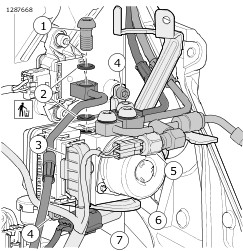
| 1 | Banjo bolt (4) |
| 2 | Gasket washer (8) |
| 3 | ABS connector |
| 4 | Screw (2) |
| 5 | Rear stoplamp switch |
| 6 | ABS module bracket |
| 7 | P&A connector |
Figure 1. ABS Module Connections
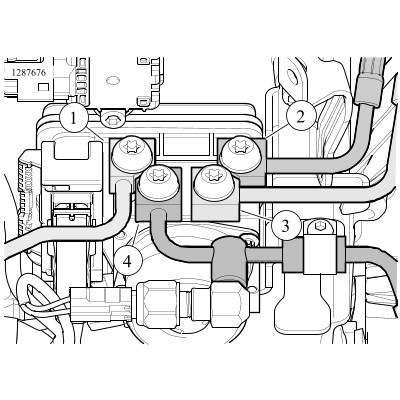
| 1 | Rear caliper to ABS module |
| 2 | Front caliper to ABS module |
| 3 | Front master cylinder to ABS module |
| 4 | Rear master cylinder to ABS module |
Figure 2. ABS Module Brake Line Connections
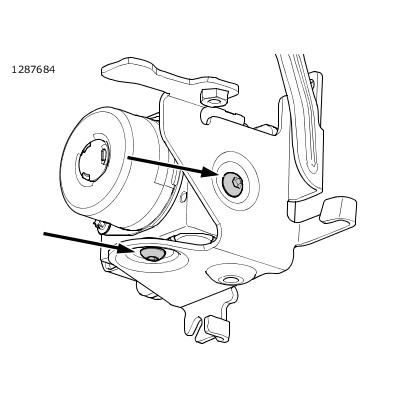
Figure 3. ABS Module Mounting Screws