Deactivate electrical system
NOTE
Follow this procedure to safely deactivate electrical system.
| 1. | Remove top cover. See Chassis → TOP COVER. | |
| 2. | Remove rear cover. See Chassis → REAR COVER. | |
| 3. | Verify fob is present. | |
| 4. | Place OFF/RUN switch in RUN position. | |
| 5. | Figure 1 Disconnect TCU. | |
| 6. | Disconnect security siren, if equipped. See Electrical → SECURITY SIREN. | |
| 7. | Place OFF/RUN switch in OFF position. | |
| 8. | Wait five minutes to allow for proper systems shut down. | |
| 9. | Remove main fuse. See Electrical → FUSES. | |
| 10. | Figure 2 Disconnect OBC connector (1). See High-Voltage System → ONBOARD CHARGER (OBC). |
Activate electrical system
| 1. | Verify OFF/RUN switch is in OFF position. | |
| 2. | Figure 1 Connect TCU. | |
| 3. | Connect security siren, if equipped. See Electrical → SECURITY SIREN. | |
| 4. | Figure 2 Connect OBC connector (1). | |
| 5. | Install main fuse. See Electrical → FUSES. | |
| 6. | Install rear cover. See Chassis → REAR COVER. | |
| 7. | Install top cover. See Chassis → TOP COVER. |
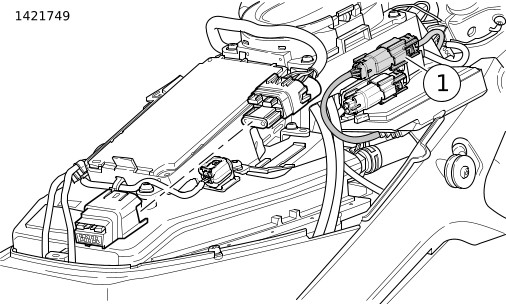
| 1 | TCU connector (5-wire) |
Figure 1. TCU connector
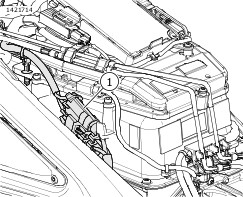
| 1 | OBC power connector |
Figure 2. OBC connector