| 1. | See Figure 2. Connect LHCM connectors (3). a. Route harness through fingers (4) and into channel in control module. b. Connect LHCM connectors. | |
| 2. | Install LHCM on handlebar. a. Rotate switch (1) up and snap latch (2) into place. NOTE Avoid pinching wires by alignment finger (4) while assembling switch housings. | |
| 3. | See Figure 3. Route wires close to the wire retainer (2). | |
| 4. | Verify that wire harness is in the recess at bottom of handlebar. | |
| 5. | See Figure 2. Install front housing. a. Align switch housing on LHCM. b. Install screws (5). Tighten. Torque: 4–5 N·m (35–44 in-lbs) Switch housing (LHCM) screws. | |
| 6. | See Figure 4. Install trigger finger switch cap (1). a. Raise switch to elevated position. b. See Figure 5. Slide switch cap onto switch until fully seated. c. Press switch cap into normal position. NOTE A click may be heard when switch cap is properly installed. |

Figure 1. Slide off Trigger Finger Switch Cap
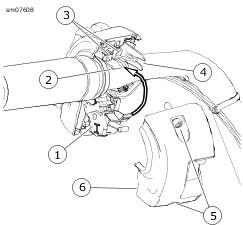
| 1 | Switch |
| 2 | Latch |
| 3 | Connectors |
| 4 | Fingers |
| 5 | Screws |
| 6 | Front housing |
Figure 2. Hand Control Module (Typical)

| 1 | Connector latch |
| 2 | Fingers |
Figure 3. LHCM Connector (Typical)

| 1 | Trigger finger switch cap |
| 2 | Housings |
| 3 | Left Hand Control Module (LHCM) |
| 4 | Alignment feature |
Figure 4. LHCM (typical): Left Side Shown

Figure 5. Slide Trigger Finger Switch Cap On