Headlamp Switch
- Flash to Pass: See Figure 1. When the headlamp switch (2) is in the low beam position, press down and release the headlamp switch to use the flash to pass to flash the high beam before passing another vehicle. The high beam indicator on the Instrument Module (IM) is illuminated as long as the flash to pass button is pressed. When in accessory, press the flash to pass button to activate the headlamp.
- Low Beam: See Figure 1. From the high beam position, press the headlamp switch (2) down to activate the low beam.
- High Beam: See Figure 1. Press the headlamp switch (2) up to activate the high beam. The (blue) high beam indicator lamp is lit when the high beam is on.
Cruise control ON
See Figure 1. Press the cruise ON button (4) to enable cruise control. The cruise icon in the IM turns amber.
Cruise control OFF
See Figure 1. Press the cruise OFF button (4) to turn OFF cruise control. The cruise icon in the IM turns off.
Cruise control set/decrease speed
See Figure 1. When the motorcycle reaches your intended speed, press the SET/- switch (1) to set the cruise speed. The amber cruise icon in the IM turns green.
Tapping the SET/- switch decreases speed by 1.6 km/h (1 mph). Holding the SET/- switch down gradually decreases cruise speed.
Cruise control resume/increase speed
See Figure 1. If cruise has been disengaged yet the cruise indicator is amber, pressing the RES/+ switch (2) resumes cruise. The icon in the IM glows green. The motorcycle automatically resumes cruise at the set speed.
Tapping the RES/+ switch up increases speed by 1.6 km/h (1 mph). Holding up the RES/+ switch gradually increases cruise speed.
Trip
See Figure 1. The trip button (5) activates the trip odometers. The trip button also is used to scroll through the additional screens of the odometer display. With the ignition off, the trip button can activate time or odometer displays.
Menu
See Figure 1. Press the Menu button (7) to access IM menu selections.
Navigate left
See Figure 1. Press the navigate left button (13) to scroll left on the IM.
Navigate right
See Figure 1. Press the navigate right button (8) to scroll right on the IM.
Navigate up
See Figure 1. Press the navigate up button (6) to scroll up on the IM.
Navigate down
See Figure 1. Press the navigate down button (10) to scroll down on the IM.
Turn signals/cancel
- Left turn signal: See Figure 1. Push the turn signal switch (11) to the left to activate the left turn signal.
- Right turn signal: See Figure 1. Push the turn signal switch (11) to the right to activate the right turn signal.
- Cancel: See Figure 1. Press the turn signal switch (11) straight in to manually cancel the signals.
Horn
See Figure 1. The horn is operated by pressing the horn button (12). The horn can be activated for up to 10 seconds at a time. If the horn button is held for a longer period, the horn automatically deactivates.
OK/enter
See Figure 1. Push the OK/enter button (14) to approve or enter a section in the IM.
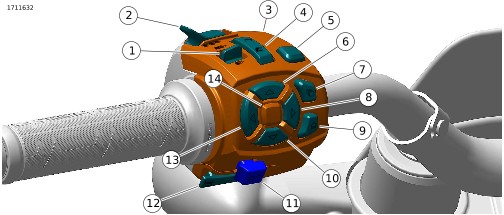
| 1 | Cruise set/resume |
| 2 | Headlamp switch |
| 3 | Left hand control module |
| 4 | Cruise control |
| 5 | Trip/odometer |
| 6 | Navigate up |
| 7 | Menu |
| 8 | Navigate right |
| 9 | Home |
| 10 | Navigate down |
| 11 | Turn signal/cancel |
| 12 | Horn |
| 13 | Navigate left |
| 14 | OK/enter |
Figure 1. Left Hand Control Module
Table 1. Left Hand Control Switches/Buttons
SWITCH/ BUTTON | NAME | FUNCTION |
|---|---|---|
SET/- | Cruise control set/ decrease speed | Press switch to set cruise control speed. |
RES/+ | Cruise control resume/ increase speed | Press switch to resume to a set cruise control speed. |
 | Flash to pass | Press and release to flash the high beam. In Accessory position on ignition switch (ACC), press to activate the headlamp. |
 | Low beam | Press the switch to switch the headlamp to low beam. |
 | High beam | Press the switch to switch the headlamp to high beam. |
 | Cruise control ON | Press the button to turn cruise control ON. |
 | Trip | Press the button to alternate odometer displays. |
 | Cruise control OFF | Press the button to turn cruise control OFF. |
 | Navigate left | Press the button to go left on IM screen. |
 | Navigate up | Press the button to go up on IM screen. |
 | Menu | Press the button to navigate through menus in the IM. |
 | Navigate right | Press the button to go right on IM screen. |
 | Home | Press the button to return the speedometer/odometer screen. |
 | Navigate down | Press the button to go down on IM screen. |
 | Turn signal
| Press the switch to signal. |
 | Horn | Press the button to sound horn. |
OK/enter | Press the button to approve or enter a section in the IM. |