The Personal Identification Number (PIN) is a number that can be used to disarm the security system. Use the PIN in case the assigned fob is misplaced, fails or if the fob cannot communicate with the motorcycle because of electromagnetic interference.
A PIN is a five-digit number (1-9).
Changing the PIN
The rider can change the PIN at any time.
- Ignition must be ON
- Fob must be present
- Can select numbers between 1-9
| 1. | Navigate dashboard menu: |
NOTE
The zero is displayed and is only a default number. Zero cannot be part of the PIN.
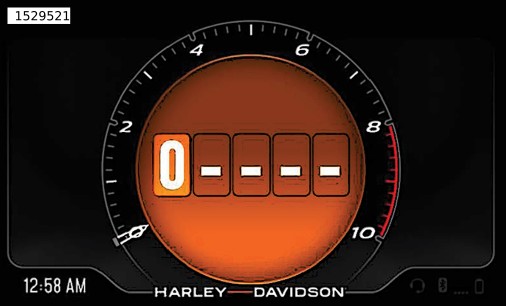
Figure 1. PIN Entry Screen
Touch Screen Entry
| 1. | Figure 2 Touching the PIN screen (1) will display the keypad (2) entry. | |
| 2. | Using the keypad enter the complete five-digit PIN. | |
| 3. | Cycle the ignition to save PIN. |
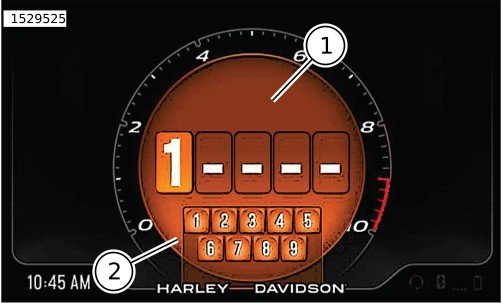
| 1 | Touch screen |
| 2 | Keypad |
Figure 2. PIN Screen with Keypad Entry
Hand Control Entry
| 1. | Figure 1 Select the first digit of the PIN. a. Push the left turn signal to scroll through the numbers (1-9) until the desired digit appears. | |
| 2. | Figure 4 Select the next digit. a. Push the right turn signal to move cursor to the right. b. Push the left turn signal to scroll through the numbers (1-9) until the desired digit appears. | |
| 3. | Repeat step 2 until all five-digits are filled in with the desired PIN. | |
| 4. | Cycle the ignition to save PIN. |
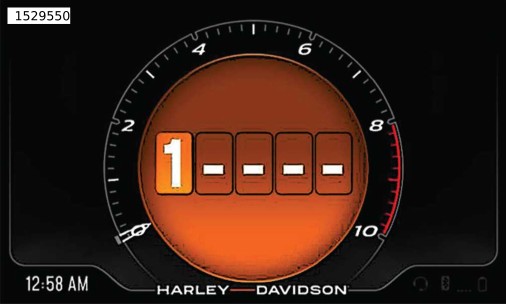
Figure 3. First PIN Digit Entry
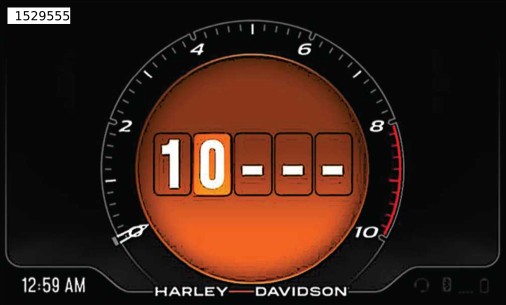
Figure 4. Moving Cursor to Next Digit