Arming
When the motorcycle is parked and the OFF/RUN switch is moved to OFF, the security system arms automatically within 5 seconds if no motion is detected. Even when the fob is present, the system arms.
On arming, the turn signals flash twice and the siren chirps twice if the siren is in the chirp mode (if equipped with a siren).
NOTE
International models: The system must be in the chirp mode for the siren to chirp on arming or disarming (if equipped with a siren). See SECURITY SYSTEM → Siren Chirp Mode (Confirmation).
Disarming
With the fob present, the rider may ride or move the motorcycle for parking, storage or service without setting off the alarm. Disarming is automatic as long as the fob is within range.
Fob: An armed security system is automatically disarmed when the fob is present and the motorcycle is moved or the OFF/RUN switch is moved to RUN.
The range of the fob is approximately 1.5 m (5 ft).
When the system disarms, the siren chirps once and the security indicator lamp illuminates for a solid four seconds and then turns off.
Personal Identification Number (PIN): If the fob is misplaced or if the present fob fails to communicate, the system can be disarmed with the Personal Identification Number (PIN).
Disarming with a PIN
Disarm the security system manually using the PIN if the fob is lost, the fob battery is discharged or if where you parked there is a strong electromagnetic interference.
Do not turn handlebars, straddle seat or lift motorcycle off the jiffy stand. During a PIN disarm, if the security system detects motorcycle motion the system will activate the alarm.
The PIN screen will automatically show up on the Instrument Module (IM) when the fob is not present and the vehicle has be attempted to be turned ON.
NOTE
- If a mistake is made while entering PIN, move the OFF/RUN switch to OFF before entering the last digit and then start the procedure from the beginning.
- If the procedure fails to disarm the security system, wait 2 minutes before attempting another PIN disarm.
- The security system remains disarmed until the OFF/RUN switch is moved to OFF.
- At any time during a PIN disarm if the fob is brought within range, the security system disarms as the module receives the coded signal from the fob.
Touch Screen Entry
| 1. | Figure 1 Touching the PIN screen (1) will display the keypad (2) entry. | |
| 2. | Using the keypad enter the complete five-digit PIN. | |
| 3. | Push right turn signal to enter PIN. |
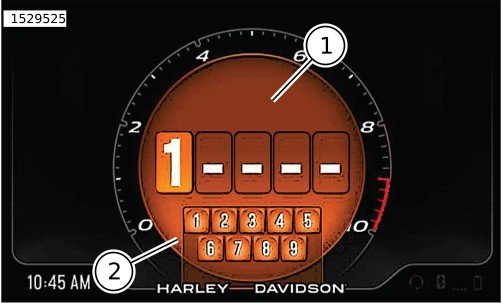
| 1 | Touch screen |
| 2 | Keypad |
Figure 1. PIN Screen with Keypad Entry
Hand Control Entry
| 1. | Figure 2 Select the first digit of the PIN. a. Push the left turn signal to scroll through the numbers (1-9) until the desired digit appears. | |
| 2. | Figure 3 Select the next digit. a. Push the right turn signal to move cursor to the right. b. Push the left turn signal to scroll through the numbers (1-9) until the desired digit appears. | |
| 3. | Repeat step 2 until all five-digits are filled in with the desired PIN. | |
| 4. | Push right turn signal to enter PIN. |
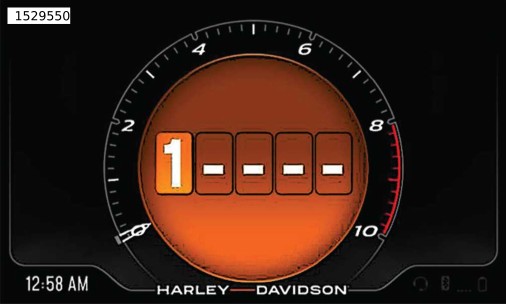
Figure 2. First PIN Digit Entry
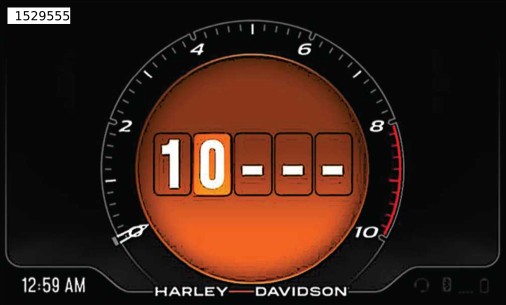
Figure 3. Moving Cursor to Next Digit