Selecting Media Source
Select the media source icon (8) Infotainment Control Unit (IFCU) on the screen. Refer to Operation → Infotainment Control Unit (IFCU).
Navigate to the desired media by using the navigate buttons on the LHCM direction pad.Refer to Operation → Left Hand Control Switches.
See Figure 1. Select the desired media source by pressing OK/enter (5) button on LHCM or pressing icon on the screen.
What is needed to use each of the sources:
AM/FM Radio - these options will always be available
USB - This option is only available if you have a supported device connected to the USB-C port in the storage compartment
Bluetooth - It is required that you first pair your device in the device manager. Refer to Infotainment Control Unit (IFCU) Operation → System Settings.
CarPlay - It is required that you have a CarPlay supported I-phone connected (wired or wireless) and a headset paired/connected to the IFCU
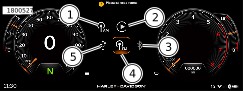
| 1 | AM station |
| 2 | Apple CarPlay |
| 3 | Bluetooth |
| 4 | FM station |
| 5 | USB |
Figure 1. Selecting Source
Tune/Seek
Once the desired band is selected (AM, FM), tune or seek stations by using the arrows on the touch screen or Previous (12) or Next (7) buttons on the RHCM. Refer to Operation → Right Hand Control Switches.
See Figure 3. A list of available stations can be viewed by selecting the stations list icon (1).
Short press: Advances to the next frequency increment.
Long press: Accelerates through the frequencies until the switch is released.
When tuning or seeking, tuner continues to wrap around at the beginning or end of frequency range.
Press back button on LHCM to return to previous screen.
Finding a Media File
See Figure 2. The browse feature can be used to find different types of media files on USB-connected media devices. File browsing features are not available for Bluetooth streaming media devices.
Categories to browse include artist, album, songs, play list and audio books. Selecting a category will show a list of items, sorted by the category selected.
Scroll through list to find desired item. Select item to be played.
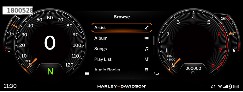
Figure 2. Browse Categories
Favorites
There are 4 types of Favorites menus: Tuner/ Media/ Contact/ Global. Contact Favorites must be selected from the Phone Contact list. Global favorites must be selected from one of the other three Favorites lists.
Setting a Favorite for Tuner or Media
If selecting a file from a removable media device, the radio will do nothing unless the media device is connected.
NOTE
Bluetooth-connected device cannot be saved as favorites.
| 1. | Tune to a radio station or file from USB-connected device. | |
| 2. | See Figure 3. Press favorites (2) on screen or Navigate down button on LHCM. | |
| 3. | Press and hold one of the favorite (+) preset buttons from the list or press OK/enter button on LHCM. |
NOTE
An existing Favorite can be replaced or deleted with a long press on the selected favorite.
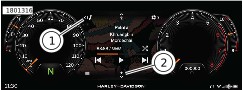
| 1 | Stations list |
| 2 | Favorites |
Figure 3. Stations List and Favorites
Voice Recognition
Seeking a Station:
| 1. | Select: Voice recognition switch. | |
| 2. | Speak: "Seek Up" or "Seek Down" into microphone. |
Tuning a Station
| 1. | Select: Voice recognition switch. | |
| 2. | Speak: "Tune to" along with the frequency into microphone (such as "Tune to ninety-seven point one"). The radio automatically tunes to appropriate band (such as AM or FM) according to frequency selected. |
Selecting a Band
| 1. | Select: Voice recognition switch. | |
| 2. | Speak the band into microphone "AM" or "FM". Media such as Bluetooth Paired device or USB is also available if connected. |