Arming
When the motorcycle is parked and the OFF switch is pressed, the security system arms automatically within 5 seconds if no motion is detected. Even when the fob is present, the system arms.
On arming, the turn signals flash twice, and the siren chirps twice.
Disarming
With the fob present, the rider may ride or move the motorcycle for parking, storage, or service without activating the alarm. Disarming is automatic if the fob is within range.
Fob: An armed security system is automatically disarmed when the fob is present, and the motorcycle is moved, or the RUN switch is pressed.
The range of the fob is approximately 1.5 m (5 ft).
When the system disarms, the turn signals flash once, and the siren chirps once.
Personal Identification Number (PIN): If the fob is misplaced or if the present fob fails to communicate, the system can be disarmed with the PIN.
Disarming with a PIN
Disarm the security system manually by using the PIN if the fob is lost, the fob battery is discharged or if where you parked there is a strong electromagnetic interference.
Do not turn handlebars, straddle seat or lift motorcycle off the jiffy stand. During a PIN disarm, if the security system detects motorcycle motion, the system will activate the alarm.
The PIN screen is automatically displayed on the Infotainment Control Unit (IFCU) when the fob is not present, and an attempt is made to turn the vehicle ON.
NOTE
- If a mistake is made while entering PIN, set the OFF/RUN/START switch to OFF before entering the last digit. Then start the procedure from the beginning.
- If the procedure fails to disarm the security system, wait 2 minutes before attempting another PIN disarm.
- Once the security system is disarmed, it remains disarmed until the OFF/RUN/START switch is set to OFF.
- At any time during a PIN disarm if the fob is brought within range, the security system disarms as the module receives the coded signal from the fob.
Touch Screen Entry
| 1. | See Figure 1. Touching the IFCU screen will display PIN digit display (1) and the keypad (2). | |
| 2. | See Figure 2 and Figure 3. Using the on-screen keypad, enter the complete five-digit PIN. |
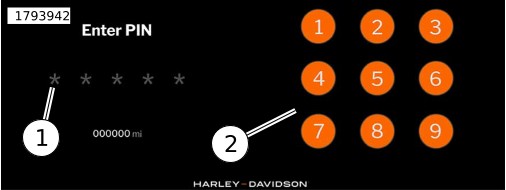
| 1 | PIN digit display |
| 2 | PIN entry keypad |
Figure 1. PIN Entry Screen
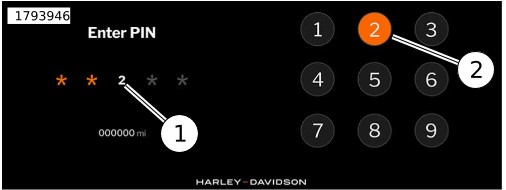
| 1 | Third digit entered |
| 2 | Third digit pressed |
Figure 2. Entering PIN Digits
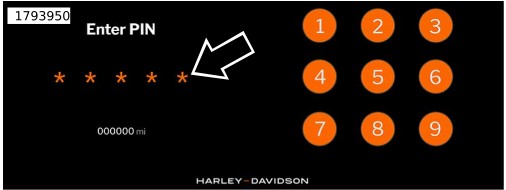
Figure 3. Five Digit PIN Entered