Alert
See Figure 1. The alert icon displays information related to specific vehicle faults and matches the illuminated lamp along with a description of the current fault.

| 1 | Alert icon |
| 2 | Alert description |
Figure 1. Alert Display
Table 1. Instrument Alert Displays
Icon | Text | Cause | Action |
|---|---|---|---|
 | WARNING – SHUTDOWN ALERT | Vehicle starting automatic shutdown sequence | See dealer |
WARNING – High Voltage (HV) DISCONNECTED | RESS High Voltage Connection Issue | See dealer | |
WARNING – MOTOR FAULT | Motor or inverter fault | See dealer | |
WARNING – Rechargeable Energy Storage System (RESS) FAULT | RESS internal fault | See dealer | |
WARNING – CHARGE BIKE FAULT | RESS state of Charge too low to enable propulsion | Charge motorcycle | |
WARNING – COMMUNICATION LOST | Vehicle Messaging not being received by Instrument. | See dealer | |
 | ALERT – CHARGER FAULT | Onboard Charger (OBC) general fault | See dealer |
ALERT – RESS SIGNIFICANTLY OUT OF BALANCE | RESS at significant level of imbalance | See dealer | |
ALERT – JIFFY STAND NOT TRUSTED | Side Stand/Jiffy Stand sensor fault | Cycle jiffy stand down and back up, if the alert is not corrected see dealer | |
ALERT – PROPULSION INHIBITED | Propulsion is Inhibited while Vehicle is Moving | Check Run/Off switch on the RHCM. Check Side-Stand status. See Dealer if not corrected. | |
 | 12 V BATTERY FAULTED | 12 V Battery needs replacement | See dealer |
12 V BATTERY WEAK | 12 V Battery needs replacement | See dealer | |
12 V BATTERY DISCONNECTED | 12 V battery leads loose or disconnected | See dealer | |
LOAD SHEDDING | Vehicle is Load Shedding to Preserve 12 V Battery | See dealer | |
 | LOW CHARGE | Low state of charge for RESS | Charge vehicle, if the alert is not corrected see dealer |
 | CHECK TIRE PRESSURE | Low tire pressure | Properly inflate tires to correct pressure |
 | NO FOB | No assigned fob detected | Bring assigned fob within range |
 | LOW FOB BATTERY | Battery in fob low | Replace fob battery |
Range
See Figure 2. The Range screen displays percent of remaining charge (1, 3) and estimated range (2).
NOTE
If charge state bar (1) continues to pulse after reaching 100% the RESS is performing cell balancing. Charging has completed and normal operation is available.
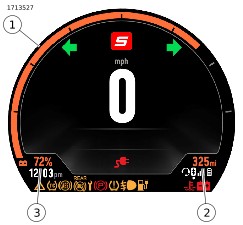
| 1 | Charge state bar |
| 2 | Estimated range |
| 3 | Remaining RESS charge |
Figure 2. Range Screen
Power Mode Off Trip/Odometer Screen
See Figure 3. The power mode off trip/odometer screen is available when the vehicle is in the Off state. A user can press the trip button on the Left Hand Control Module (LHCM) to wake the vehicle and display the total odometer (3), estimated range (2) and charge state bar (1) for a total of 5 seconds.
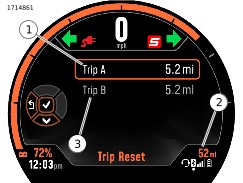
| 1 | Trip A |
| 2 | Estimated range |
| 3 | Trip B |
Figure 3. Trip Screen
Bluetooth
In order to leverage Bluetooth enabled functions such as Navigation, Media display and controls, the phone must be paired through the LiveWire S2 App.
Once paired, the Bluetooth icon displays phone connection status, device name and battery level.
Navigation
Refer to Operation → Indicators → Page Selections. Selecting the Maps & Navigation page (3) is intended to assist you when traveling. Always use personal judgment and observation of the actual road conditions while riding. In some circumstances, information provided in the navigation display may be incomplete, incorrect or outdated. Road conditions, traffic laws and restrictions (such as no left turns, street closures, one way streets, road construction detours, and so on) can frequently change. Before following any instruction from the screen, check that the instruction can be done safely and legally.
If necessary, safely park the vehicle if there is difficulty following the route guidance or if there is a need to program a new route.
Program and review navigation routes with the vehicle stopped. Follow these steps to load navigation instructions.
| 1. | Ensure the LiveWire S2 App is in proper state before pairing. | |
| 2. | Verify the phone is connected via Bluetooth to the Livewire instrument module. | |
| 3. | Select the Maps & Navigation screen on the instrument display. It’s normal to see “No Route Available” in the display prior to a route being pushed to the instrument. | |
| 4. | Open the LiveWire S2 App on your phone. | |
| 5. | Select a route or a Point Of Interest (POI), then click the action boxes: Take Me There (not “send to bike”), then Continue, Start, and finally Let’s Ride a. Turn By Turn (TBT) navigation should be running on the app and appear on the screen of the instrument display in place of where “No Nav” was previously displayed. b. If TBT does not push to the instrument, close the app and re-open it and repeat step 3. |
Plan and review the route before riding the motorcycle.
See Figure 4. The navigation screen displays turn by turn navigation information that has been entered into the connected device using the LiveWire S2 App. This information includes next action (1), miles to go in trip (2), arrival time or duration (3) and minutes left in trip (4).
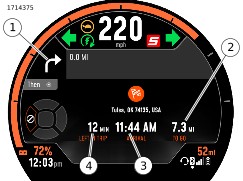
| 1 | Next action |
| 2 | Miles to go in trip |
| 3 | Time information |
| 4 | Minutes left in trip |
Figure 4. Navigation Screen
Table 2. Navigation Icons
ICON | DESCRIPTION |
|---|---|
 | Start |
 | Finish |
 | Ended |
 | Navigation paused |
 | Navigation cancelled |
 | No signal |
 | Unidentified |
 | Straight |
 | Turn left |
 | Turn right |
 | Light left |
 | Light right |
 | Heavy left |
 | Heavy right |
 | U-Turn left |
 | U-Turn Right |
 | Keep left |
 | Keep right |
 | Keep middle |
 | Enter highway left |
 | Enter highway right |
 | Keep left highway |
 | Keep right highway |
 | Leave highway left |
 | Leave highway right |
 | Roundabout left(1) |
 | Roundabout right(1) |
 | Ferry |
(1) The number in the center of the icon corresponds to the exit to be taken, counted from the entry into the roundabout.
Media Page
See Figure 5. The media page displays information including song duration (1), artist and album (2) and song title (3).
NOTE
Must be used with a connected device through a connected headset.
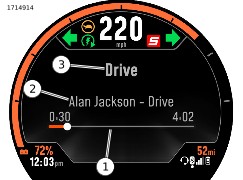
| 1 | Song duration |
| 2 | Artist and album |
| 3 | Song title |
Figure 5. Media Page