Service Lamps
Refer to Operation → Instruments → Instrument Module Displays and Selections. The service lamps indicate the condition of the powertrain/powertrain management system.
Fault Indicator Lamp (FIL): Amber Icon appears when the vehicle has detected the vehicle requires maintenance and/or repair but can still be operated.
Electric Vehicle (EV) Fault: Red Icon appears when the vehicle has detected an error, the vehicle should not be operated and may go into shutdown mode.
Malfunction Indicator Lamp / On Board Diagnostics (MIL/OBD) Fault: The Malfunction Indicator Lamp (MIL) normally comes on when the ignition is first turned on. During this time, the powertrain management system runs a series of self-diagnostics. If the MIL does not turn off after enabling propulsion or comes on at any other time, See an authorized LiveWire dealer.
Propulsion Enabled (Vehicle Starting Up)
See Figure 1. The Propulsion Enabled Icon will be Active whenever the vehicle is operable and can be ridden Forward or Reverse directions.
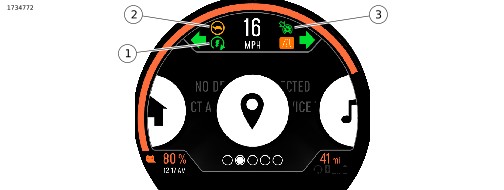
| 1 | Propulsion enabled |
| 2 | Propulsion limited |
| 3 | Cruise control enabled |
Figure 1. Propulsion States
Bluetooth
Refer to Operation → Instruments → Instrument Module Displays and Selections. The bluetooth indicator displays the connection status of the users Phone or other Device to the Instrument.
Pairing Device
| 1. | Activate Bluetooth on your device. | |
| 2. | See Figure 2. Select: Settings menu (5). | |
| 3. | Select: BLUETOOTH. | |
| 4. | Select: Add new device. a. Phone Select: Add new phone. b. Headset Select: Add new headset. | |
| 5. | Follow on screen prompts to complete pairing. |
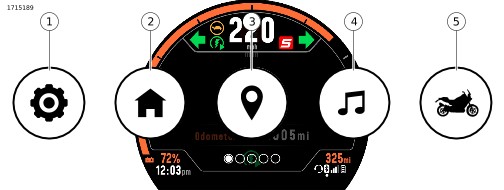
| 1 | Settings |
| 2 | Home |
| 3 | Maps and Navigation |
| 4 | Media |
| 5 | Bike Status |
Figure 2. Page Selections
Media
NOTE
A phone and headset must be paired to the Instrument Module (IM) before media functions can be used.
See Figure 2. To access audio and media features, navigate to the Media page (4). Use the Right Hand Control Module (RHCM) to control audio functions. Refer to Operation → Right Hand Control Switches.
Phone
NOTE
- A phone must be paired before call or text notifications can be viewed through the IM.
- A headset with microphone is required to make and receive calls via Bluetooth.
See Figure 3. The phone screen displays current call status (1), caller ID or phone number (2), hang up (3).
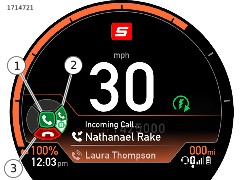
| 1 | Answer call |
| 2 | Incoming call |
| 3 | Hang up |
Figure 3. Phone Pop-Up Notification
Notifications
Call and text notifications can be turned on or off through the SETTINGS.
| 1. | See Figure 2. Select: SETTINGS (1). | |
| 2. | Select: PHONE NOTIFICATIONS. | |
| 3. | Adjust notification settings. |
Making a Call
See Figure 3. Voice recognition can be used to place a call through the a headset connected to the Instrument.
Receiving a Call
See Figure 3. When receiving a call, a notification will be displayed on the IM. Use the Left Hand Control Module (LHCM) to answer or decline the call.
Voice Recognition
Refer to Operation → Right Hand Control Switches → Right Hand Control Module. The voice recognition switch (10) activates voice recognition features on a connected device (if supported). With a headset connected, press the voice recognition switch. Speak the desired command into the headset microphone.
Propulsion Limited
See Figure 1. The propulsion limited Indicator illuminates when there is a fault that requires performance to be limited.
12 V Battery Discharge
Refer to Operation → Instruments → Instrument Module Displays and Selections. The battery discharge lamp indicates overcharging or undercharging of the 12 V battery.
Bike Status
See Figure 2. Selecting the bike status page (5) will display Vehicle Information including: Front and Rear Tire Pressure, Telematics (TCU) Connectivity Strength, and 12 V Battery Voltage Level.
A Diagnostic Menu may also be available to view and Diagnostic Trouble Codes (DTCs) currently Active on the Vehicle.
Coolant Temperature
 WARNING
Do not loosen or remove pressure cap when cooling system is hot. The cooling system is under pressure and hot coolant and steam can escape from pressure cap, which could cause severe burns. Allow motorcycle to cool before servicing the cooling system. (00091c)
Refer to Operation → Instruments → Instrument Module Displays and Selections. The coolant temperature indicator illuminates when the coolant has exceeded threshold temperature.
If coolant level is sufficient and the lamp remains on, see a LiveWire dealer for service.
Ride Mode
Refer to Operation → Instruments → Instrument Module Displays and Selections. The ride mode Indicator displays the current selected ride mode.
Turn Signal Indicator Lamps
Flashing: A turn signal is activated. When the 4-way hazard flashers are operating, both turn indicators flash simultaneously.
Rapid flashing: A turn signal bulb is not operating. Exercise caution and use hand signals. Replace inoperative components at earliest opportunity.
Headlamp High Beam Lamp
Refer to Operation → Instruments → Instrument Module Displays and Selections. The headlamp high beam lamp is on when the high beam or flash to pass switch is activated.
Cruise Control
Off: Cruise control is not enabled.
Enabled - speed not set: Cruise control is enabled, cruising speed is not set. Cruise indicator shown in amber color.
Engaged - speed set: Cruising speed is set. Motorcycle speed is maintained by the cruise control system. Cruise indicator shown in green color.
ABS Lamp
WARNINGIf ABS lamp continues flashing at speeds greater than 5 km/h (3 mph) or remains on continuously, the ABS is not operating. The standard brake system is operational, but wheel lock up can occur. Contact a LiveWire Dealer to have ABS repaired. A locked wheel will skid and can cause loss of vehicle control, which could result in death or serious injury. (12135b)
Flashing: The Anti-lock Braking System (ABS) lamp begins flashing when the vehicle is turned on. The flashing lamp indicates that the system is in self-diagnosis mode. It continues to flash until motorcycle speed exceeds 5 km/h (3 mph). ABS is not operational until the lamp turns off.
Tire Pressure/TPMS Fault Indicator
WARNINGBe sure tires are properly inflated, balanced, undamaged, and have adequate tread. Inspect your tires regularly and see a LiveWire dealer for replacements. Riding with excessively worn, unbalanced, improperly inflated, overloaded or damaged tires can lead to tire failure and adversely affect stability and handling, which could result in death or serious injury. (12123b)
Refer to Operation → Instruments → Instrument Module Displays and Selections. The low tire pressure/Tire Pressure Monitoring System (TPMS) fault indicates when a low tire pressure condition or a TPMS system fault has occurred.
Flashing (60 seconds, followed by solid lamp): TPMS fault has been detected. This event can occur for a variety of reasons, including loss of signal from the sensors or sensor battery failure. Tire pressure data may not be available while the lamp is lit. See a LiveWire dealer for service.
Solid: The system has detected that one or more tires have low pressure. Safely stop the vehicle and use a tire pressure gauge to check the pressure of each affected tire. Inflate the tires according to specifications in Before Riding → Checking Tire Pressure and Inspecting Tires, or as specified on the label on the frame downtube. The indicator will turn off when you begin riding the motorcycle with the correct pressure in the tires. Also refer to Before Riding → Checking Tire Pressure and Inspecting Tires to compensate tire pressures for tires that have recently been ridden.
Traction Control (TCS)
NOTE
Traction Control Lamp will flash when vehicle is turned ON until vehicle exceeds 3MPH (5km/h). Similar to ABS TT.
Solid: Traction control has been turned off.
Flashing: Traction control system active intervention.
Off: Traction control system is on.
Solid/FIL ON: Continuous illumination of the Traction Control System (TCS) and FIL a traction control fault. Traction control is disabled and the motorcycle is operating as if traction control is turned off. See a LiveWire dealer for service.