Settings Menu
 WARNING
Set volume levels and other controls on audio and electronic devices before riding. Distractions can lead to loss of control, resulting in death or serious injury. (00088b)
See Operation → Indicators → Page Selections. Selecting the bike status card (1) displays the menus used to set up ride modes, appearance, system, icons and user settings.
NOTE
To make full use of features and minimize distraction while on the road, configure the system with your personal preferences before riding.
After propulsion has been enabled the settings menu is disabled.
Table 1. Settings Main Menu
Press | Result |
|---|---|
[Settings]  | Configure instrument module settings. Do before riding the motorcycle. |
Available selections: General, Ride Customization, Appearance, Bluetooth, Phone Notifications, Software. |
GENERAL
Table 2. Settings Menu: General
Press | Result | |
|---|---|---|
GENERAL | Configure instrument module settings. Do before riding the motorcycle. | |
Available selections: Trip Reset, Adjust Date, LW App Time Sync, Adjust Clock Time, Clock Format, Units, Change Security Pin, Display Language. | ||
TRIP RESET | Select from Trip A or B, Reset Trip | |
ADJUST DATE | Manually set date displayed | |
LW APP TIME SYNC | Toggle On/Off to Sync Instrument to Connected Phone | |
ADJUST CLOCK TIME | Manually set time displayed if LW APP TIME SYNC is Off | |
CLOCK FORMAT | Select 12 or 24 hour time display | |
UNITS | Select STANDARD or METRIC units of measure | |
CHANGE SECURITY PIN | Select PIN for security system | |
DISPLAY LANGUAGE | Select language to display | |
TARGET CHARGE PERCENT | Select target charge percent of 70%, 80%, 90% or 100% | |
RIDE CUSTOMIZATION
Table 3. Settings Menu: Ride Customization
Press | Result |
|---|---|
[Ride Customization] | Allows enable and disable of available ride modes and allows setup of custom ride modes. |
Preset ride mode selections: Preset Ride mode selections: Enable/Disable, Copy+Edit.(1) | |
Custom ride mode selections: Enable/Disable, Power slider, Regen slider, Throttle slider, Traction control setting(2, 3) |
(1) Copy+Edit selection will copy the selected ride mode into a selected custom ride mode option and allow the rider to build a custom ride mode using a preset selection as a starting point.
(2) Power Slider adjusts how much overall power will be available in the custom ride mode. Regen slider adjusts how much regen will be enabled in the custom ride mode. Throttle slider adjusts the intensity of throttle response felt by the rider in the custom ride mode.
(3) The traction control level adjusts how much rear wheel slip the system will allow. Traction control adjustment does not affect the performance of drag torque slip control or ABS functions.
APPEARANCE
Table 4. Settings Menu: Appearance
Press | Result |
|---|---|
[Appearance] | Configure instrument module appearance. |
Available selections: Auto-Brightness (on/off), Brightness Level (adjustable slider). |
BLUETOOTH
Table 5. Settings Menu: Bluetooth
Press | Result | |
|---|---|---|
[Bluetooth] | Configure connections with bluetooth devices. | |
Available selections: Phone List, Add New Phone, Headset List, Add New Headset | ||
Phone List | Shows paired phones | |
Add New Phone | Use to pair new phone to vehicle | |
Headset List | Shows paired headsets | |
Add New Headset | Use to pair new headset to vehicle | |
PHONE NOTIFICATIONS
Table 6. Settings Menu: Phone Notifications
Press | Result |
|---|---|
[Phone Notifications] | Configure which phone notifications are displayed. |
Available selections: Call notifications (on/off) and text notifications (on/off). |
SOFTWARE
Table 7. Settings Menu: Software
Press | Result | |
|---|---|---|
[Software] | View and update software versions. | |
Available selections: Infotainment SW Update, Regulatory Info, Software Information | ||
Infotainment SW Update | Displays available updates | |
Regulatory Info | Displays regional regulatory information | |
Software Information | Displays software part number/revision, hardware part number/revision and hardware serial number | |
Updating Software
| 1. | Check software version. a. Table 7 Settings> Software> Software Information. This menu will show the current software version on the Instrument Module (IM). b. Check for latest software version. See website: Refer to: www.H-D.com/infotainment-support. | |
| 2. | Update software. a. Download the latest software version to Universal Serial Bus Type-C (USB-C) device. See website: Refer to: www.H-D.com/infotainment-support. b. Unzip the downloaded file to extract the pv2 file. The pv2 file must be at the root directory of your USB-C drive in order for it to be detected by the IM. Only one pv2 file should be present at the root directory level. c. See Your Motorcycle → Primary Controls and Service Components → Controls and Service Components (Typical). Connect USB-C drive to motorcycle. d. Table 7 Settings> Software> Infotainment SW Update. e. Select software update file. f. Select check mark to start update. g. Allow update to complete. h. Remove USB-C drive. |
USER SETTINGS
Charge State/Range
NOTE
Actual range will vary depending on riding habits, ambient weather and equipment conditions.
See Figure 1. The charge state and range bar displays the charge state of the Rechargeable Energy Storage System (RESS) and estimated remaining range.
Speedometer
WARNINGTravel at speeds appropriate for road and conditions and never travel faster than posted speed limit. Excessive speed can cause loss of vehicle control, which could result in death or serious injury. (00008a)
See Figure 1. The IM registers miles per hour (MPH) (U.S. models default) and kilometers per hour (km/h) (international models default). The IM can be configured to register either miles per hour or kilometers per hour through the settings menu.
Instrument backlighting changes with ambient lighting differences, changes in ambient light, such as such as going through a tunnel, may change level of backlighting.
Clock
See Figure 1. The clock displays current time in 12/24 hour format. The settings menu is used to set time and select 12 hours or 24 hours format.
Odometer
Pressing the trip switch with the OFF/RUN switch in either position activates the odometer reading.
See Operation → Left Hand Control Switches → Left Hand Control Module and Operation → Instrument Alerts → Trip Screen. The odometer display also provides the following selectable displays:
- Odometer
- Trip odometer A
- Trip odometer B
- Ambient temperature
Press and release the trip switch to cycle through the displays.
Trip Odometers A and B
See Operation → Left Hand Control Switches → Left Hand Control Module and Operation → Instrument Alerts → Trip Screen. To check mileage or to reset trip odometers, the OFF/RUN switch must be in the RUN position. Press and release the trip switch until the desired trip odometer is displayed. An A or B on the left of the odometer display identifies the trip odometer.
To reset or zero trip odometers, have desired (A or B) odometer displayed. Press the trip switch and hold for approximately 1 second. The trip odometer resets to zero.
Propulsion Interlocks
See Figure 1. The vehicle is equipped with propulsion interlocks. Propulsion interlocks are conditions that must be met before propulsion can be enabled. Propulsion interlock messages will be displayed on the IM when conditions are not met to enable propulsion.
Propulsion interlock messages include; CALL SERVICE, UNPLUG TO RIDE, PRESS RUN, WAIT - NOT READY, UNLOCK FORK, RAISE SIDE STAND, RELEASE TWIST GRIP and PRESS START.
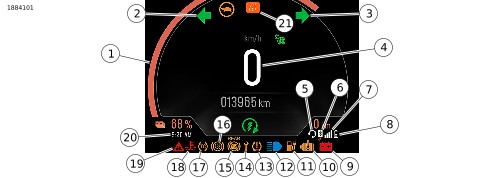
| 1 | Charge state/Range bar |
| 2 | Left turn signal |
| 3 | Right turn signal |
| 4 | Speedometer |
| 5 | Headset connection |
| 6 | Bluetooth |
| 7 | Device signal |
| 8 | Device battery |
| 9 | 12V battery discharge |
| 10 | MIL/OBD fault |
| 11 | Low state of charge |
| 12 | Headlamp high beam |
| 13 | Low tire pressure |
| 14 | Maintenance required |
| 15 | Rear Anti-lock Braking System (ABS) disabled |
| 16 | ABS |
| 17 | Traction control |
| 18 | Coolant temperature |
| 19 | EV alert |
| 20 | Clock |
| 21 | Ride mode |
Figure 1. Instrument Module Displays and Selections